
Comparison
The best apps to scan book pages
To scan a book on iPhone without cutting it, use an app that flattens curved pages. vFlat is built for it: its description says it flattens thick books, removes your fingers, auto-captures as you turn pages and splits two-page spreads. Prizmo flattens books and magazines, Adobe Scan’s Straighten tool fixes curved pages, and Genius Scan has curvature correction. Scanner One, our app, splits book spreads into two pages and flattens curved lines. Notes works for a page or two.

Scanner One is our app; it flattens book pages, so it is one of the six below, with its limits stated. Facts about other apps come from their App Store pages and developer sites, read on November 13, 2026.
Why books are hard to scan
A flat sheet is easy for any scanner. An open book isn’t: the pages curve down into the spine, the lines of text bend, the inner margin darkens, and your fingers end up in the shot because you are holding the book open. A regular scan fixes the edges of the page, not the curve inside it.
Apps built for books do three extra things: they flatten the curve, they split a two-page spread into two pages in the right order, and some erase fingers. Which of those you need depends on how many pages you scan.
Book scanning apps compared
Checked on November 13, 2026, on the US App Store.
| App | Curve correction, per the developer | Two-page spreads | Fingers | Price model (US) | Data used to track you |
|---|---|---|---|---|---|
| vFlat Scan | AI curve correction for thick books | Splits into separate pages | Removed automatically | Free to start; Weekly $4.99, Yearly from $35.90, EduPlus $39.99 | Identifiers, Usage Data |
| Prizmo | Flattening of curved books and magazines | Not described | Not described | Free; one-time Premium Pack $23.99 | Data Not Collected |
| Adobe Scan | Straighten tool for curved or tilted pages | Not described | Magic eraser lists thumbs | Free; subscriptions $3.99 to $69.99 | Identifiers |
| Genius Scan | Curvature correction, can be on by default | Not described | Not described | Free Basic; Ultra $39.99 a year | None |
| CamScanner | A Scan Books tool on its website | Not described | Not described | Free; subscriptions billed weekly to annually | Identifiers, Usage Data |
| Scanner One (ours) | Book spreads are split into two pages and curved lines are flattened. | Yes (see left) | Not automatic | Pro comes monthly, yearly with a free week, or once for life. | No account, no tracking |
Each app, honestly
vFlat Scan: made for books
vFlat’s description is about books first: AI curve correction for thick textbooks, manuals and sheet music, finger removal while you hold the book open, auto-capture when you hold still or turn the page, and splitting a two-page spread into separate pages. It exports PDF, JPG or TXT, and its website says it recognizes text in 100+ languages. It is free to start, with weekly, monthly and yearly plans, an EduPlus yearly plan, and text recognition sold in page packs from $5.90. The label lists Identifiers and Usage Data as used to track you.
Pick it for whole chapters or whole books.
Prizmo: flattening plus serious OCR
Prizmo’s description lists flattening of curved contents such as books and magazines, on-device OCR in 30 languages, and searchable PDF and Word (DOCX) export, with reading aloud. The Premium Pack is a one-time purchase, per the description, at $23.99 in its list. Data Not Collected.
Pick it when you need the words from the book, not only the picture.
Adobe Scan: straightens what you catch
Adobe Scan’s description says its Straighten tool fixes pages that come out curved or tilted while you scan, even if all four corners aren’t visible, and its Magic eraser removes thumbs, shadows, stains and creases. Free OCR covers 5 pages; scans save to Adobe Document Cloud automatically.
Pick it for the occasional page from a library book.
Genius Scan: curvature correction in a general scanner
Genius Scan’s version notes say you can turn curvature correction on by default in the scanning settings (May 2026), and that it now better preserves page content instead of cropping useful parts (June 2026). Basic is free with no document limit or watermark.
Pick it if you already use Genius Scan and scan a book now and then.
CamScanner: a book mode on the menu
CamScanner’s website lists Scan Books among its scan tools. Its App Store page doesn’t detail how it handles the curve. Its App Store page marks it Designed for iPhone, with subscriptions billed weekly to annually.
Scanner One: spreads split, lines flattened
Book spreads are split into two pages and curved lines are flattened. A scan can have many pages, and you can reorder them. Text recognition runs on every page for everyone, free or Pro. Listen reads any document aloud.
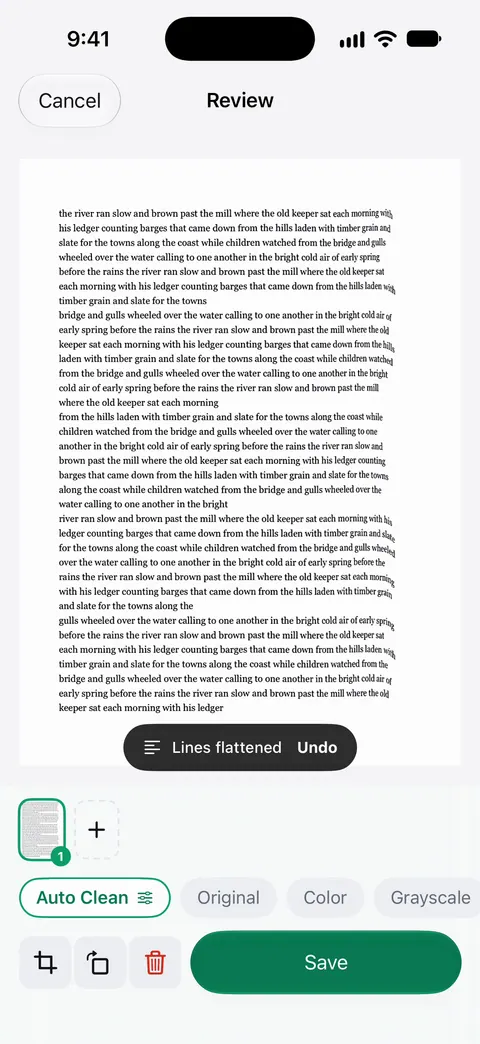
How to get a clean book scan in any app
- Light it evenly. Daylight from a window to the side, no overhead lamp straight above, no flash glare. See the best light for scanning.
- Hold the book open at the edges, not over the text, so fingers stay in the margin.
- Hold the phone parallel to the pages, centered over the spine for a spread.
- Keep the pages in order: scan left and right together if the app splits spreads, or one page at a time if it doesn’t.
- Check a page at full size before you scan the next fifty.
Step by step: scan a book without the curve.
Where Scanner One helps, and where it doesn’t
Where it helps: Book spreads are split into two pages and curved lines are flattened. Text recognition runs on every page for everyone, free or Pro. Search looks inside the text of every document and shows the matching line and page. Listen reads any document aloud.
Where it doesn’t: vFlat’s description adds finger removal during capture and page-turn auto-capture, which suit long books better. Free accounts can use Clean Up, the smart eraser, on 3 documents a month. On a free account, pages you share, print or export carry a small “Scanned with Scanner One” label at the bottom right. Pro removes it. Scanner One runs on iPhone and iPad. For a page or two, Notes is enough. More in Scanner One’s book pages feature.
Questions and answers
How do I scan a book without the curve near the spine?
Use an app with curve or curvature correction, press the book open with your hands near the edges, and scan in even light. vFlat, Prizmo, Adobe Scan and Genius Scan describe curve correction. Book spreads are split into two pages and curved lines are flattened.
Can an app remove my fingers from a book scan?
vFlat’s App Store description says it removes your fingers from every scan automatically while you hold the book open. In Scanner One, Clean Up brushes out marks after the scan rather than during it. Free accounts can use Clean Up, the smart eraser, on 3 documents a month.
Can the iPhone’s Notes app scan a book?
It can scan a page you hold flat, and it saves pages as a PDF. Apple’s steps don’t describe correcting the curve near a book’s spine, so for more than a few pages, an app built for books saves time.
Can I make a scanned book searchable?
Yes, with text recognition. vFlat and Prizmo export searchable text; vFlat sells recognition in page packs and Prizmo’s one-time pack unlocks unlimited on-device OCR. Text recognition runs on every page for everyone, free or Pro.
Sources
What this page says about Scanner One was checked against the app on .
- vFlat Scan on the App Store — curve correction, finger removal, auto-capture, two-page spreads, in-app purchases, privacy label; read 2026-11-13
- Prizmo on the App Store — flattening of curved contents (books and magazines), one-time Premium Pack; read 2026-11-13
- Adobe Scan on the App Store — the Straighten tool for curved or tilted pages; read 2026-11-13
- Genius Scan on the App Store — curvature correction in the 8.11 and 8.12 version notes; read 2026-11-13
- Apple Support, How to scan documents on your iPhone or iPad — Notes scanning steps; page published 2026-02-13
- Scanner One on the App Store — the app’s own listing
Get Scanner One
Scanner One is free, with generous limits: scanning, clean PDFs and text search never stop.

Scanner OneScan, sign and ask anything
Scanner One is free, with generous limits: scanning, clean PDFs and text search never stop.