
Comparison
The best scanner apps for students, by the job
For handing in homework as one PDF, the free scanner in Notes or Files is enough. Genius Scan’s free Basic plan adds folders and no watermark. For textbooks, vFlat flattens curved pages and removes fingers, with an EduPlus plan. Adobe Scan’s Digitize tool turns handwritten notes and whiteboards into editable text. Scanner One, our app, splits book spreads, cleans whiteboards and reads every page for free, but marks pages you share from a free account.

Scanner One is our app and is one of the six options below, with its limits stated. Facts about other apps come from their own App Store pages and developer sites, read on November 13, 2026. Prices are US prices; student discounts, where they exist, are listed as the developer names them.
What students actually scan
Four jobs come up again and again, and they need different things from a scanner:
- Handing in homework as one clean PDF, often to a portal with a file size limit.
- Textbook and library pages, where the curve near the spine and your fingers get in the way.
- Whiteboards and slides at the end of a class.
- Forms: enrollment, financial aid and applications, which need a readable copy and sometimes a signature.
Start with what’s on your iPhone
For homework, Notes does the job. Apple’s steps: in a note, tap the Attachment button, then Scan Documents. Adjust settings such as Flash or Filters if you need to. Keep the iPhone steady and it captures each page when it sees the edges; tap Done when the last page is in. The document is saved as a PDF in the note. Notes also has Scan Text, which types the words from a page straight into your note.
Our guide to scanning several pages into one PDF covers naming and sending it, and making a PDF smaller helps when a portal rejects a big file.
Student scanner apps compared
Checked on November 13, 2026.
| App | Best for | Free version, per the developer | Student or paid option (US) | Data used to track you |
|---|---|---|---|---|
| Notes, Files, Preview (Apple) | Homework PDFs | All of it | Nothing to buy | Part of iOS |
| Genius Scan | Weekly scanning, unmarked | No document limit, no watermark | Ultra $39.99 a year | None |
| vFlat Scan | Textbooks and sheet music | “Free to start” | EduPlus Yearly $39.99; OCR packs from $5.90 | Identifiers, Usage Data |
| Adobe Scan | Handwritten notes | OCR up to 5 pages | Subscriptions, $3.99 to $69.99 listed | Identifiers |
| iScanner | Math homework | Not stated | Premium, $3.99 to $19.99 listed | Six categories, including Location |
| Scanner One (ours) | Notes you want to search and ask about | Scanner One is free, with generous limits: scanning, clean PDFs and text search never stop. | $4.99 a month, $29.99 a year, $59.99 once | No account, no tracking |
Each app, honestly
Genius Scan: the free workhorse
The Grizzly Labs’ pricing page says Basic is free, has no limit on the number of documents, and adds no watermark; it lists batch mode for scanning dozens of pages in a row. Its help center says the basic version has no ads. Text recognition is in Ultra at $39.99 a year.
Pick it if you scan homework every week and want it to look clean.
vFlat Scan: made for books
vFlat’s description says it flattens the curved pages of thick textbooks, manuals and sheet music, removes your fingers from the scan, captures automatically as you turn pages, and splits a two-page spread into separate pages. It exports PDF, JPG or TXT. It lists an EduPlus Yearly Subscription at $39.99 and text recognition page packs. The label lists Identifiers and Usage Data as used to track you.
Pick it for library research and textbook chapters. More in the best apps to scan book pages.
Adobe Scan: notes into text
Adobe Scan’s description says its Digitize tool turns handwritten notes and whiteboards into editable, searchable documents, and lists exports to Word, Excel or PowerPoint. Free text recognition covers 5 pages; a subscription raises it to 100. Scans save to Adobe Document Cloud automatically.
Pick it if your school gives you Adobe access, or for short handwritten notes.
iScanner: if you scan math
iScanner’s description lists a math mode that solves a photographed equation, OCR in 20+ languages, and AI Chat for summarizing or translating. Premium is a subscription, with purchases listed from $3.99 to $19.99. Its privacy label lists Purchases, Location, Identifiers, Usage Data, Diagnostics and Other Data as used to track you. Check whether your course allows equation solvers before you rely on one.
Scanner One: notes you can search and ask
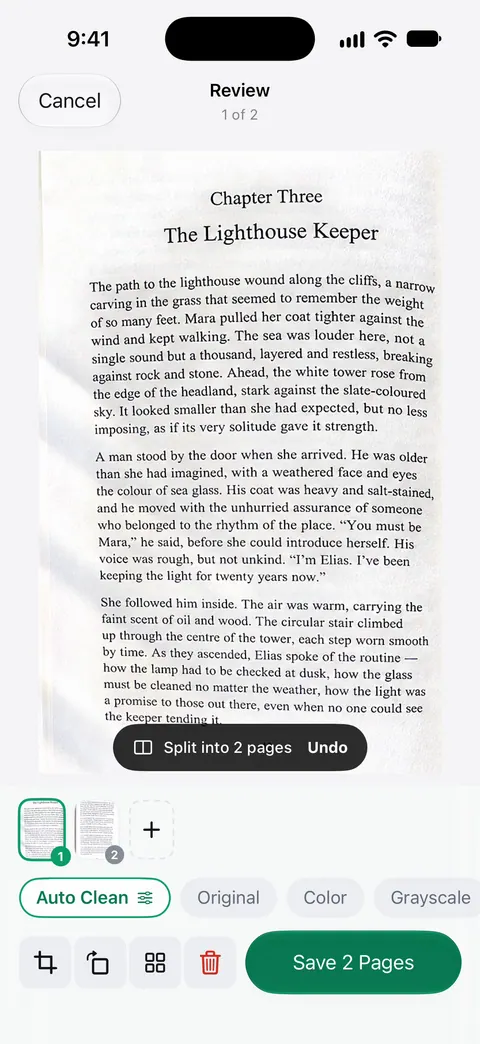
Book spreads are split into two pages and curved lines are flattened. Whiteboards are cleaned automatically. Text recognition runs on every page for everyone, free or Pro. Listen reads any document aloud. Ask your documents anything. When does the lease end? What did I spend at the shop? The answer comes back with the page it came from.
Pick this if
- You hand in homework: Notes or Files, or Genius Scan Basic if you scan every week.
- You scan from textbooks: vFlat or Scanner One.
- You take notes on paper and want them searchable: Adobe Scan for short notes, Scanner One for searching everything.
- You are applying to college or for aid: any scanner works; what matters is the paper list. See college application documents.
Where Scanner One helps, and where it doesn’t
Where it helps a student: Search looks inside the text of every document and shows the matching line and page. Free accounts can ask the on-device AI 3 questions a day. A scan can have many pages, and you can reorder them. The PDF tools merge, split, compress, password-protect, add page numbers and watermarks, and extract text.
Where it doesn’t: On a free account, pages you share, print or export carry a small “Scanned with Scanner One” label at the bottom right. Pro removes it. So homework shared from a free account carries that label; if your teacher would mind, use Notes or Genius Scan Basic for handing in. Free accounts can run the PDF tools and the Word, Excel and CSV exports 3 times a week, from one shared allowance. Scanner One runs on iPhone and iPad. Pro costs $4.99 a month, or $29.99 a year with a free week, or $59.99 once.
Questions and answers
What is the best free scanner app for students?
Start with Notes or Files: they scan several pages into one PDF at no cost. If you scan every week, Genius Scan’s free Basic plan has no document limit and no watermark, per its pricing page, which matters when a teacher sees every page.
How do I scan homework into one PDF?
In Notes, tap the Attachment button, then Scan Documents, and keep scanning page after page before you tap Done. All the pages go into one PDF in the note, which you can share to your school’s portal or email.
Can I scan pages from a thick textbook without the curve?
Yes, with an app that flattens pages. vFlat’s description says it flattens curved pages of thick books and removes your fingers. Book spreads are split into two pages and curved lines are flattened.
Will my teacher see a watermark?
Depends on the app. Genius Scan Basic and Apple’s scanner don’t mention one. On a free account, pages you share, print or export carry a small "Scanned with Scanner One" label at the bottom right. Pro removes it.
Sources
What this page says about Scanner One was checked against the app on .
- Apple iPhone User Guide, Scan text and documents in Notes — Scan Documents and Scan Text in Notes; saved as a PDF in the note; guide for iOS 27
- The Grizzly Labs, Genius Scan pricing — Basic free with no document limit and no watermark; batch mode; read 2026-11-13
- vFlat Scan on the App Store — book scanning, finger removal, two-page spreads, EduPlus Yearly $39.99, privacy label; read 2026-11-13
- Adobe Scan on the App Store — Digitize tool for handwritten notes and whiteboards; OCR 5 to 100 pages; read 2026-11-13
- iScanner on the App Store — math mode, OCR languages, privacy label; read 2026-11-13
- Scanner One on the App Store — the app’s own listing
Get Scanner One
Scanner One is free, with generous limits: scanning, clean PDFs and text search never stop.

Scanner OneScan, sign and ask anything
Scanner One is free, with generous limits: scanning, clean PDFs and text search never stop.