
Comparison
The best OCR apps for iPhone, compared
To copy a few lines, use Live Text: point the Camera at text, tap the Detect Text button, then touch and hold to copy. To make a scanned PDF searchable, Preview on iOS 26 and later has Embed Text when you export. For more, Prizmo offers on-device OCR in 30 languages with a one-time pack, vFlat claims 100+ languages with page packs, Adobe Scan reads 5 pages free, Genius Scan includes OCR in Ultra, and Scanner One, our app, reads every page on the device for free.

Scanner One is our app and is one of the six below, with its limits stated. Facts about other apps come from their own App Store pages and developer sites, read on November 13, 2026.
First, what kind of text recognition do you need?
Text recognition (OCR) turns the picture of a page into words a computer can use. People want it for three different jobs, and the right tool differs:
- Grab a few lines now: a phone number from a poster, a paragraph from a book. Live Text does this for free.
- Make a scan searchable: keep the page as it looks, with the words hidden underneath so search finds them. Preview, Prizmo, Genius Scan Ultra, Adobe Scan and Scanner One do this.
- Turn a page into an editable document: a Word file you can change. Prizmo and Scanner One export Word; Adobe Scan exports to Word, Excel and PowerPoint.
Live Text and Preview: start here
Apple’s steps for the Camera: open Camera, point it so the text is in the frame, and when a yellow frame appears around the text, tap the Detect Text button. Touch and hold the text, then choose Copy, Select All, Look Up, Translate, Search Web or Share. Apple notes that Live Text isn’t available in all regions or languages. Notes has Scan Text under its Attachments button, which types recognized text straight into a note.
For a whole scanned PDF on iOS 26 and 27, open it in Preview, tap the Actions menu next to the file name, tap Export, choose PDF and turn on Embed Text: Apple says this runs OCR on the images and makes the PDF searchable. Our guides cover copying text from a photo and making a scanned PDF searchable step by step.
OCR apps compared
Checked on November 13, 2026.
| App | Where it reads | Languages, per the developer | Free | Paid | Data used to track you |
|---|---|---|---|---|---|
| Live Text and Preview (Apple) | Built into iOS | Not all regions or languages | Yes | Nothing to buy | Part of iOS |
| Prizmo | On device, optional cloud | 30 on device, 139 in the cloud | To try | Premium Pack $23.99 once; Cloud Plan optional | Data Not Collected |
| vFlat Scan | Not stated | 100+ | “Free to start” | Subscriptions; OCR packs from $5.90 for 1,000 pages | Identifiers, Usage Data |
| Adobe Scan | Not stated | Not stated | Up to 5 pages | Subscription raises it to 100 pages | Identifiers |
| Genius Scan | On device | Not stated | No, OCR is in Ultra | Ultra $39.99 a year | None |
| Scanner One (ours) | Text recognition runs on the device, in 29 languages. | 29 languages | Text recognition runs on every page for everyone, free or Pro. | Pro comes monthly, yearly with a free week, or once for life. | No account, no tracking |
Each app, honestly
Prizmo and Prizmo Go: the text specialists
Prizmo’s description is mostly about text: on-device OCR in 30 languages, optional Cloud OCR in 139 languages with handwriting, searchable PDF and Word (DOCX) exports, and reading text aloud. The Premium Pack is a one-time purchase that unlocks unlimited on-device OCR, per the description, listed at $23.99. Prizmo Go is the quick-grab sibling: aim at text, shoot, and copy it, with on-device OCR that works without an internet connection. Both labels say Data Not Collected.
Pick Prizmo if OCR quality and control matter most.
vFlat Scan: for books and many languages
vFlat’s website says the app is free to start and offers text recognition in 100+ languages; its description says scans become searchable text you can copy, and exports PDF, JPG or TXT. Text recognition is sold in page packs, listed from 1,000 pages for $5.90 to 10,000 pages for $20.00, beside its subscriptions. The label lists Identifiers and Usage Data as used to track you.
Pick vFlat if you are reading from books, or in a language other apps don’t cover.
Adobe Scan: free for short documents
Adobe Scan’s image-to-text feature makes the words in scans searchable and editable, and its Digitize tool turns handwritten notes and whiteboards into editable documents, per its description. Free OCR covers 5 pages; a subscription raises that to 100. Scans save to Adobe Document Cloud automatically.
Pick it for short documents if you already use Acrobat.
Genius Scan: on-device, in Ultra
The Grizzly Labs’ pricing page says Genius Scan’s text recognition is on-device and adds a text layer to your PDFs so you can search them; it is part of Ultra, at $39.99 a year. The free Basic plan scans without limits but doesn’t include OCR.
Pick it if you already use Genius Scan and want search added.
Scanner One: every page, on the device, free
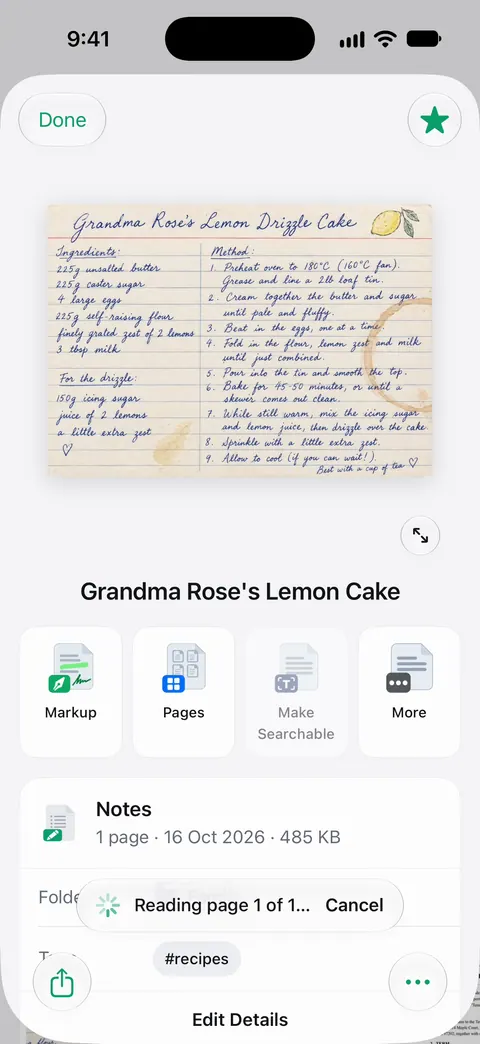
Text recognition runs on the device, in 29 languages. Text recognition runs on every page for everyone, free or Pro. Scanner One makes searchable PDFs. Search looks inside the text of every document and shows the matching line and page. Scanner One exports to Word, keeping headings, lists and tables, and to Excel and CSV.
Tips that matter more than the app
- Light and flatness win. A flat page in even light reads better in every app than a curled page in shadow. See the best light for scanning.
- Check numbers by eye. OCR can confuse 0 and O, 1 and l. Before you rely on an amount or an account number, look at the page.
- Pick the language. If an app asks for the document’s language, set it; mixed-language pages are harder.
Where Scanner One helps, and where it doesn’t
Where it helps: Text recognition runs on every page for everyone, free or Pro. Search looks inside the text of every document and shows the matching line and page. Listen reads any document aloud. Documents stay on your iPhone unless you share them or turn on iCloud Sync.
Where it doesn’t: Prizmo lists more languages in its cloud OCR and handwriting recognition, and vFlat says it reads 100+ languages; 29 languages on the device is what Scanner One offers. Free accounts can run the PDF tools and the Word, Excel and CSV exports 3 times a week, from one shared allowance. So turning many documents into Word files on the free version runs into that allowance. On a free account, pages you share, print or export carry a small “Scanned with Scanner One” label at the bottom right. Pro removes it. If you only copy a line now and then, Live Text is quicker than any app. See text recognition in other languages and Scanner One’s languages.
Questions and answers
Does the iPhone have OCR built in?
Yes. Live Text recognizes text in the Camera and in images you open in Preview, and Notes can Scan Text straight into a note. Preview on iOS 26 and later can also embed recognized text when it exports a PDF, which makes it searchable.
What is the difference between copying text and a searchable PDF?
Copying gives you the words to paste somewhere else. A searchable PDF keeps the page image and adds an invisible text layer, so the PDF looks the same but you can search it, select it and find it later by a word inside.
Which OCR app works offline?
Prizmo and Prizmo Go describe on-device OCR that works without an internet connection, and Genius Scan’s pricing page calls its OCR on-device. Text recognition runs on the device, in 29 languages.
Which OCR app reads handwriting?
Prizmo lists handwriting recognition as part of its Cloud OCR, and Adobe Scan’s description says its Digitize tool turns handwritten notes into editable, searchable documents. Handwriting is harder than print for every app, so check the result.
Sources
What this page says about Scanner One was checked against the app on .
- Apple iPhone User Guide, Use Live Text with your iPhone camera — the Detect Text steps, actions, and that Live Text isn’t available in all regions or languages; guide for iOS 27
- Apple iPhone User Guide, Export or compress PDFs and images in Preview — Embed Text runs OCR on images to make a PDF searchable; guide for iOS 26 and 27
- Prizmo on the App Store — on-device OCR in 30 languages, Cloud OCR in 139, one-time Premium Pack, Data Not Collected; read 2026-11-13
- vFlat Scan on the App Store — OCR and text recognition page packs, privacy label; read 2026-11-13
- vFlat website — text recognition in 100+ languages, free to start; read 2026-11-13
- Scanner One on the App Store — the app’s own listing
Get Scanner One
Scanner One is free, with generous limits: scanning, clean PDFs and text search never stop.

Scanner OneScan, sign and ask anything
Scanner One is free, with generous limits: scanning, clean PDFs and text search never stop.