
Comparison
Apps that turn handwriting into text on iPhone, compared
Try Notes first: Scan Text inserts recognized text into a note, and Notes search finds handwritten words in supported languages. For a specialist, PenToPrint says it reads cursive and messy script and exports Word or text, in English, with a lifetime plan at $74.99. Prizmo reads handwriting in 9 languages through its Cloud OCR plan, and Adobe Scan’s new Digitize tool turns handwritten notes into editable documents. Scanner One, our app, reads printed text in 29 languages but doesn’t promise handwriting.

Scanner One is our app. It is in this list with its limits stated, and it is not our pick for handwriting. Facts about other apps come from their own App Store pages, read on November 13, 2026.
This page compares apps for turning handwriting into typed text. For the step-by-step version with your iPhone’s own tools, see our guide to converting handwriting to text on iPhone.
Why handwriting is harder than print
Text recognition (OCR) learns the shapes of letters. Printed letters look the same every time; handwritten ones don’t. Joined-up cursive, letters that lean, words that run into the margin and faint pencil all make it harder. Every app on this page gets some words wrong, so the right question is which one gets your writing wrong least, and how easy it is to fix.
Three things help in every app:
- Even light, no shadow. Hold the phone parallel to the page, and avoid your own shadow.
- Dark ink on plain paper. Lined paper is fine; graph paper and pencil are harder.
- One page at a time, filling most of the frame.
Our guide on why OCR gets words wrong goes deeper.
Start with Notes: free and already there
Apple’s steps to read text with the camera: go to the Notes app, open a note, tap the attachment button, then tap Scan Text. Position your iPhone so the text is in the camera frame, drag or use the grab points to select the text, then tap Insert. Apple says this works in supported languages.
Notes helps in a second way. Apple’s guide says Notes search finds typed and handwritten text (in supported languages) and text in scanned documents. So if you scan a page of handwritten notes with Scan Documents, you may be able to find it later by a word you wrote, even if you never convert it.
If Notes reads your writing well, you don’t need anything else. If it struggles, try one of the apps below on the same page and compare.
Handwriting apps compared
Checked on November 13, 2026.
| App | Handwriting, per its page | Languages | Where it reads | Export | Price | Used to track you |
|---|---|---|---|---|---|---|
| Notes (Apple) | Search finds handwritten text; Scan Text inserts text | Supported languages | Part of iOS | Text in a note | Built in | Part of iOS |
| PenToPrint | Cursive and messy script | English | Not stated | Word, plain text | Free; plans $4.99 a month, $24.99 a year, $74.99 lifetime | None listed |
| Prizmo | Cloud OCR, detected automatically | 9 for handwriting | Cloud, with a Cloud Plan | Word (DOCX), searchable PDF, TXT | Cloud Plan from $3.99 a month or $9.99 a year | Data Not Collected |
| Adobe Scan | Digitize tool for handwritten notes and whiteboards | Not stated | Not stated | Word, Excel, PowerPoint | Free; purchases $3.99 to $69.99 | Identifiers |
| Scanner One (ours) | Not promised | 29 languages for print | On the device | Word, Excel, CSV | Pro comes monthly, yearly with a free week, or once for life. | No account, no tracking |
Each app, honestly
PenToPrint: the handwriting specialist
PenToPrint, from Serendi, calls itself an AI-powered handwriting to text scanner and says it reads all kinds of handwriting, including cursive and messy script. You export the result as a Word document or a plain text file. Its US page lists English as its only language. In-app purchases include a monthly plan at $4.99, an annual plan at $24.99 and a lifetime plan at $74.99; the page doesn’t spell out the free limits. The privacy label shows no data used to track you.
Pick PenToPrint if you write in English and handwriting is the whole job.
Prizmo: handwriting in several languages
Prizmo’s page says handwriting recognition is part of Cloud OCR and is detected automatically; its version 5.6 notes say it covers 9 languages. Cloud OCR needs a Cloud Plan, listed from $3.99 a month or $9.99 a year. The one-time Premium Pack ($23.99) covers on-device OCR for print. Prizmo exports Word files that keep the layout, and its label says Data Not Collected.
Pick Prizmo if you write in a language other than English, or want printed and handwritten pages in one app.
Adobe Scan: Digitize, if you use Acrobat
Adobe Scan’s description says its Digitize tool scans handwritten notes and whiteboards into editable, searchable documents that look digitally created. The version history shows Digitize arrived in version 26.11.04, so it is new. A subscription raises OCR capacity from 5 to 100 pages. Scans save to Adobe Document Cloud, and the label lists Identifiers as used to track you.
Pick Adobe Scan if your work already lives in Acrobat.
Scanner One: for printed pages
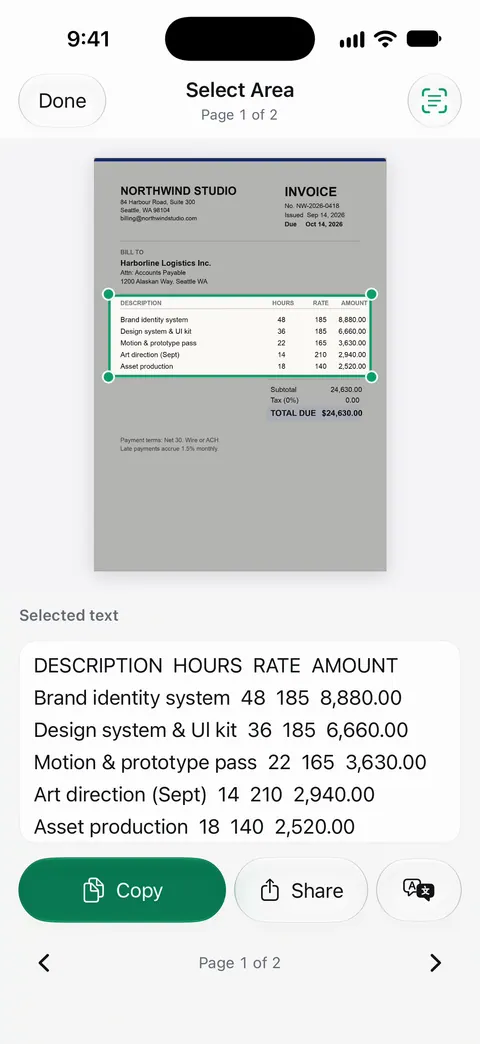
Text recognition runs on the device, in 29 languages. Scanner One makes searchable PDFs. Search looks inside the text of every document and shows the matching line and page. We have no handwriting claim to make, so we don’t make one.
Pick this if
- You want to try for free: Notes, with Scan Text and search.
- You write cursive in English: PenToPrint.
- You write in another language: Prizmo with a Cloud Plan.
- Your notes go into Acrobat anyway: Adobe Scan.
- Your pages are mostly printed, with a few handwritten notes: see the best OCR apps for iPhone.
Where Scanner One helps, and where it doesn’t
Where it helps: if your pile is printed letters, forms and receipts with a few handwritten notes in the margins, Text recognition runs on every page for everyone, free or Pro. Search looks inside the text of every document and shows the matching line and page. Whiteboards are cleaned automatically. Our guide to scanning handwritten notes shows how to keep them clear and in one place.
Where it doesn’t: Scanner One doesn’t claim to turn handwriting into text, so for that job Notes, PenToPrint or Prizmo is the better pick. Free accounts can run the PDF tools and the Word, Excel and CSV exports 3 times a week, from one shared allowance. That includes the Word export. On a free account, pages you share, print or export carry a small “Scanned with Scanner One” label at the bottom right. Pro removes it. Scanner One runs on iPhone and iPad.
Questions and answers
Can the iPhone read handwriting by itself?
Notes can. Apple’s guide says Notes search finds handwritten text in supported languages, and Scan Text inserts text the camera reads into a note. How well it reads your writing depends on the writing, so check the result.
Which app reads cursive?
PenToPrint’s App Store description says it reads all kinds of handwriting, including cursive and messy script. Its page lists English as its only language.
Is handwriting recognition done on the device?
It depends on the app. Prizmo’s page says handwriting is part of Cloud OCR, which runs in the cloud and needs a Cloud Plan. Notes is part of iOS. Check each app’s page before you scan private notes.
Does Scanner One read handwriting?
We don’t promise it. Text recognition runs on the device, in 29 languages. For handwriting, Notes or a specialist app is a better first try.
Sources
What this page says about Scanner One was checked against the app on .
- Apple iPhone User Guide, Scan text and documents in Notes — the Scan Text steps, in supported languages; guide for iOS 27, read 2026-11-13
- Apple iPhone User Guide, Search through your notes — search finds typed and handwritten text in supported languages; guide for iOS 27, read 2026-11-13
- Handwriting to Text PenToPrint on the App Store — in-app purchases, cursive and messy script, Word and text export, English only, privacy label, iOS 15.6; read 2026-11-13
- Prizmo on the App Store — handwriting through Cloud OCR, 9 handwriting languages in version 5.6 notes, Cloud Plan and Premium Pack prices; read 2026-11-13
- Adobe Scan on the App Store — the Digitize tool for handwritten notes, added in version 26.11.04; OCR 5 to 100 pages; read 2026-11-13
- Scanner One on the App Store — the app’s own listing
Get Scanner One
Scanner One is free, with generous limits: scanning, clean PDFs and text search never stop.

Scanner OneScan, sign and ask anything
Scanner One is free, with generous limits: scanning, clean PDFs and text search never stop.