
Comparison
PDF to Word apps for iPhone, compared
The iPhone has no PDF to Word button: Preview exports images and PDFs only. Acrobat Reader and PDF Expert convert in their paid Premium plans; iLovePDF and Smallpdf convert free within a daily limit, and Smallpdf says uploaded files are deleted 1 hour after processing; Prizmo exports Word files that keep the layout. Scanner One, our app, exports Word with headings, lists and tables, 3 a week on the free version, with a small label on exported pages.

Scanner One is our app and is one of six options below, with its limits stated. Facts about other apps come from their own App Store pages, read on November 13, 2026.
This page helps you choose an app. If you just need the steps, including the free Pages workaround, our guide to PDF to Word on iPhone walks through them.
First, what kind of PDF do you have?
Two very different files end in .pdf, and the right app depends on which you have:
- A text PDF was made on a computer: from Word, a website or an invoice system. Its words are real text. You can tell by pressing on a word in Preview: if you can select it, it’s text. Any converter on this page handles it.
- A scanned PDF is a photo of paper. There are no words in it, only a picture of words. To get an editable Word file, the converter must first read the page with text recognition (OCR). Without OCR, you get a Word file with a picture inside it.
If you have scans, look at the “Reads scans” column below.
What the iPhone can do without an app
Preview, Apple’s PDF app on iOS 26 and 27, exports to HEIC, JPEG, PDF, PNG and TIFF, per Apple’s guide. There is no Word option. The workaround is to copy the text out of the PDF and paste it into Pages, then tap the Share button, tap Export and Send, and choose Word, as Apple’s article on Pages describes. You keep the words but lose the layout: tables, columns and headings come out as plain paragraphs.
That is enough for a few paragraphs. For a form, a table or a long document, use an app.
PDF to Word apps compared
Checked on November 13, 2026.
| App | PDF to Word | Reads scans | Free | Paid, as listed | Used to track you | Needs |
|---|---|---|---|---|---|---|
| Acrobat Reader | Premium; “keeping fonts and formatting” | OCR in Premium | Reading, filling, signing | Premium from $9.99 a week to $69.99 a year; free trial of 7 days | Identifiers | iOS 18.3 |
| PDF Expert | Premium | Not stated for conversion | Reading, filling, signing | Premium $49.99; Mac and iOS $79.99 | None listed | iOS 16.0 |
| iLovePDF | Yes | OCR listed | Limited daily tasks | $5.49 a month, $44.99 a year | None listed | iOS 18.0 |
| Smallpdf | Yes | OCR listed | Within a daily task limit | $7.99 to $14.99 a month, $49.99 to $119.99 a year | Identifiers | iOS 15.6 |
| Prizmo | DOCX, keeps the layout | On-device OCR | To try | Premium Pack $23.99 once | Data Not Collected | iOS 17.5 |
| Scanner One (ours) | Scanner One exports to Word, keeping headings, lists and tables, and to Excel and CSV. | Text recognition runs on every page for everyone, free or Pro. | 3 a week | $4.99 a month, $29.99 a year, $59.99 once | No account, no tracking | iOS 17 or later |
Each app, honestly
Acrobat Reader: if you already pay for Acrobat
Adobe’s description says Premium converts PDFs to Word, Excel, PowerPoint or image files, keeping fonts and formatting, and turns scanned documents into searchable, editable text with OCR. Premium starts with a free trial of 7 days. Reading, filling and signing are free. The label lists Identifiers as used to track you.
Pick Acrobat if your office already uses Acrobat, or the layout must match closely.
PDF Expert: for a PDF power user
PDF Expert, from Readdle, lists “Convert PDF to Word, Excel, PowerPoint, JPG, PNG, and TXT” under its Premium features, along with editing text and merging. One Premium subscription covers iPhone, iPad and Mac. The label shows no data used to track you.
Pick PDF Expert if you edit PDFs every week, not just convert them.
iLovePDF and Smallpdf: free, a few a day
Both list PDF to Word in their apps. iLovePDF says in a reply on its App Store page that free users get limited daily tasks, renewed every day. Smallpdf says it is free within a daily task limit, offers a free Pro trial of 7 days, and deletes uploaded files 1 hour after processing unless you save them. Smallpdf’s label lists Identifiers as used to track you; iLovePDF’s lists none.
Pick one of these for the odd conversion when you don’t want to pay.
Prizmo: for scans you want to keep the layout of
Prizmo’s description says it exports Word DOCX files that keep the original layout, as well as searchable PDFs, and runs OCR on the device in 30 languages. The Premium Pack is one payment of $23.99. Its label says Data Not Collected.
Pick Prizmo for scans, paid once, read on the device.
Scanner One: scan, read and export in one place
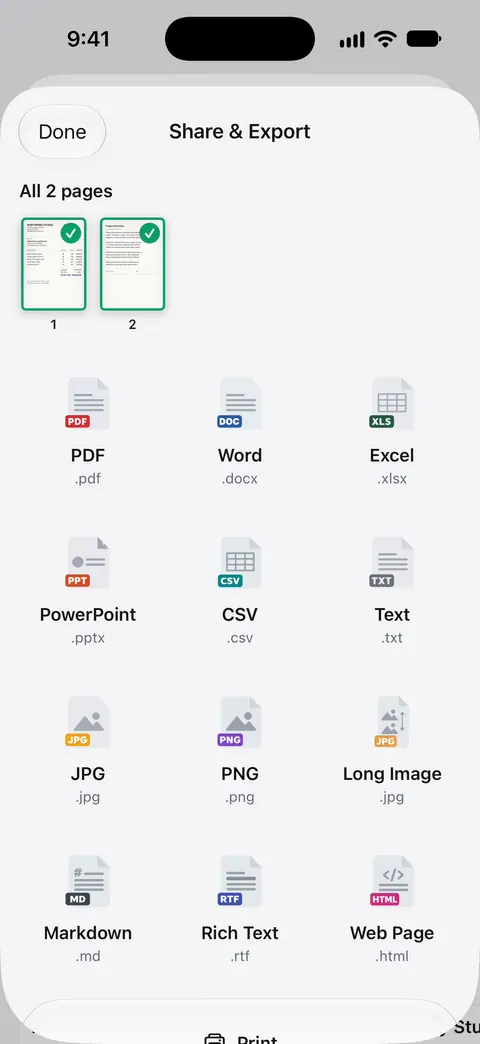
Scanner One exports to Word, keeping headings, lists and tables, and to Excel and CSV. Text recognition runs on every page for everyone, free or Pro. The To PDF tool turns files and photos into PDFs.
Pick this if
- A few paragraphs, once: copy into Pages and export as Word.
- A few files a month, free: iLovePDF or Smallpdf.
- Scans, paid once, on the device: Prizmo, or Scanner One Lifetime at $59.99 once.
- You edit PDFs as part of your job: Acrobat or PDF Expert.
- You’re starting from paper: see scan to Word on iPhone.
Where Scanner One helps, and where it doesn’t
Where it helps: Scanner One exports to Word, keeping headings, lists and tables, and to Excel and CSV. Text recognition runs on every page for everyone, free or Pro. Documents stay on your iPhone unless you share them or turn on iCloud Sync. You can go from a paper page to a Word file without uploading it anywhere. See Word, Excel and CSV for what each export keeps.
Where it doesn’t: Free accounts can run the PDF tools and the Word, Excel and CSV exports 3 times a week, from one shared allowance. If you convert many files a week, that allowance runs out fast. On a free account, pages you share, print or export carry a small “Scanned with Scanner One” label at the bottom right. Pro removes it. So Word files exported from a free account carry that label. Very complex layouts, with many columns or text over pictures, can shift in any converter, ours included, so check the file before you send it. Pro removes every limit. Scanner One runs on iPhone and iPad.
Questions and answers
Can I convert a PDF to Word on iPhone for free?
Yes, within limits. iLovePDF gives free users a limited number of daily tasks, and Smallpdf is free within a daily task limit. Without an app, you can copy the text from Preview, paste it into Pages and export that as Word, which keeps the words but not the layout. Free accounts can run the PDF tools and the Word, Excel and CSV exports 3 times a week, from one shared allowance.
Why does my converted Word file come out as a picture?
The PDF is probably a scan: a photo of a page with no real text in it. The converter needs text recognition (OCR) first. Acrobat lists OCR in Premium; Prizmo and Scanner One read the text on the device. See our guide to making a scanned PDF searchable.
Are my files uploaded when I convert?
It depends on the app. Smallpdf’s description says uploaded files are deleted 1 hour after processing unless you save them. Prizmo’s page says the developer does not access, read or host your data. Documents stay on your iPhone unless you share them or turn on iCloud Sync.
Which app keeps tables when converting to Word?
Acrobat says it keeps fonts and formatting, Prizmo says its Word files keep the original layout, and Scanner One exports to Word, keeping headings, lists and tables, and to Excel and CSV. Complex layouts can still shift, so check the file before you send it.
Sources
What this page says about Scanner One was checked against the app on .
- Apple iPhone User Guide, Export or compress PDFs and images in Preview — Preview’s export formats: HEIC, JPEG, PDF, PNG, TIFF; guide for iOS 26 and 27, read 2026-11-13
- Apple Support, Convert Pages, Numbers, or Keynote files to Microsoft Word, Excel, PowerPoint, PDF, and more (article 105050) — Share, Export and Send, Word; published January 28, 2026
- Acrobat Reader on the App Store — PDF to Word and OCR in Premium, free trial, in-app purchases, privacy label, iOS 18.3; read 2026-11-13
- PDF Expert on the App Store — convert PDF to Word under Premium Features, in-app purchases, privacy label, iOS 16.0; read 2026-11-13
- iLovePDF on the App Store — Office converter, limited daily tasks for free users (developer reply), Premium prices, iOS 18.0; read 2026-11-13
- Smallpdf on the App Store — PDF to Word, daily task limit, files deleted 1 hour after processing, privacy label, iOS 15.6; read 2026-11-13
- Prizmo on the App Store — DOCX export that keeps the layout, Premium Pack $23.99 once, Data Not Collected; read 2026-11-13
- Scanner One on the App Store — the app’s own listing
Get Scanner One
Scanner One is free, with generous limits: scanning, clean PDFs and text search never stop.

Scanner OneScan, sign and ask anything
Scanner One is free, with generous limits: scanning, clean PDFs and text search never stop.