
Guide
Scan handwritten notes so they stay readable
Scan in Notes, Files or Preview with Scan Documents, in soft even light. Pick the filter by the pen: grayscale for pencil and faint ink, black and white only for dark pen on white paper, color for colored pens and diagrams. Check that the faintest line survived before you tap Done. Don’t count on text recognition reading your handwriting: give each scan a clear name with the subject and date, so you can find it without searching the words.

Get the page ready
Handwriting is harder to scan than print: strokes are thinner, pressure varies, and pencil is gray, not black.
- Flatten it. Tear-out pages curl at the torn edge; press them flat under a book for a while.
- Spiral notebooks: fold the cover all the way back so the page lies flat, or tear pages out cleanly if you’re keeping only the scan.
- Bound notebooks and journals curve into the spine like a book. Scan one page at a time and press the page down at its outer edge. See scanning a book without the curve.
- Put something dark behind thin paper. Writing on the back shows through cheap paper. A sheet of dark card behind the page hides it.
Light it evenly
Faint strokes are the first thing to disappear in a shadow.
- Use daylight from a window, or a room light in front of or beside you, never behind you.
- Avoid the flash on pencil: graphite is slightly shiny and can turn into a gray glare.
- Look at the screen before you capture: if a corner looks darker, move the page or the light. More in the best light for scanning.
Scan with the right filter
- Start a scan: in Notes, tap the Attachments button, then Scan Documents; or use Files (More button, Scan Documents) or Preview (Scan Documents).
- Before capturing, tap Filters and choose by what you wrote with. Apple’s guide lists color, grayscale, black-and-white and photo looks.
- Capture each page. For notebooks, switch to manual capture so you can drag the corners to one page at a time.
- Before tapping Done, open a page and zoom in on the faintest writing on it.
| You wrote with | Use | Why |
|---|---|---|
| Pencil | Grayscale | Keeps light strokes that black and white would drop |
| Black or blue ballpoint, dark ink | Black and white or grayscale | Black and white is crisp if every stroke is dark |
| Colored pens, highlighters, diagrams | Color | Colors often carry meaning in notes |
| Fountain pen or felt tip on thin paper | Grayscale | Handles show-through and varying ink |
In Notes, you can change a page’s filter afterwards: tap the page’s thumbnail on the scan, tap the More button and choose Filters. More on the choice in making a scan black and white.
Will the iPhone read my handwriting?
Be careful with expectations. Apple says Notes search covers “typed and handwritten text (in supported languages)” and “text in scanned documents”. In practice, how well a scanned page of handwriting is read depends on the writing: neat block letters in a supported language are much more likely to be found than quick, joined-up notes. Don’t plan on searching your handwriting.
What works instead:
- Name each scan with the subject and date: “Chemistry lecture 7, 2026-10-14”. See naming scanned documents.
- Type a few keywords into the note above the scan, if you scan into Notes. Notes searches typed text reliably.
- Copy what you need right away. For a phone number or a short passage, try Live Text on the scan or photo; if it misreads, type it. See copying text from a photo.
Recipe cards, letters and family papers
Handwriting from people you love is a different case from lecture notes: the look of the writing is the point.
- Always scan in color. The ink color, the paper’s age and the stains are part of it.
- Scan both sides. Recipe cards often continue on the back, and letters have dates and addresses on the envelope.
- Name it with the person and the dish or date: “Grandma Rose, apple cake, card”. A search for the dish will find it even if the writing can’t be read by a machine.
- Keep the originals. A scan is a good copy for sharing with the family; it isn’t a replacement.
Scanning a whole notebook
A semester of notes or a year of journal pages is a big job. Make it manageable:
- One PDF per notebook, scanned in one sitting where possible, so the pages are in order.
- Page numbers help. If the notebook has none, number the corners in pencil before you scan; it makes a missing page obvious.
- Scan in batches of 20 or so, then check the batch before going on.
- Name it with the date range, and keep the notebooks in a box until you’ve checked every page.
Whiteboard notes have their own problems, glare mainly: see scanning a whiteboard.
Where Scanner One helps, and where it doesn’t
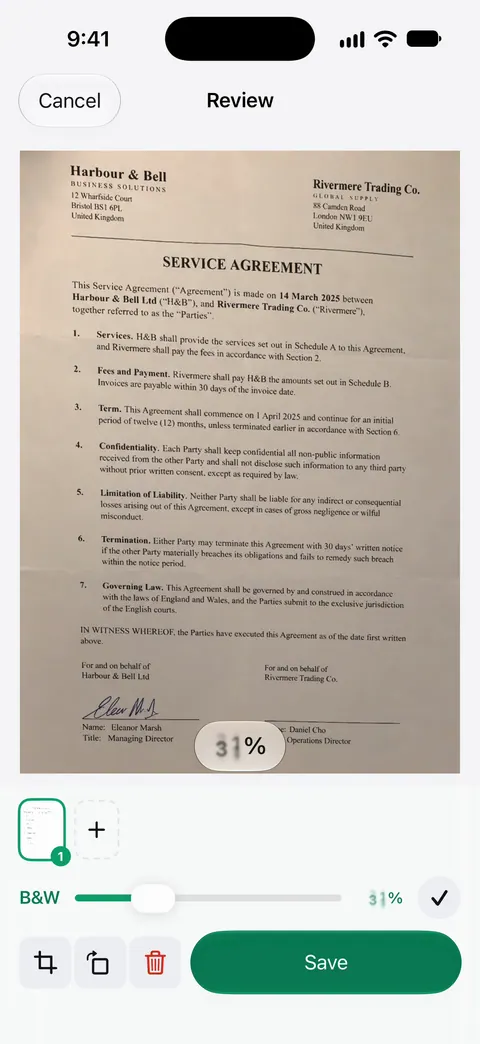
Scans come with Auto Clean, Color, Grayscale and Receipt filters. For pencil, the B&W filter’s strength slider is the useful control: it sets how strong the effect is, so you can ease it off until light strokes stay on the page.
Notebooks and journals get the book treatment. Book spreads are split into two pages and curved lines are flattened. A scan can have many pages, and you can reorder them. Then it reads the text, names the document, tags it and puts it in the right folder.
What it doesn’t do: it doesn’t promise to read handwriting. Text recognition runs on the device, in 29 languages. That works on printed text; handwriting is read far less reliably, so name and tag your handwritten scans rather than counting on search. Scanner One is free, with generous limits: scanning, clean PDFs and text search never stop.
When the built-in way is enough: for a few pages of notes, Notes with a grayscale filter keeps them readable and next to your typed notes. More scanning guides are in Guides.
Questions and answers
Can my iPhone turn handwritten notes into text?
Sometimes, for neat writing in a supported language, but don’t rely on it. Treat a scan of handwriting as a picture of the page, and type up anything you need to search or copy.
Which filter is best for pencil notes?
Grayscale. A black-and-white filter decides for every spot whether it’s black or white, and light pencil often falls on the white side and disappears.
How do I scan a whole notebook?
Scan it in one session per notebook, page by page in order, into one PDF. Name it with the subject and date range, such as 'Biology notebook, Sep to Dec 2026'.
Should I keep the paper notes after scanning?
Keep them until you’ve checked the scan page by page. For notes that matter, such as a family recipe in a grandparent’s hand, keep the original too: a scan is a copy, not a replacement.
Sources
What this page says about Scanner One was checked against the app on .
- iPhone User Guide (iOS 27), Scan text and documents in Notes — Flash and Filters before capture, and the scan saved as a PDF in the note; read 2026-11-13
- iPhone User Guide (iOS 15), Scan text and documents in Notes — names the filter choices: color, grayscale, black-and-white or photo
- iPhone User Guide (iOS 27), Search through your notes — search covers handwritten text in supported languages and text in scanned documents; read 2026-11-13
- iPhone User Guide (iOS 27), Work with PDFs in Notes — changing a page’s filter after scanning; read 2026-11-13
- Scanner One on the App Store — the app’s own listing
Get Scanner One
Scanner One is free, with generous limits: scanning, clean PDFs and text search never stop.

Scanner OneScan, sign and ask anything
Scanner One is free, with generous limits: scanning, clean PDFs and text search never stop.