
Glossary
What is OCR (text recognition)?
OCR, optical character recognition, is software that reads the letters in a picture of a page and turns them into real text a computer can search, copy and edit. Your phone’s camera only takes a picture of a document; OCR is the step that makes the words in that picture usable. It matters because a scan without it can’t be searched, copied or read aloud.

This page explains the term itself: what OCR is, how it works and how to tell when it has been done. If you already have a scanned PDF and want to fix it, go straight to make a scanned PDF searchable.
What OCR means in plain words
When a camera or scanner captures a page, it records colored dots. To you, the dots look like a letter from your bank. To the phone, they are only a picture: it has no idea that a group of dark dots is the word “balance”.
Optical character recognition is the software that looks at those dots and works out which letters and numbers they form. The result is real text, the same kind you type, that you can search, copy, paste, translate or have read aloud. Adobe defines it as technology that “converts printed text, scanned documents, and images into machine-readable, searchable, and editable digital text.”
How OCR works, simply
Adobe describes four stages, and they match what happens on a phone:
- Image analysis. The software separates light areas (the paper) from dark areas (the ink).
- Pre-processing. It cleans the picture: removes specks, smooths the edges of letters, straightens a skewed page and finds lines and columns.
- Recognition. It identifies each character, either by its features (loops, lines, crossings) or by matching it against known letter shapes.
- Post-processing. It assembles the characters into words and lines and saves them as text.
Modern systems also use language knowledge to choose between lookalikes, such as “rn” and “m”. That is why the language setting matters, and why OCR in a language the software doesn’t support produces nonsense.
Why it matters when you have papers to deal with
Without OCR, a scanned lease or tax form is a photo in a PDF wrapper. With it:
- Search works. You can find the document that mentions a policy number, or find a word in a PDF without reading every page.
- Copy works. You can paste an account number or an address instead of retyping it.
- Accessibility works. VoiceOver and read-aloud features need text to read.
- Uploads behave better. Some portals and reviewers search or copy from what you send.
How to use OCR on an iPhone
Your iPhone has OCR built in, called Live Text. These are Apple’s steps for a photo:
- Open the Photos app and open a photo of a page.
- Touch and hold a word, then move the grab points to choose the text you want.
- Tap Copy, or tap Select All to take everything.
- To highlight all the text in the photo at once, tap the Live Text button in the lower-right corner.
Apple lists Live Text for iPhone XS, iPhone XR or later, with iOS 15 or later. To use it in every supported language, go to Settings > General > Language & Region and turn on Live Text.
On iOS 27, Preview can also run OCR on a whole PDF: open it, tap the menu next to the file name, tap Export, choose PDF and turn on Embed Text. Apple describes that option as running OCR to make the PDF searchable.
How to tell whether OCR has been done
- Touch and hold a word in the PDF. If it selects like normal text, there is text. If the whole page selects like a picture, or nothing happens, there isn’t. Adobe uses the same test.
- Search the file for a word you can see. If search finds it, the text is there.
- Or drop the file on our free is my PDF searchable tool, which runs in your browser.
Confusions people have
- OCR vs a searchable PDF. OCR is the process. A searchable PDF is one result of it: the picture of the page with the recognized text hidden behind it.
- OCR vs editing. OCR gives you the text, but it doesn’t turn the scan into a Word file with the same layout. Converting to Word is a further step.
- OCR vs accuracy. OCR is never perfect. Blur, shadows, curved pages, faint print and unusual fonts cause misreads, such as a 5 read as an S. Why OCR gets words wrong covers the fixes. Check numbers by eye.
- OCR vs AI reading. OCR turns pixels into characters. Answering questions about a document is a separate job that works on the text OCR produced.
Where Scanner One helps, and where it doesn’t
For copying a line from a photo now and then, Live Text is enough, and it costs nothing.
Scanner One runs OCR on every scan without you asking. Text recognition runs on every page for everyone, free or Pro. Text recognition runs on the device, in 29 languages. Scanner One makes searchable PDFs. Search looks inside the text of every document and shows the matching line and page. The search feature page shows what that looks like.
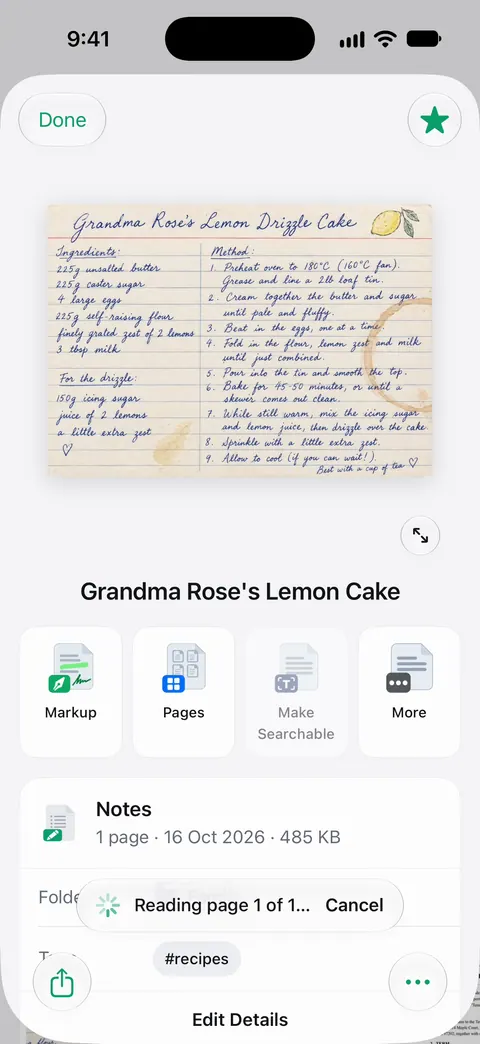
What it doesn’t change: recognition is only as good as the photo, so a blurry or shadowed page still reads badly, and handwriting is hit and miss. And if you send scans to other people: On a free account, pages you share, print or export carry a small “Scanned with Scanner One” label at the bottom right. Pro removes it.
Questions and answers
What does OCR stand for?
OCR stands for optical character recognition. Optical because it works from an image, character recognition because it identifies each letter and number in that image.
Is OCR the same as a scan?
No. A scan is a picture of the page. OCR is a second step that reads the picture and produces text. Many scanner apps do both at once, which is why the difference is easy to miss.
Can OCR read handwriting?
Neat, printed handwriting often works. Joined-up or messy handwriting is much harder and produces more mistakes. Check the result before you rely on it for names or numbers.
Does my iPhone have OCR built in?
Yes. Live Text reads text in photos and in the camera view on supported iPhones (iPhone XS, iPhone XR or later, with iOS 15 or later). On iOS 27, Preview can also run OCR when it exports a PDF, with the Embed Text option.
Is text recognition free in Scanner One?
Text recognition runs on every page for everyone, free or Pro. Text recognition runs on the device, in 29 languages.
Sources
What this page says about Scanner One was checked against the app on .
- Adobe Acrobat, OCR meaning: what is OCR and why it’s important — definition of OCR and the four stages: image analysis, pre-processing, text recognition by feature extraction or pattern matching, post-processing; undated, read 2026-11-13
- Adobe Acrobat, Free OCR for PDF: recognize text for a searchable PDF — OCR converts scanned images of text into text you can search, copy, edit and highlight; if you can’t select text, it is likely a scanned PDF; undated, read 2026-11-13
- Apple Support, Copy and translate text from photos on your iPhone or iPad (article 120004) — Live Text steps (touch and hold a word, Copy, Select All, the Live Text button), device and iOS requirements, the Live Text language setting; page dated 2026-05-01
- Apple iPhone User Guide, Export or compress PDFs and images in Preview on iPhone — Embed Text runs OCR on images and makes the PDF searchable (iOS 27 version of the guide); undated, read 2026-11-13
- Scanner One on the App Store — the app’s own listing: on-device text recognition, searchable PDFs
Get Scanner One
Scanner One is free, with generous limits: scanning, clean PDFs and text search never stop.

Scanner OneScan, sign and ask anything
Scanner One is free, with generous limits: scanning, clean PDFs and text search never stop.