
Comparison
iScanner alternatives for iPhone
To leave iScanner, export your documents to Files first, then cancel in Settings, your name, Subscriptions. Good alternatives: the free scanner in Notes and Files; QuickScan, free with no data collected per its label; Genius Scan, whose Basic plan is free and unlimited; TurboScan, with one $14.99 purchase and a Data Not Collected label; Scanner Pro by Readdle; and Scanner One, our app, with a one-time Lifetime option at $59.99 once. Pick by what pushed you away: the subscription, the tracking label or the cloud.

Scanner One is our app. It’s included below with its limits, beside apps we don’t make. Facts about other apps come from their own App Store pages and developer sites, read on November 13, 2026.
This page is for people leaving iScanner: how to get out cleanly, and where to go. For a feature-by-feature look at iScanner against Scanner One alone, see iScanner vs Scanner One.
First, get your files out
iScanner’s App Store page says files sync through AWS cloud storage and can be managed from a browser with its web version. Before you cancel anything:
- In iScanner, export the documents you want to keep as PDFs to the Files app, in On My iPhone or iCloud Drive.
- Open a few in Files to check they are complete.
- If you have many, export folder by folder so you know what’s done.
Moving phones at the same time? Move scans to a new iPhone covers the rest.
Then cancel the subscription
iScanner’s page says the subscription auto-renews 24 hours before it expires and that you can cancel anytime in your App Store settings. Apple’s steps:
- In Settings, tap your name.
- Tap Subscriptions.
- Tap the subscription.
- Tap Cancel Subscription. If there is no Cancel button, or you see an expiration message in red, it’s already canceled.
iScanner alternatives compared
Checked on November 13, 2026, on the US App Store and the developers’ own pages.
| App | Price model | Listed prices | Data used to track you (label) | Needs |
|---|---|---|---|---|
| iScanner (for reference) | Free; Pro subscription unlocks all features | $3.99 to $20.99 | Purchases, Location, Identifiers, Usage Data, Diagnostics, Other Data | iOS 18.0 |
| Notes and Files (Apple) | Built into iOS | None | Part of iOS | Built in |
| QuickScan (iSolid) | Free; donations don’t restrict features | Donations $4.99 to $49.99 | Data Not Collected | iOS 16.4 |
| Genius Scan | Free Basic; Ultra $39.99 a year | $1.99 to $49.99 | None listed | iOS 17.0 |
| TurboScan | Free with one purchase | $14.99 | Data Not Collected | iOS 13.0 |
| Scanner Pro | Free with Scanner Pro Plus purchases | $0.99 to $59.99 | Identifiers | iOS 18.0 |
| Scanner One (ours) | Pro comes monthly, yearly with a free week, or once for life. | $4.99 a month, $29.99 a year, $59.99 once | No account, no tracking | iOS 17 or later |
Each alternative, honestly
Notes and Files: free, already there
In Notes, open a note, tap the Attachment button, then Scan Documents. In Files, tap the More button, then Scan Documents, choose a folder and tap Save. In iOS 26 you can pick flash or a filter before you scan. For a few pages a month, this replaces iScanner at no cost. See how to scan documents on iPhone.
QuickScan: free, on the device
Its App Store page says it is 100% free, with no ads and no data collection, processes everything on the device and doesn’t use any server. It runs OCR on images and PDFs and exports searchable PDFs and text. Donations are optional and don’t unlock anything.
Pick QuickScan if the subscription and the tracking label were both reasons to leave. More in Scanner One vs QuickScan.
Genius Scan: the free plan with no cap
The Grizzly Labs’ pricing page lists Basic as free and unlimited. OCR, cloud exports, sync and web access are in Ultra at $39.99 a year. Its App Store label lists Contact Info and User Content as linked to you and no data used to track you.
Pick Genius Scan if you want a familiar scanner with a free plan, and can do without OCR or buy Ultra.
TurboScan: one purchase
TurboScan lists a single in-app purchase, TurboScan Premium at $14.99, and its label says Data Not Collected; the description says all scanning happens on your iPhone. Its page doesn’t say what Premium unlocks, so check inside the app.
Pick TurboScan if you want to pay once, a small amount, and be done.
Scanner Pro: Readdle’s scanner
Scanner Pro’s App Store page says you can share unlimited scans by email or with any app, completely free, and lists built-in OCR. Its in-app purchases show Scanner Pro Plus at several prices from $3.99 to $59.99. Its label lists Identifiers as data used to track you.
Pick Scanner Pro if you use Readdle’s other apps.
Scanner One: ours, with its limits stated
Point your camera at any piece of paper. Scanner One finds the edges, straightens the page, cleans it up and saves a real PDF. Then it reads the text, names the document, tags it and puts it in the right folder. Text recognition runs on every page for everyone, free or Pro. Scanner One needs no account and does no tracking.
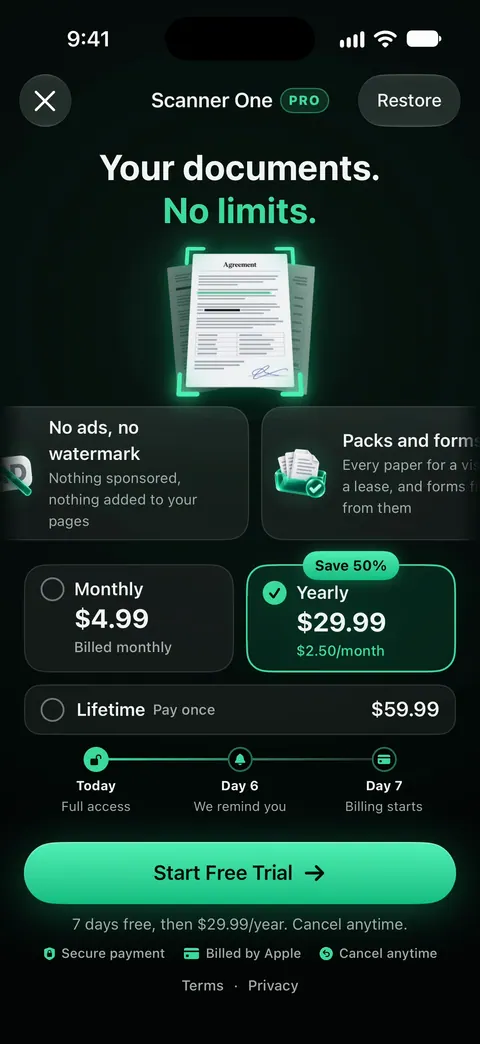
If iScanner’s subscription was the problem, the one-time option is the part to look at: Scanner One Pro Lifetime is a one-time purchase of $59.99 in the US. Lifetime is one payment, yours forever. Pro also comes as $4.99 a month or $29.99 a year; The yearly plan starts with a free week. Subscriptions renew automatically and you can cancel anytime.
What you give up leaving iScanner
Be fair to what you’re leaving. iScanner’s App Store page lists a web version and cloud sync through AWS, so your files are reachable from a browser. If you relied on that, check that your new app’s storage works for you: Scanner One keeps documents on the phone (Documents stay on your iPhone unless you share them or turn on iCloud Sync.), Genius Scan puts sync and web access in Ultra, and Files can save a scan straight into an iCloud Drive folder.
Where Scanner One helps, and where it doesn’t
Where it helps an iScanner user: a one-time price instead of a subscription, no account and no tracking, and text read on every page. Search looks inside the text of every document and shows the matching line and page. The PDF tools merge, split, compress, password-protect, add page numbers and watermarks, and extract text. Scanner One exports to Word, keeping headings, lists and tables, and to Excel and CSV.
Where it doesn’t:
- No web version or cloud account. Scanner One runs on iPhone and iPad. Syncing between devices is through iCloud Sync.
- Free caps and the label. Scanner One is free, with generous limits: scanning, clean PDFs and text search never stop. Free accounts can run the PDF tools and the Word, Excel and CSV exports 3 times a week, from one shared allowance. On a free account, pages you share, print or export carry a small “Scanned with Scanner One” label at the bottom right. Pro removes it. If you won’t pay at all and send scans often, QuickScan or Genius Scan Basic fit better.
- When Notes and Files are enough. For occasional scanning, they replace iScanner for nothing.
For more apps with no subscription at all, see scanner apps without a subscription, and for the label details, scanner apps and their privacy labels.
Questions and answers
How do I cancel iScanner?
iScanner’s App Store page says you can manage or cancel the subscription anytime in your App Store settings. Apple’s steps: in Settings, tap your name, tap Subscriptions, tap the subscription, then tap Cancel Subscription.
Will I lose my iScanner files if I cancel?
iScanner’s page says files sync through its AWS cloud storage. Export the documents you want to keep as PDFs to the Files app before you cancel or delete the app, and check that they open.
Is there a scanner app without a subscription?
Yes. QuickScan is free with optional donations, Genius Scan’s Basic plan is free, TurboScan lists a single $14.99 purchase, and Scanner One offers Lifetime: Scanner One Pro Lifetime is a one-time purchase of $59.99 in the US.
Which iScanner alternative collects the least data?
On the labels we read on November 13, 2026, QuickScan and TurboScan say Data Not Collected. iScanner lists Purchases, Location, Identifiers, Usage Data, Diagnostics and Other Data as data used to track you.
Sources
What this page says about Scanner One was checked against the app on .
- iScanner: PDF Document Scanner on the App Store — in-app purchases, auto-renewal, Pro unlocks all features, AWS cloud sync and web version, privacy label, iOS 18.0 requirement; read 2026-11-13
- Apple Support, Cancel a subscription from Apple (article 118428) — the steps to cancel an App Store subscription on iPhone; published 2026-09-29
- The Grizzly Labs, Genius Scan pricing — Basic free and unlimited, Ultra $39.99 a year with OCR; read 2026-11-13
- QuickScan:PDF OCR Text Scanner on the App Store — free with donations, no ads, Data Not Collected, on-device OCR; read 2026-11-13
- TurboScan on the App Store — one in-app purchase at $14.99, Data Not Collected, scanning on the iPhone; read 2026-11-13
- Scanner One on the App Store — the app’s own listing
Get Scanner One
Scanner One is free, with generous limits: scanning, clean PDFs and text search never stop.

Scanner OneScan, sign and ask anything
Scanner One is free, with generous limits: scanning, clean PDFs and text search never stop.