
Comparison
Scanner One vs the Google Drive scanner
If your files already live in Google Drive, its built-in scanner is free and enough for most paperwork: tap Add, then Scan, and Google saves a searchable PDF to the Drive folder you pick, with filters and a Clean tool for stains. It uses your Google storage, 15 GB shared with Gmail and Photos. Pick Scanner One if you want scans kept on your iPhone without an account, filed for you, and tools like Word exports, ID cards on one page and redaction. Its free PDF tools run 3 a week.

Scanner One is our app. The Google Drive steps and facts below come from Google’s own help page and Drive’s US App Store page, read on November 13, 2026.
How the Google Drive scanner works
The scanner is part of the Google Drive app, which is free. These are the steps from Google’s help page for iPhone and iPad.
- Open the Google Drive app.
- At the bottom right, tap Add, then Scan, or tap the camera icon.
- Point the camera at the document. A blue line outlines it to show where the picture will be cropped. You can switch between Manual and Auto capture.
- Adjust the scan: Crop & Rotate, Filter for color or grayscale, Clean to erase stains and fingers, Add for another page, Retake, or Delete.
- Tap Done.
- Type a file name or pick a suggested title. To choose a folder, tap Location.
- Tap Save.
Google says the result is a searchable PDF in your Google Drive. Our guide to scanning to Google Drive, Dropbox or iCloud covers the other cloud routes, including Apple’s.
When Drive’s scanner is enough
If you already keep your files in Google Drive, use it. It is free, the PDF is searchable, the Clean tool deals with stains and fingers, and the file is on every device you sign in to, including Android and a computer. For a lease you need to share with a partner, or receipts an accountant reads from a shared folder, that is the shortest path.
Side by side
Checked on November 13, 2026.
| Google Drive scanner | Scanner One | |
|---|---|---|
| Price | Free app. Storage: 15 GB shared with Gmail and Photos; listed purchases include 100 GB at $1.99, 200 GB at $2.99 and Google AI Plus (2 TB) at $9.99 | Free download. Pro at $4.99 a month, $29.99 a year or $59.99 once |
| Where scans go | Your Google Drive | Documents stay on your iPhone unless you share them or turn on iCloud Sync. |
| Account | A Google account | No account, no tracking |
| Searchable | Yes, searchable PDFs | Scanner One makes searchable PDFs. Text recognition runs on the device, in 29 languages. |
| Cleanup | Filter, Clean, Crop & Rotate | Scans come with Auto Clean, Color, Grayscale and Receipt filters. |
| Privacy label | Linked to you: Purchases, Location, Contact Info, Contacts, User Content, Search History, Identifiers, Usage Data, Diagnostics, Other Data. No tracking section | No account, no tracking |
| Platforms | iPhone and iPad, Android, and a computer | iPhone and iPad |
Drive needs iOS 17.0 or later; version 4.2645.41004 came out on November 12, 2026. Google’s help page adds that Google doesn’t use your Drive content for advertising.
What Scanner One does differently
The difference is where the file lives and what happens after the scan.
Drive puts the scan in the cloud, under your Google account. Scanner One keeps it on the phone. Documents stay on your iPhone unless you share them or turn on iCloud Sync. Scanner One needs no account and does no tracking. You can lock the app with Face ID.
After the scan, Drive gives you a named PDF in a folder you pick. Scanner One reads it and files it. Then it reads the text, names the document, tags it and puts it in the right folder. QR codes and barcodes are found on every page. Business cards go straight to Contacts.
It also does the jobs a cloud drive leaves to other apps. The PDF tools merge, split, compress, password-protect, add page numbers and watermarks, and extract text. Scanner One exports to Word, keeping headings, lists and tables, and to Excel and CSV. ID cards and passports are scanned with both sides on one printable page.
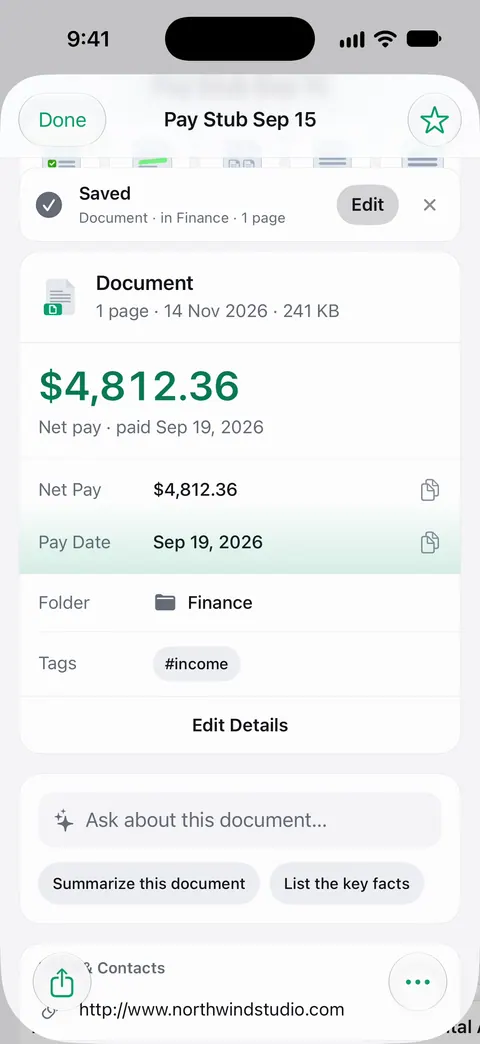
You don’t have to choose only one. Other apps can send a file to Scanner One with Save to Scanner One in their share sheet. Pro adds redaction, the smart eraser, edit text, auto-export and five alternate app icons. See smart filing for how documents get sorted.
Pick the Google Drive scanner if
- Your files already live in Google Drive, or you share folders with people who use it.
- You want scans on Android or a computer without extra steps.
- You want free and simple.
Pick Scanner One if
- You want papers on your iPhone, not in an account.
- You want each document named, tagged and filed for you.
- You need Word or Excel files, merged or smaller PDFs, ID cards on one page, or redaction (a Pro feature).
Where Scanner One helps, and where it doesn’t
Scanner One helps when you want a private paper archive on the phone that files itself and answers questions. Ask your documents anything. When does the lease end? What did I spend at the shop? The answer comes back with the page it came from.
Where Drive’s scanner is the better fit:
- Free scanning to the cloud. Drive’s scanner costs nothing beyond your storage. On Scanner One’s free plan, On a free account, pages you share, print or export carry a small “Scanned with Scanner One” label at the bottom right. Pro removes it.
- Reach. Scanner One runs on iPhone and iPad. Scanner One has no Android, Mac or web version, so a scan you need on a computer has to be shared out first.
- Caps. Scanner One’s free PDF tools and exports run 3 a week; Free and Pro lists every limit.
- Cloud AI. Cloud AI is off until you switch it on, and page images are a separate permission. Pro Max, the plan with cloud AI, costs $149.99 a year in the US.
Apple’s own free scanners in Notes and Files are covered in how to scan documents on iPhone.
Questions and answers
How do I scan with Google Drive on iPhone?
Google’s help page says: open the Google Drive app, tap Add and then Scan (or the camera icon) at the bottom right, take the photo, adjust it with Crop & Rotate, Filter or Clean, tap Done, name it, pick a Location and tap Save.
Are Google Drive scans searchable?
Yes. Google’s help page says Drive saves scans as searchable PDFs, and Drive’s App Store description says you can search files by name and content. In Scanner One, Search looks inside the text of every document and shows the matching line and page.
Does the Google Drive scanner use my storage?
Scans are saved to your Google Drive, and Drive’s App Store description says Google accounts get 15 GB shared across Drive, Gmail and Google Photos. More storage is a purchase, from $1.99 for 100 GB on the US App Store.
Can I send a Google Drive scan to Scanner One?
Yes, through the share sheet. Other apps can send a file to Scanner One with Save to Scanner One in their share sheet. From Home you can bring in pictures from Photos and files from the Files app, or scan an ID card.
Sources
What this page says about Scanner One was checked against the app on .
- Google Drive Help, Scan documents with Google Drive (iPhone & iPad) — the scanning steps, searchable PDFs, Filter and Clean, and Google’s advertising statement; page shows no date, read 2026-11-13
- Google Drive on the App Store — 15 GB of shared storage, storage purchases, privacy label, iOS 17 requirement and version 4.2645.41004 of November 12, 2026; read 2026-11-13
- Scanner One on the App Store — the app’s own listing
Get Scanner One
Scanner One is free, with generous limits: scanning, clean PDFs and text search never stop.

Scanner OneScan, sign and ask anything
Scanner One is free, with generous limits: scanning, clean PDFs and text search never stop.