
Comparison
Scanner One vs SwiftScan
Pick SwiftScan if you fax, upload scans to FTP, WebDAV or many cloud services, or use Android as well; its site says text recognition runs on the device. Its App Store page lists VIP plans from $5.99 a month and Plus plans up to $59.99 a year. Pick Scanner One if you want no tracking, free text recognition and search on every page, and documents filed for you, with a one-time Pro option at $59.99 once. Scanner One’s free tools are capped at 3 a week and shared pages carry a small label.

Scanner One is our app. The facts about SwiftScan below come from its two US App Store pages and its website, read on November 13, 2026.
Side by side
Checked on November 13, 2026, on the US App Store and swiftscan.app.
| SwiftScan AI | Scanner One | |
|---|---|---|
| Price model | Free download. Listed: VIP Monthly $5.99, VIP Annual $34.99, Plus Monthly $7.99 and $9.99, Plus Annual $59.99, “Full Scanner App” purchases at $6.99 and $8.99, fax credits from $1.99 | Free download. Pro at $4.99 a month, $29.99 a year with a free week, or $59.99 once |
| Free version | Not spelled out on the App Store page | Scanning, clean PDFs and text search never stop. PDF tools and exports: 3 a week. A small “Scanned with Scanner One” label on shared pages |
| Text recognition | On the device, per its website | Text recognition runs on the device, in 29 languages. |
| Privacy label | Tracking: Contact Info, Identifiers, Usage Data. Linked to you: Purchases, Contact Info, Identifiers, Usage Data. Not linked: Usage Data, Diagnostics | No account, no tracking |
| Platforms | iPhone, iPad, iPod touch, Mac (Apple M1 or later) and Apple Vision; Android | iPhone and iPad |
| Fax | Yes, with credits | No |
| Standout | Fax, uploads to WebDAV, FTP and many clouds, Home Screen widget | Files each document by itself and answers with the page it came from |
SwiftScan AI needs iOS 15.0 or later; version 9.6.83 came out on November 5, 2026. Scanner One needs iOS 17 or later.
What SwiftScan does well
SwiftScan has a long feature list. Its App Store description lists AI tools to summarize or translate a scan, text recognition for search and copying, uploads to iCloud Drive, Dropbox, Google Drive, Box, Evernote, WebDAV, FTP and SFTP, a QR code reader, a Home Screen widget, signatures, redaction, PDF passwords, a Face ID or Touch ID passcode and smart file naming from tags you pick.
Two things set it apart. It sends faxes: the website says to more than 50 countries, at one credit per page, charged only for faxes that get through. And it works with servers, not only consumer clouds, which suits an office that files to WebDAV or SFTP.
On privacy, the website says no data in your documents is ever sent to the developer or a third party, and that text recognition runs on the device. Its App Store privacy label separately lists Contact Info, Identifiers and Usage Data under “Data Used to Track You”.
Two apps and many prices
SwiftScan comes in two App Store listings. The free SwiftScan AI offers in-app purchases with several names: VIP at $5.99 a month or $34.99 a year, Plus at $7.99 or $9.99 a month or $59.99 a year, and “Full Scanner App” purchases at $6.99 and $8.99. A separate app, SwiftScan Pro, is listed at $199.99 and says it unlocks the features limited in the free app; its latest version shown is from April 19, 2026. Open the plan screen in SwiftScan AI to see what each tier includes before you pay.
Scanner One has one free app and one Pro. Scanner One is free, with generous limits: scanning, clean PDFs and text search never stop. Pro comes monthly, yearly with a free week, or once for life. What the free version caps:
- PDF tools and Office exports: 3 a week.
- Signing and markup: 3 documents a month.
- Smart filing: 10 documents a month.
- AI questions on the device: 3 questions a day.
Pro removes every limit.
Finding and filing
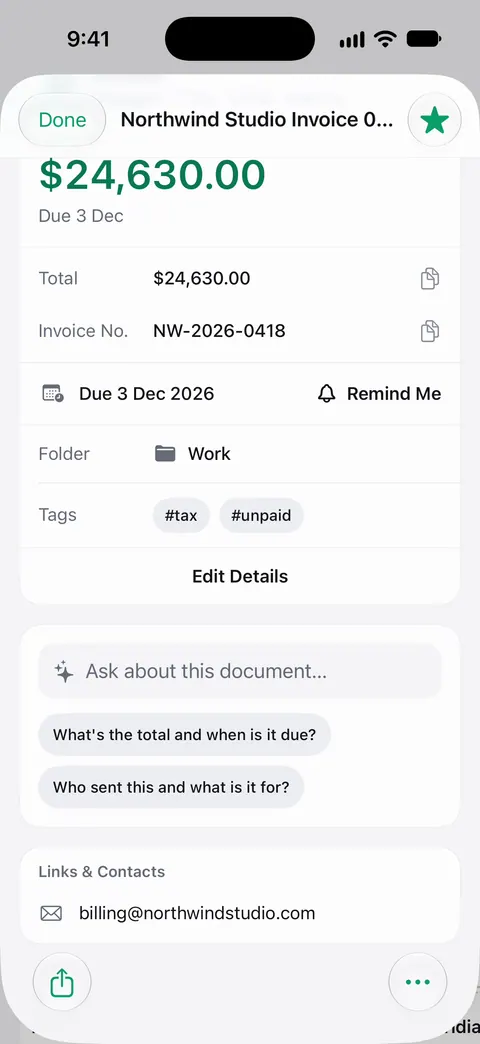
SwiftScan names files from tags you choose. Scanner One reads the page and does the naming. Then it reads the text, names the document, tags it and puts it in the right folder. Search looks inside the text of every document and shows the matching line and page.
Our guide to naming scanned documents has a naming scheme that works in any app, including Files.
Pick SwiftScan if
- You send faxes from your phone.
- You upload to WebDAV, FTP or SFTP, or many cloud services.
- You also use Android or the Mac version.
Pick Scanner One if
- You want text recognition and search on every page, free.
- You want documents named and filed for you, and to ask them questions. Ask your documents anything. When does the lease end? What did I spend at the shop? The answer comes back with the page it came from.
- You want a privacy label without tracking: Scanner One needs no account and does no tracking.
- You want a simple price list, with a lifetime option.
Where Scanner One helps, and where it doesn’t
Scanner One helps if you scan personal papers and want them kept on the phone, read and filed. Documents stay on your iPhone unless you share them or turn on iCloud Sync. You can lock the app with Face ID.
Where SwiftScan does more:
- Fax. Scanner One does not send faxes. If someone insists on one, read what to do when someone asks for a fax.
- Servers and many clouds. SwiftScan uploads to FTP, SFTP and WebDAV. In Scanner One, auto-export is part of Pro: Pro adds redaction, the smart eraser, edit text, auto-export and five alternate app icons.
- Platforms. Scanner One runs on iPhone and iPad. There is no Android, Mac or web version of Scanner One.
- The free label and caps. On a free account, pages you share, print or export carry a small “Scanned with Scanner One” label at the bottom right. Pro removes it. The full list is on Free and Pro.
- Cloud AI. Cloud AI is off until you switch it on, and page images are a separate permission. Pro Max, the plan with cloud AI, costs $149.99 a year in the US.
For a quick one-page scan, Apple’s Notes and Files apps are free and enough: see how to scan documents on iPhone.
Questions and answers
How much is SwiftScan VIP or Plus?
The US App Store lists SwiftScan VIP Monthly at $5.99, VIP Annual at $34.99, Plus Monthly at $7.99 and $9.99, and Plus Annual at $59.99, plus one-time 'Full Scanner App' purchases at $6.99 and $8.99. Check the plan screen in the app for what each includes.
What is SwiftScan Pro?
A separate paid app from the same developer, listed at $199.99 on the US App Store. Its description says it unlocks the features limited in the free SwiftScan app. Its latest version shown is from April 19, 2026.
Can SwiftScan send a fax?
Yes. Its site says faxes go to more than 50 countries at one credit per page, and the App Store lists Credits to Fax from iPhone at $1.99. Scanner One does not send faxes.
Does SwiftScan read text on the device?
Its website says everything, including text recognition, is done on the device. Scanner One works the same way: Text recognition runs on the device, in 29 languages.
Sources
What this page says about Scanner One was checked against the app on .
- SwiftScan AI Document Scanner on the App Store — in-app purchases, features, privacy label, compatibility and version 9.6.83 of November 5, 2026; read 2026-11-13
- SwiftScan Pro Document Scanner on the App Store — the separate paid app at $199.99, last updated April 19, 2026; read 2026-11-13
- SwiftScan website — on-device text recognition, Android, fax to 50+ countries at one credit a page; read 2026-11-13
- Scanner One on the App Store — the app’s own listing
Get Scanner One
Scanner One is free, with generous limits: scanning, clean PDFs and text search never stop.

Scanner OneScan, sign and ask anything
Scanner One is free, with generous limits: scanning, clean PDFs and text search never stop.