
Guide
Name scanned documents so you can find them later
Start with the date as year-month-day, then who the paper is from, then what it is: 2026-11-04 City Water bill. Dates written this way sort in order, and the sender and subject tell you what’s inside without opening it. Keep names short, leave out symbols like / : * ? and &, and use the same pattern every time. On iPhone, touch and hold the file in the Files app and tap Rename.

The pattern: date, source, subject
A name that works for years has three parts, always in the same order:
- Date, as year-month-day: 2026-11-04
- Who it’s from: City Water, First Bank, Dr Ruiz, IRS
- What it is: bill, statement, lab results, letter
Put together: 2026-11-04 City Water bill. Add one detail when it helps you tell papers apart, such as the month a bill covers or the last 4 digits of an account.
| Paper | Example name |
|---|---|
| Utility bill | 2026-11-04 City Water bill October |
| Bank statement | 2026-10-31 First Bank checking 4471 |
| Pay stub | 2026-11-01 Acme pay stub |
| Tax form | 2026 tax year W-2 Acme |
| Receipt | 2026-08-15 Main St Appliances receipt dishwasher |
| Medical | 2026-09-22 Dr Ruiz lab results |
| Lease | 2026-06-01 lease 12 Oak St signed |
| Warranty | 2026-08-15 dishwasher warranty |
| ID | Passport Jane exp 2034-05-10 |
IDs are the exception to date first: you look them up by person, and the date that matters is when they expire.
Why the date goes first
Files sort names letter by letter. Year-month-day dates sort in time order, so a folder of bills lines up oldest to newest without any extra work. The US National Archives recommends this format for file names: “Use international standard date notation (YYYY-MM-DD or YYYYMMDD)”.
Other date styles break sorting. “11-04-2026” puts every November 4 together across years. “Nov 4” sorts by the letter N. And 03/04 is March 4 in the US and 3 April in most other countries.
Rules that keep names working
The National Archives’ file naming guidance for records offices boils down to a few rules that also work at home:
- Keep names short. It suggests 25 to 35 characters. Long names get cut off on a phone screen.
- Leave out symbols. It advises avoiding punctuation and special characters such as periods, commas, parentheses, ampersands and asterisks. Slashes and colons can break a name when the file moves to another computer.
- Be consistent. The same pattern every time, so you can predict a name before you search for it.
- Be unique. Two files called “bill” in one folder help no one.
- Use leading zeros. 01, 02 … 10, so numbered files sort in order.
It also prefers hyphens or underscores to spaces. On an iPhone, spaces are easier to read and type; pick one style and keep it.
Which date to use
- Bills and statements: the statement date, or the due date if that’s how you think about bills.
- Letters: the date written on the letter.
- Medical: the date of service, not the date the bill came.
- Tax papers: the tax year, since a W-2 for 2026 arrives in 2027.
- Receipts: the purchase date. It starts the return window and the warranty.
- IDs and policies: the expiry or renewal date, so the name tells you when to act.
Rename files on iPhone
In the Files app:
- Touch and hold the file.
- Tap Rename, type the new name and tap Done.
If you have Apple Intelligence, Files recommends a name above the keyboard when you rename. Check it against your pattern before accepting it.
When you scan in Files (tap the More button, then Scan Documents), you choose a location and tap Save. Rename the file right after, while the paper is still in your hand.
In Notes, a scanned document lives inside a note. Give the note a title that follows the pattern, and to rename the PDF itself, tap its Menu button and choose the rename action.
Fix a folder of badly named scans
If you already have fifty files called “Scan” and “Document”, don’t rename them all at once.
- In Files, open the folder, tap the More button and sort by Date.
- Start with the newest files: they’re the ones you’re most likely to need.
- Open each one, note the date on the paper and who sent it, then go back, touch and hold the file, and tap Rename.
- Delete duplicates and blurry retakes as you go.
Ten files a day clears a backlog in a week, and new scans get the right name from the start.
Names, folders and tags each do one job
Don’t cram everything into the name. Let each part of your system carry one thing:
- Folder: the topic (Home, Health, Taxes).
- Name: date, source, subject.
- Tag: status or a cross-cutting group (To Pay, Keep Forever, Tax 2026).
The guide to organizing documents on iPhone sets up the folders and tags.
Where Scanner One helps, and where it doesn’t
If you scan a few papers a month and rename them as you go, the Files app is all you need.
The trouble is that renaming is the step everyone skips, which is how a folder fills with “Scan 14” and “Scan 15”. Scanner One does that step itself. Then it reads the text, names the document, tags it and puts it in the right folder.
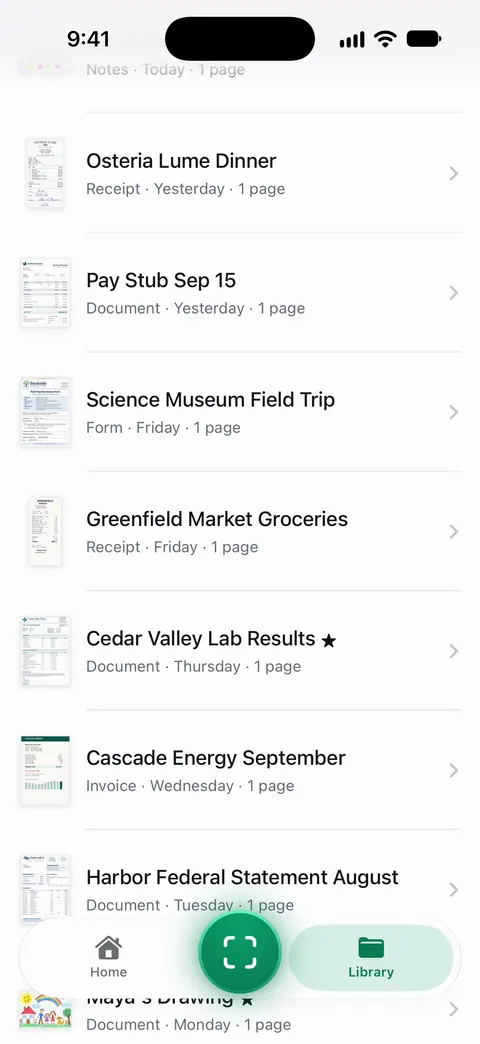
Names matter less when the text inside is searchable too: Search looks inside the text of every document and shows the matching line and page. So even a badly named scan can be found by a word on its pages.
The limits, plainly:
- Free accounts get smart filing for 10 documents a month. Pro removes every limit.
- A name is only as good as the text it was read from: a faded or handwritten page can get a vaguer name. Check the first few.
- It names documents inside Scanner One, not files already in your Files app.
The smart filing feature page shows how documents are named and filed, and finding a document by a word inside it covers search.
Questions and answers
What is the best date format for file names?
Year-month-day with leading zeros: 2026-03-04. The National Archives recommends this international standard notation, and files named this way sort in date order. 3-4-26 doesn’t sort and means different dates in different countries.
Which date should I use, the scan date or the document date?
The date on the document: the statement date, the date of service, the date a letter was sent. For tax papers, add the tax year. For IDs, put the expiry date in the name too.
Should I use spaces in file names?
The National Archives' guidance for records offices prefers hyphens or underscores to spaces. For a home system on iPhone, readable names matter more; just be consistent.
Can Scanner One name scans for me?
Then it reads the text, names the document, tags it and puts it in the right folder. Free accounts get smart filing for 10 documents a month. Pro removes every limit.
Sources
What this page says about Scanner One was checked against the app on .
- US National Archives, Records Express: Best Practices for File Naming — YYYY-MM-DD dates, characters to avoid, 25 to 35 characters, unique and consistent names, leading zeros; August 22, 2017, updated August 31, 2017
- Apple iPhone User Guide, Organize files and folders in Files on iPhone — renaming a file, and Apple Intelligence suggesting a name; iOS 27 guide, undated, read 2026-11-13
- Apple iPhone User Guide, Work with PDFs in Notes on iPhone — renaming a PDF in a note from its menu; iOS 27 guide, undated, read 2026-11-13
- Apple Support, How to scan documents on your iPhone or iPad (article 108963) — scanning in Files and choosing where to save; published 2026-02-13
- Scanner One on the App Store — the app’s own listing: documents named, tagged and filed
Get Scanner One
Scanner One is free, with generous limits: scanning, clean PDFs and text search never stop.

Scanner OneScan, sign and ask anything
Scanner One is free, with generous limits: scanning, clean PDFs and text search never stop.