
Guide
The paperless weekend: triage, capture, close
Go through the whole pile three times, each time with one job. Pass 1, triage: touch each paper once and drop it in one of four boxes: keep the original, scan then shred, shred now, or act on it. Pass 2, capture: scan the scan-then-shred box in batches, naming every file by one rule. Pass 3, close: check every scan, back it up, shred the paper and put the originals away. Plan the three passes across one weekend.

Why passes, not piles
Most paperless attempts stall in the same place: scanning paper by paper, deciding what each one is while the camera waits. Every paper needs three different kinds of attention: a decision, a scan, and a filing. Doing all three at once is slow and tiring.
The three-pass method splits them. You go through the whole pile three times, and each pass has one job:
| Pass | Its one job | You need | Takes |
|---|---|---|---|
| 1. Triage | Decide what each paper is | Four boxes, a pen | The longest pass |
| 2. Capture | Scan what needs scanning | Your phone, a table, good light | Quicker than you expect |
| 3. Close | Check, back up, shred, file | A shredder or a shred bag, a safe place | An hour or two |
Run Pass 1 on Friday evening or Saturday morning, Pass 2 on Saturday, and Pass 3 on Sunday. If you prefer a schedule hour by hour, the weekend plan for going paperless at home lays one out; this page is the method behind it.
Pass 1: triage
Gather every paper in the house into one place first: drawers, the kitchen counter, the car, the bag by the door. Then set out four boxes and label them:
- Keep the original
- Scan, then shred
- Shred now
- Act on it
The rule of this pass: touch each paper once. Pick it up, decide, drop it in a box. No reading, no scanning, no filing. If you can’t decide in a few seconds, it goes in “Keep the original” for now.
Use the FTC’s keep-or-shred groups to decide:
| If the paper is | It goes in |
|---|---|
| A birth certificate, Social Security card, passport, citizenship paper, marriage or divorce paper, military record, will, power of attorney, pension plan, family death certificate | Keep the original |
| A car title, home deed, loan document, lease | Keep the original |
| A tax return, W-2, 1099, or receipt behind a deduction | Scan, then keep or shred by the tax-year rule |
| A bank statement, pay stub, credit card or utility bill, deposited check, undisputed medical bill | Scan, then shred, or shred now if it is over a year old and proves nothing |
| An appliance receipt, warranty or manual you still need | Scan, then shred, unless the warranty asks for the original |
| An ATM receipt, credit or insurance offer, cleared check, old credit report, expired card or warranty | Shred now |
| A bill to pay, a form to sign, a letter to answer | Act on it |
The FTC also says that if you can access bank statements and bills electronically, consider shredding your paper copies. So if your bank’s website has every statement, the paper ones can go straight into “Shred now”. The full table is in the keep or shred chart.
Before you leave Pass 1, empty the “Act on it” box into your calendar or reminders, one item each, with a date. Then put the box away. It is not part of this weekend.
Pass 2: capture
Now only one box matters: Scan, then shred. Everything in it gets scanned, nothing else does.
- Sort the box into batches by kind: statements, receipts, medical, tax, manuals. Scanning one kind at a time keeps the names consistent.
- Pick one naming rule and stick to it. For example: year, month, kind, who. “2026-03 Statement Chase”, “2025 W-2 Employer”. The naming guide has more patterns.
- Scan. On iPhone, Apple’s built-in way is in Notes (tap the Attachment button, then Scan Documents) or in the Files app (tap the More button, then Scan Documents, then choose where to save). In Auto mode the page scans when it is in view.
- Keep multi-page papers together: a 6-page statement should be one file, not six. See scanning several pages into one PDF.
- Look at each batch before you move on. Every number should be sharp, not just readable on the screen.
Put each scanned batch back in the box, upside down, so you can see what is done. Don’t shred anything yet.
Pass 3: close
Pass 3 is what makes the weekend safe.
- Check. Open a few files from each batch. Can you read the smallest number on the page? If not, rescan that batch.
- Back up. Make sure the scans exist in a second place, such as iCloud or another drive. The backup guide covers the options. The IRS’s standard for electronic business records is a useful test even at home: a record is only as good as your ability to reproduce it in legible form.
- Shred. Now, and only now, shred the scanned paper and the “Shred now” box. The FTC’s advice is to shred documents with personal or financial information, and to look for a community shred day if you don’t own a shredder.
- File the originals. Put the “Keep the original” box in one safe place, with the keep-forever papers together. Tax years go in folders with the year they can go written on the front: usually the filing year plus 3, says the IRS, longer in some cases.
Keep it paperless: one tray, one pass a week
New paper arrives every day. Give it one tray. Once a week, run a small version of the three passes on the tray: triage, scan, close. Ten minutes is often enough for a normal week’s mail.
Once a year, pull last year’s one-year box and shred it.
Mistakes that undo the weekend
- Scanning before sorting. You end up scanning junk and keeping duplicates.
- Shredding before checking. A blurry scan you can’t read is the same as no record.
- No backup. One lost phone takes the whole archive with it.
- Shredding originals that matter. A scan of a car title or a birth certificate is a copy, not the document. Which papers to keep after scanning lists them.
- Names like “Scan 37”. A file you can’t find is the same as a lost one.
Where Scanner One helps, and where it doesn’t
Scanner One does not sort the pile for you. Pass 1 is yours, and it is where the real decisions are.
It speeds up Pass 2 and Pass 3. Point your camera at any piece of paper. Scanner One finds the edges, straightens the page, cleans it up and saves a real PDF. A scan can have many pages, and you can reorder them. Then it reads the text, names the document, tags it and puts it in the right folder. That takes care of much of the naming rule. Search looks inside the text of every document and shows the matching line and page.
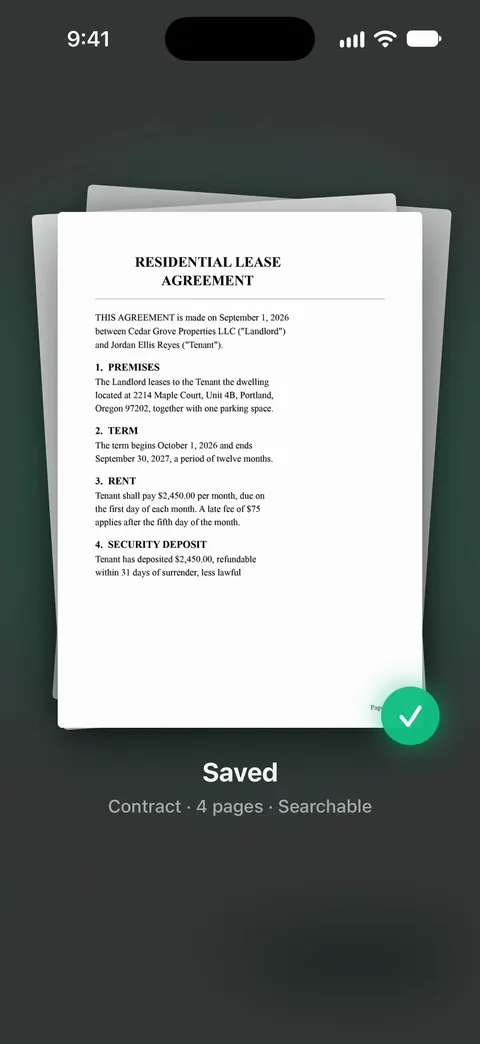
Text recognition runs on every page for everyone, free or Pro. Scanner One is free, with generous limits: scanning, clean PDFs and text search never stop. Smart filing on a free account covers 10 documents a month, so a big backlog goes past it quickly; scanning and search keep working for the rest.
Documents stay on your iPhone unless you share them or turn on iCloud Sync. Deleted documents wait in Recently Deleted for 30 days before they are deleted for good.
If you would rather keep everything in the Files app with your own folder names, the built-in scanner and this method work fine together.
Questions and answers
Why sort before scanning?
Because a lot of the pile should be shredded, not scanned, and a lot should be kept as the original anyway. Sorting first means you scan only the papers that need it, and you make each decision once.
What should I never shred after scanning?
The papers the FTC says to keep forever, such as birth certificates, Social Security cards, passports, marriage and divorce papers, military records and wills, and the ones to keep while you own the thing, such as titles and deeds. Scan them as a backup, but keep the paper.
How do I keep from going back to paper?
Give new paper one tray, and run the three passes on it once a week: shred, scan, act, done. A week’s mail rarely takes more than a few minutes.
Do I need a scanner for this?
No. The Notes and Files apps on iPhone can scan documents, and so can scanner apps. A sheet-fed scanner is faster for very large piles, but a phone is enough for most homes.
Sources
What this page says about Scanner One was checked against the app on .
- FTC Consumer Alert, Protecting your personal information: Which documents to keep and which to shred — which papers to keep forever, while you own, three years or one year, what to shred, shredding paper copies you can access electronically, and shred days; dated 10 June 2025
- Apple Support, Scan documents on your iPhone or iPad (article 108963) — the Scan Documents steps in Notes and in the Files app; published 13 February 2026
- IRS, How long should I keep records? — how long tax records stay; page last reviewed or updated 30 June 2026
- IRS, Publication 583, Starting a Business and Keeping Records — electronic records must be reproducible in legible form; paper may be destroyed once an electronic storage system is tested; revised December 2024
- Apple Support, Add details in Reminders on iPhone — dates, early reminders and scanning a document into a reminder; read 2026-11-13
- Scanner One on the App Store — the app’s own listing
Get Scanner One
Scanner One is free, with generous limits: scanning, clean PDFs and text search never stop.

Scanner OneScan, sign and ask anything
Scanner One is free, with generous limits: scanning, clean PDFs and text search never stop.