
Guide
Can you throw away the original after you scan it?
Often, yes. The IRS applies the same rules to electronic records as to paper, and its Publication 583 says original paper records may be destroyed once your electronic system has been tested to show it reproduces them properly, and you keep it that way. That covers ordinary records like receipts and statements. Keep the originals of vital and ownership papers (birth certificates, passports, Social Security cards, titles, deeds, wills) and anything you may need to show in its original form. Shred what you discard.

This page is general information, not legal or tax advice. The IRS rules quoted here are for federal tax records in the US; other countries, states, courts and agencies have their own. Check the official pages in the sources, and ask a tax professional or lawyer about your situation.
What the IRS says about scanned records
The IRS doesn’t require you to keep paper. Its small business publication, Publication 583, says: “All requirements that apply to hard copy books and records also apply to electronic storage systems that maintain tax books and records.” It defines an electronic storage system as any system for keeping records “either by electronic imaging or by transfer to an electronic storage media”, which includes scanning.
It then sets the condition for getting rid of the paper:
“The original hard copy books and records may be destroyed provided that the electronic storage system has been tested to establish that the hard copy books and records are being reproduced in compliance with IRS requirements for an electronic storage system and procedures are established to ensure continued compliance with all applicable rules and regulations.”
Those requirements come from Revenue Procedure 97-22, which applies to taxpayers who keep records in an electronic storage system. Section 4 asks for:
- an accurate and complete transfer of the paper to the electronic copy;
- a way to index, store, preserve, retrieve and reproduce the records;
- reasonable controls against unauthorized changes, deletion or deterioration;
- regular checks of the stored records;
- the ability to reproduce legible and readable hard copies. It defines legibility as being able to identify every letter and numeral “positively and quickly”.
Section 7 permits destroying the originals once you’ve tested the system and set up procedures to keep it compliant. And the electronic records must be kept as long as their contents may matter for tax purposes.
What that means for a home filing system
Rev. Proc. 97-22 is written in the language of business record systems, but its tests translate into plain habits:
- Complete: every page and both sides, including the back of a receipt or the second page of a statement.
- Legible: you can read every number. Zoom in on the smallest print before you shred.
- Indexed: you can find it. Clear names and folders, or text you can search.
- Preserved: two copies in two places, checked once or twice a year.
- Printable: a PDF you can print or send if asked.
- Kept long enough: at least as long as the IRS periods, generally 3 years and longer in some cases.
The procedure also lists, among recommended practices, keeping paper copies of records that are illegible or that can’t be accurately or completely transferred. If a faded receipt won’t scan clearly, keep it, or keep a photo and the paper.
Keep the original anyway
Tax rules are only one reason to keep a paper. Keep originals of:
- Vital records: birth, marriage, divorce and death certificates. The FTC lists these to keep forever.
- Identity papers: passports, Social Security cards, citizenship and residency papers.
- Ownership papers: vehicle titles and home deeds, while you own the thing.
- Wills, living wills and powers of attorney.
- Anything with a raised seal, a stamp or an original signature that someone may need to inspect.
Offices that act on these papers often want the original. The New York DMV, for example, says that for removing a lien from a title “photocopies are not accepted” and it will accept only the signed, original release. Other agencies have similar rules for their own papers.
Wait before you shred if
- a dispute is open with a bank, a store, a landlord or an insurer;
- a warranty or insurance claim is in progress;
- you’re being audited or expect questions about a return;
- a legal matter might involve the paper;
- the scan isn’t clear.
Keep the paper until it’s settled, then scan anything new and shred.
Getting rid of the paper
The FTC’s advice is simple: when you dispose of documents with personal or financial information, shred them. If you don’t have a shredder, look for a local shred day in your community. Don’t put whole statements, pay stubs or medical bills in the recycling.
Where Scanner One helps, and where it doesn’t
Any scanner that makes clear, complete PDFs can do this, including Notes and the Files app. What matters is the habits above.
Scanner One helps with the first three of them. Point your camera at any piece of paper. Scanner One finds the edges, straightens the page, cleans it up and saves a real PDF. Scanner One finds the edges of the page automatically and corrects the perspective. A scan can have many pages, and you can reorder them. For indexing, Scanner One makes searchable PDFs. Search looks inside the text of every document and shows the matching line and page.
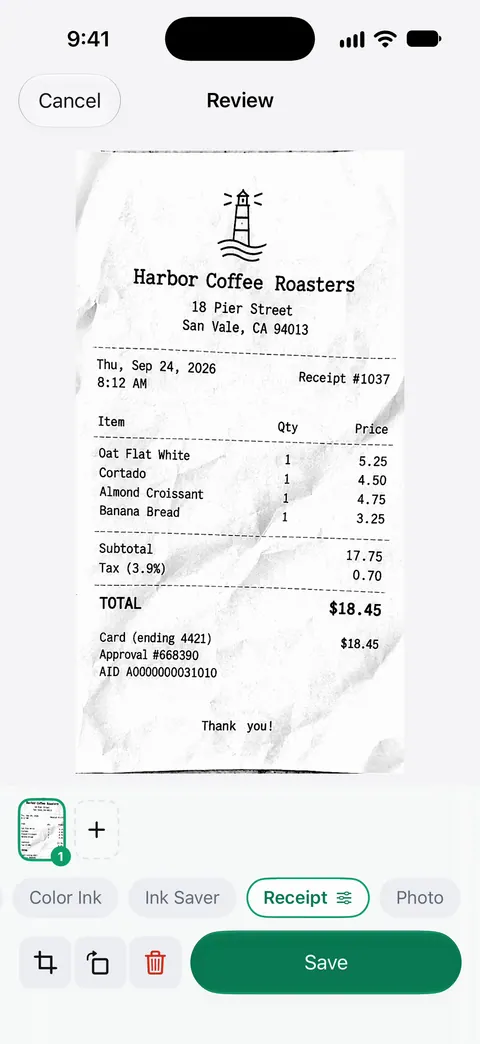
For the copies: Documents stay on your iPhone unless you share them or turn on iCloud Sync. For a second copy, export documents as PDFs to iCloud Drive or a USB drive. Share & Export saves a document as a PDF, Word, Excel, PowerPoint, JPG, PNG, a long image, plain text, Markdown, Rich Text, a web page or CSV. The guide to backing up scanned documents shows how.
What it doesn’t do: it doesn’t make a scan into a certified copy, and it doesn’t decide what you can shred. Deleted documents wait in Recently Deleted for 30 days before they are deleted for good. That’s a safety net for mistakes, not a second copy.
Questions and answers
Does the IRS accept scanned receipts?
The IRS says all requirements that apply to paper records also apply to electronic ones, and that the electronic system must index, store, preserve, retrieve and reproduce the records in legible form. A clear, complete, findable scan meets the spirit of that; a blurry one doesn’t.
What is Rev. Proc. 97-22?
An IRS revenue procedure from 1997 that sets out when records kept in an electronic storage system, including scans of paper, count as records for tax purposes. Section 7 allows destroying the paper originals after the system is tested.
Is a scan of a document a legal copy?
For many everyday purposes a clear scan is accepted, but not for everything. Agencies that issue passports, licenses and benefits often want the original or a certified copy. Check the instructions of the office asking.
How should I get rid of the paper?
Shred anything with personal or financial details. The FTC suggests a local shred day if you don’t have a shredder.
Sources
What this page says about Scanner One was checked against the app on .
- IRS, Publication 583, Starting a Business and Keeping Records — electronic records, electronic storage systems, and when original hard copies may be destroyed; revision 12/2024, page last reviewed or updated 2026-04-30
- IRS, Internal Revenue Bulletin 1997-13, Rev. Proc. 97-22 (page 9) — the requirements for electronic storage systems (sections 3, 4 and 7), including legibility, indexing, keeping illegible originals and destroying originals after testing; March 31, 1997
- IRS, How long should I keep records? — how long to keep tax records; page last reviewed or updated 2026-06-30
- FTC Consumer Alert, Protecting your personal information: Which documents to keep and which to shred — papers to keep forever, and shredding what you discard; June 10, 2025
- New York State DMV, Information and instructions about your certificate of title — an example of an office that accepts only signed originals for some papers; read 2026-11-13
- Scanner One on the App Store — the app’s own listing: scanning and searchable PDFs
Get Scanner One
Scanner One is free, with generous limits: scanning, clean PDFs and text search never stop.

Scanner OneScan, sign and ask anything
Scanner One is free, with generous limits: scanning, clean PDFs and text search never stop.