
Guide
Keep your car papers on your phone: registration, insurance and title
Scan your registration and insurance card, save your insurer’s electronic ID card if it offers one, and keep them in one folder on your phone. Whether a phone copy counts depends on your state: North Carolina now issues registration electronically and says you needn’t carry a printed copy, while New York tells you to keep the paper insurance card with the car or generate the electronic one. Keep the title at home, never in the car.

Rules for car documents are set by each state (or country) and change. This page gives examples from official DMV pages; check your own DMV’s site for what you must carry.
What to keep on your phone
These are the papers people reach for at a traffic stop, after a crash, at the repair shop or when selling:
- Registration, or your state’s electronic registration.
- Insurance ID card, front and back, or the electronic card from your insurer’s app or site.
- Driver’s license, in Apple Wallet where supported, plus a scan of both sides for your records.
- Title: a scan only. The original stays at home.
- Loan or lease papers: the account number and the lender’s contact details.
- Roadside assistance number and membership card.
- Service records: oil changes, tires, recalls. Useful at sale time.
- A photo of the VIN plate and the license plate, for insurance claims and police reports.
Put them in one Car folder, with one file per paper and names that start with the date: “2026-06-01 insurance card 2026-27”.
What a phone copy can replace, and what it can’t
Registration
States are moving to electronic registration. North Carolina’s DMV says it moved to an all-electronic registration system on 1 October 2026: paper or sticker registration is no longer issued automatically, officers can check your registration electronically, and you don’t need to carry a printed copy. It suggests downloading the free PDF to your phone and printing one to keep in the vehicle as a backup, and says digital registration is accepted in most states. Other states still issue a registration card to keep in the car.
Insurance card
Many states accept an electronic insurance card, with conditions. The New York DMV says your insurer gives you two original Insurance ID cards, and to keep one paper card with the vehicle as proof of insurance, or generate your electronic Insurance ID card. It also lists policy types for which electronic cards can’t be used, including all owned vehicles policies, dealer policies and self-insured vehicles.
One detail matters for scans: New York’s DMV accepts copies or faxes of the card for its own transactions, but “will not accept an Insurance ID card if the DMV barcode reader cannot read the barcode.” A blurry scan isn’t a copy anyone can use.
Title
The title is the one paper a scan never replaces. The New York DMV says the title certificate is used to transfer ownership, that titles with cross-outs, alterations or erasures won’t be accepted, and that for a lien release “photocopies are not accepted”: only the signed original. Your scan is for reference and for replacing a lost title, not for selling the car.
Keep the title at home
The New York DMV’s advice is direct: “Keep your title certificate in a safe place. Do not keep it in the car or carry it with you.” A title in the glove box goes with the car if it’s stolen. Keep it with your other ownership papers, in a fire-resistant box or a safe deposit box. If it’s lost or damaged, your DMV issues a duplicate (in New York, with form MV-902).
Your license in Apple Wallet
In participating locations, you can add an eligible driver’s license or state ID to Apple Wallet. Apple says you can present it at select businesses, venues and TSA checkpoints there, and share identity information in participating apps and websites. You need an iPhone 8 or later with Face ID or Touch ID and Bluetooth on.
To present it, double-click the side button, authenticate if asked, and tap your license. You can choose what information is shared by default. Because it’s accepted only at participating places, keep the physical license with you when you drive.
Scan car papers so they’re usable
- Both sides. Insurance cards often carry claim numbers and barcodes on the back.
- Flat and sharp. Every letter of the VIN and the policy number readable, and any barcode crisp.
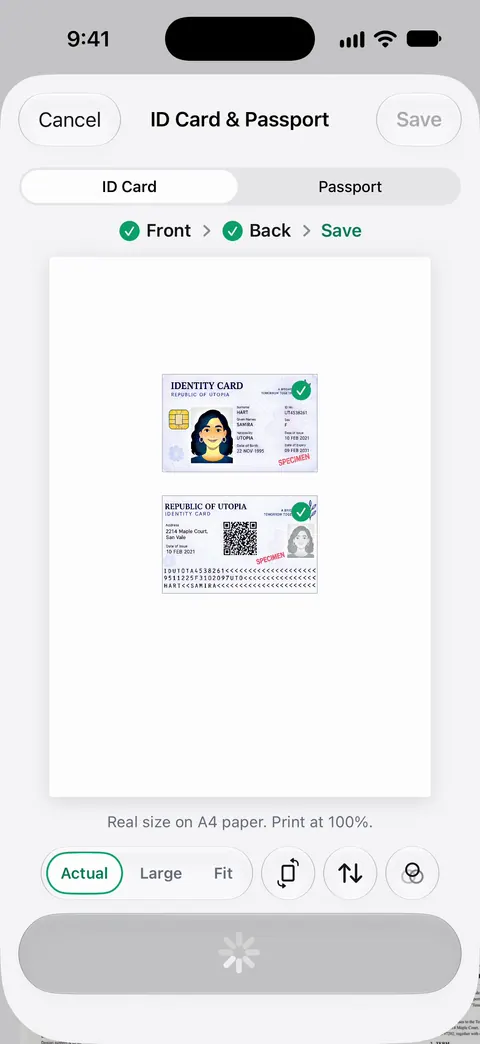
- One page for the card. Front and back on one page is easier to show and to print.
- Updated every renewal. Replace the old insurance card scan when the new one arrives, and delete the expired one.
After a crash, the situation guide on the documents to collect after a car accident lists what to photograph. When you sell, see the papers to hand over and keep.
Where Scanner One helps, and where it doesn’t
A Car folder in the Files app, your insurer’s app for the electronic card, and Wallet for your license cover most drivers.
Scanner One helps keep the paper side of it ready. ID cards and passports are scanned with both sides on one printable page. That suits your license: both sides on one page you can print. QR codes and barcodes are found on every page. Search looks inside the text of every document and shows the matching line and page. So you can search for the VIN or the policy number when the insurer asks.
You can lock the app with Face ID. Worth doing for papers that carry your address and license number.
The limits, plainly:
- A scan is a copy. It isn’t a Wallet ID, an electronic insurance card from your insurer, or a title.
- On a free account, pages you share, print or export carry a small “Scanned with Scanner One” label at the bottom right. Pro removes it. If you print or send a card, that label is on it unless you have Pro.
Needs You gathers bills due, return windows and IDs about to expire on Home, from your own papers.
For a reminder before your license runs out, see getting a reminder before your ID expires. The car registration checklist lists the papers to register a car.
Questions and answers
Can I show my insurance card on my phone if I’m pulled over?
In many states, yes, but rules vary. New York, for example, says to keep the paper card with the vehicle or generate your electronic Insurance ID card. Check your state’s DMV page, and keep a paper copy in the glove box to be safe.
Do I need to carry my registration?
It depends on the state. North Carolina, which moved to electronic registration on 1 October 2026, says you don’t need to carry a printed copy, though it suggests keeping one in the vehicle as a backup. Other states still issue a card to keep in the car.
Should I keep the car title in the glove box?
No. The New York DMV says to keep your title certificate in a safe place, and not to keep it in the car or carry it with you. Keep a scan on your phone and the original at home.
Can I put my driver’s license on my iPhone?
In participating locations, an eligible license or state ID can go in Apple Wallet and be presented at select businesses, venues and TSA checkpoints. It doesn’t work everywhere, so carry the card too.
Sources
What this page says about Scanner One was checked against the app on .
- NCDMV, Digital vehicle registration — all-electronic registration from 1 October 2026, no printed copy needed, a printed backup suggested, accepted in most states; page updated 2026-10-07
- New York State DMV, Insurance requirements — keep a paper Insurance ID card with the vehicle or generate the electronic card; policy types that can’t use electronic cards; unreadable barcodes refused; read 2026-11-13
- New York State DMV, Information and instructions about your certificate of title — keep the title in a safe place, not in the car; altered titles are void; only signed original lien releases accepted; read 2026-11-13
- Apple Support, Present your driver’s license from Apple Wallet (article 118237) — presenting a license or ID from Wallet in participating locations and what you need; published 2026-10-26
- Scanner One on the App Store — the app’s own listing: ID cards, codes, search and Face ID lock
Get Scanner One
Scanner One is free, with generous limits: scanning, clean PDFs and text search never stop.

Scanner OneScan, sign and ask anything
Scanner One is free, with generous limits: scanning, clean PDFs and text search never stop.