
Guide
Keep warranties, receipts and manuals in one place
Make one folder called Warranties and give each purchase one file: the receipt and the warranty terms, scanned or saved together, plus a photo of the serial number. Name it with the purchase date and the product. Save the manual as a PDF from the maker’s website. Put the warranty’s end date in your calendar. The FTC’s advice is to save the receipt with the warranty: it proves when you bought the product and that you’re the original owner.

What to keep for each purchase
For anything with a warranty, gather these into one file at the time you buy it:
- The receipt. The FTC’s advice is to save your product receipt with the warranty: “The receipt proves the date you bought the product and that you’re the original product owner.”
- The warranty terms. The leaflet in the box, or the page from the seller’s site. If you shop online, the FTC suggests printing or downloading a copy of the warranty.
- The registration confirmation. The FTC notes that some warranties require you to return a registration card before you can get warranty service. Keep the confirmation email or a photo of the card you sent.
- The serial and model numbers. A photo of the label, usually on the back or under the product. Live Text can copy the number from the photo later.
- Any extended warranty or service contract. It’s a separate contract you paid extra for, with its own terms and end date.
- The manual. Download the PDF from the maker’s site rather than scanning a 60-page booklet.
A word on extended warranties
The FTC explains that an extended warranty or service contract “costs extra and is sold separately from a product”, covers repairs or maintenance for a set time, and may overlap with the warranty you already have. Before you buy one, check what the free warranty already covers and for how long. The FTC also notes that the law says a warranty must be available for you to read before you buy, in a store or online. If you do buy one, its contract goes in the same file as the product.
Set up one Warranties folder
Keep it simple: one folder, one file per purchase.
- In the Files app, under iCloud Drive, tap the More button, then New Folder, and call it Warranties.
- Scan the receipt and the warranty card together into one PDF, or merge them afterwards. The guide to merging PDFs shows how.
- Name the file with the purchase date and the product: “2026-08-15 dishwasher receipt and warranty”.
- Save the manual next to it: “dishwasher manual”.
- Add a tag such as Under warranty, and remove it when the warranty ends. Touch and hold the file and tap Tags to add one.
For a big purchase with several papers (a car, a roof, a heating system), use a subfolder instead of a single file.
Scan receipts the day you buy
Many receipts are printed on thermal paper that fades, sometimes within months. By the time the dishwasher breaks, the total and date may be gone. Scan the receipt when you get home, while the print is dark. The guide to scanning receipts has tips for faint and long receipts.
Track when warranties end
A warranty is only useful if you remember it before it runs out.
- Calendar: add an event a month before the end date, with the file name in the notes.
- The file name: some people add “until 2028-08” to the name.
- Return windows: the store’s return period is often much shorter than the warranty, so note it separately.
The guide to tracking warranty end dates goes further.
When something breaks
- Open the Warranties folder and find the file. Search by product or brand if the folder is long.
- Read the warranty: what’s covered, for how long, and who to contact (the maker or the store).
- Have the receipt, the serial number and a short description of the fault ready before you call or fill in the form.
- Keep everything from the claim (emails, case numbers, repair receipts) in the same file or subfolder.
If you can’t find the receipt, all isn’t lost: the situation guide on a warranty claim without the receipt has other ways to prove the purchase.
When to let them go
The FTC lists appliance sales receipts and warranties among the papers to keep while you own the item, and expired warranties among the papers to shred. When you sell or give away a product, hand the manual and warranty to the new owner if the warranty transfers; otherwise delete the file. Tax rules can give a receipt a second life: a home improvement receipt may matter when you sell the house, so file those with your home papers too.
Where Scanner One helps, and where it doesn’t
A folder in Files and the habit of scanning receipts on the day covers most households. If that’s working, keep it.
Scanner One helps with the scanning and the filing. Point your camera at any piece of paper. Scanner One finds the edges, straightens the page, cleans it up and saves a real PDF. Scans come with Auto Clean, Color, Grayscale and Receipt filters. Then it reads the text, names the document, tags it and puts it in the right folder. So a receipt and a warranty card end up named and in the right folder. Search looks inside the text of every document and shows the matching line and page. Search for the brand, the product or the store and the receipt comes up.
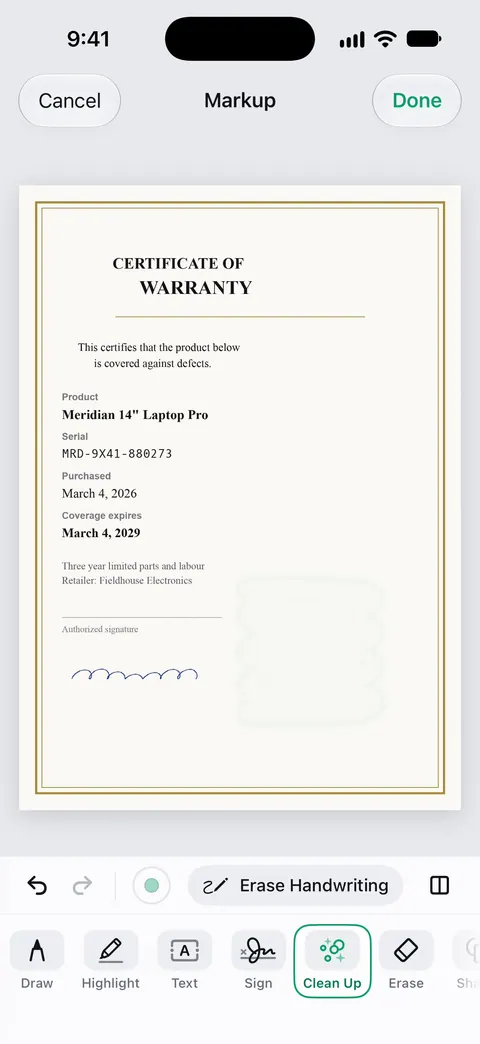
QR codes and barcodes are found on every page. That helps with the barcodes and QR codes on warranty cards and labels. And when a coffee ring or a stain covers part of an old warranty, Clean Up, the smart eraser, can brush it out.
The limits, plainly:
- Free accounts get smart filing for 10 documents a month.
- Free accounts can use Clean Up, the smart eraser, on 3 documents a month. Pro removes every limit.
- A faded thermal receipt can only be scanned as it is. Scan it early.
Needs You gathers bills due, return windows and IDs about to expire on Home, from your own papers. The guide to tracking return windows covers the store’s side.
Questions and answers
Do I need to keep the paper receipt for a warranty claim?
The FTC says to save your receipt with the warranty because it proves the purchase date and that you’re the original owner. Many makers accept a clear copy, but terms vary, so check the warranty. Keep the paper too if the terms ask for the original.
Do I have to send in the registration card?
The FTC says that sometimes you’ll have to return a product registration card first to qualify for warranty service. Read the warranty to see whether yours requires it.
How long should I keep warranty papers?
The FTC lists appliance sales receipts and warranties among papers to keep while you own the item, and expired warranties among papers to shred.
Is an extended warranty the same as a warranty?
No. The FTC explains that an extended warranty or service contract costs extra and is sold separately, and it may overlap with the warranty that comes with the product.
Sources
What this page says about Scanner One was checked against the app on .
- FTC Consumer Advice, Warranties — save the receipt with the warranty, registration cards, saving online warranties, extended warranties and service contracts, seeing the warranty before you buy; July 2023
- FTC Consumer Alert, Protecting your personal information: Which documents to keep and which to shred — keep appliance receipts and warranties while you own the item; shred expired warranties; June 10, 2025
- Apple iPhone User Guide, Organize files and folders in Files on iPhone — folders, renaming and tags in the Files app; iOS 27 guide, undated, read 2026-11-13
- Apple iPhone User Guide, Interact with content in a photo or video on iPhone — copying a serial number from a photo with Live Text; iOS 27 guide, undated, read 2026-11-13
- Scanner One on the App Store — the app’s own listing: scanning, filing, search, codes and Clean Up
Get Scanner One
Scanner One is free, with generous limits: scanning, clean PDFs and text search never stop.

Scanner OneScan, sign and ask anything
Scanner One is free, with generous limits: scanning, clean PDFs and text search never stop.