
Guide
Number the pages of court exhibits in a PDF
Check your court’s own instructions first: they decide whether exhibits are numbered (1, 2, 3) or lettered (A, B, C), where the label goes, and whether pages run in one sequence. A common pattern is an exhibit label and page number in the bottom right corner of each page, such as "Plaintiff’s Exhibit 4, page 1." On iPhone, you can add those labels with Markup’s text tool, page by page. For long files or Bates numbering with a prefix on every page, a desktop PDF editor is the realistic tool.

This page is general information, not legal advice. Every court sets its own rules for exhibits, and they change. Follow your court’s current instructions, local rules and any order in your case, and ask the clerk’s office if you’re unsure.
If you’re handling your own case, the court will want your evidence labeled so the judge, the other side and the clerk can all find the same page. This page is about numbering and labeling exhibit pages. To add plain page numbers to an ordinary PDF, the guide to adding page numbers to a PDF is simpler.
Read your court’s instructions first
There is no single national rule. Courts publish their own instructions, and they differ in ways that matter. A few real examples:
| Court | What it asks for |
|---|---|
| California self-help guide | Plaintiff’s exhibits numbered, defendant’s lettered; check with your court; don’t mark exhibits before trial |
| California Court of Appeal, Fifth District (exhibits to a motion) | Pages numbered 1, 2, 3 from the cover page through the last page; index page numbers must match the PDF page counter |
| Oregon, Tillamook County | Exhibit number and page number in the bottom right of every page; plaintiff 1 to 100, defendant 101 to 199 |
| U.S. District Court, Western District of Wisconsin | Exhibits numbered in the bottom right corner; plaintiffs start at 1, defendants at 101 |
Look for “exhibits” on your court’s website, in its local rules, and in any order in your case. The clerk’s office can tell you where the instructions are, even though they can’t give legal advice.
Two ways courts number exhibit pages
Most instructions follow one of two patterns. Know which one you need before you start.
Page numbers restart in each exhibit. Each exhibit has its own label, and its pages count from 1. Tillamook County’s example is “Plaintiff’s Exhibit 4 page 1.” Five separate photos are five exhibits, each page 1.
One sequence for everything. All the exhibits are one document, numbered straight through. The Fifth District’s guidelines say to number pages consecutively from the cover page to the final page, and that the page numbers in the index must match the PDF’s own page counter. That last point matters: if your printed “page 12” is the PDF’s 14th page, the court can’t find it.
Label and number pages on iPhone
For a handful of exhibits, Markup’s text tool works. Put the exhibits in order first (see the next section), then:
- Open the PDF in Files or Preview and tap the Markup button.
- Tap the Add button, then tap Add Text.
- Type the label, for example “Plaintiff’s Exhibit 4, page 1.”
- Use the text tools to set a plain font, a readable size and black.
- Drag the text to the bottom right corner, clear of the document’s own text. Pinch open to zoom in while you place it.
- Tap the text box, tap the More button, then Copy. Go to the next page, paste, and change the page number.
- Repeat for every page, then share or save the PDF.
Add each label in the same spot on every page. A label that wanders around the page is harder to find in court.
Put the exhibits in order before numbering
Numbering is the last step. Before it:
- Gather each exhibit as its own PDF. Scan paper with Notes, Files or Preview; the guide to scanning several pages into one PDF helps.
- Remove private details your court requires you to redact, such as account numbers. A black box drawn on a PDF can often be removed: see the guide to redacting a PDF properly.
- Combine files only if your court wants one file. The guide to merging PDFs covers it.
- Fill in an exhibit list if your court has one: the number, a short description, and whose exhibit it is.
Then add numbers, so nothing you move later throws them off.
When this is a desktop job
Being honest: a phone is fine for a few short exhibits, and slow for anything large.
- Bates numbering puts a unique prefixed number on every page of a document set. It’s normally done in desktop PDF software that stamps every page at once.
- Hundreds of pages, or numbering that must match an index exactly, are easier with a computer, a desktop PDF editor and a big screen.
- Bookmarks for each exhibit, which some appellate courts ask for, are made in desktop editors.
A library, a law library or a court self-help center may have computers you can use.
Before you file or bring copies
- Check the last page number against the PDF page count.
- Make the copies your court asks for. California’s guide says to bring copies for the witness and the judge, and often the other side.
- Check file size and format for electronic filing; many courts set limits.
- If you’re preparing a small claims case, the page on small claims court evidence covers the rest.
Where Scanner One helps, and where it doesn’t
For a few exhibits labeled one page at a time, Markup is enough, and free.
Scanner One helps with the steps before and around numbering. Point your camera at any piece of paper. Scanner One finds the edges, straightens the page, cleans it up and saves a real PDF. The PDF tools merge, split, compress, password-protect, add page numbers and watermarks, and extract text. Its Page Numbers tool offers number formats and positions, which suits a set of exhibits numbered straight through.
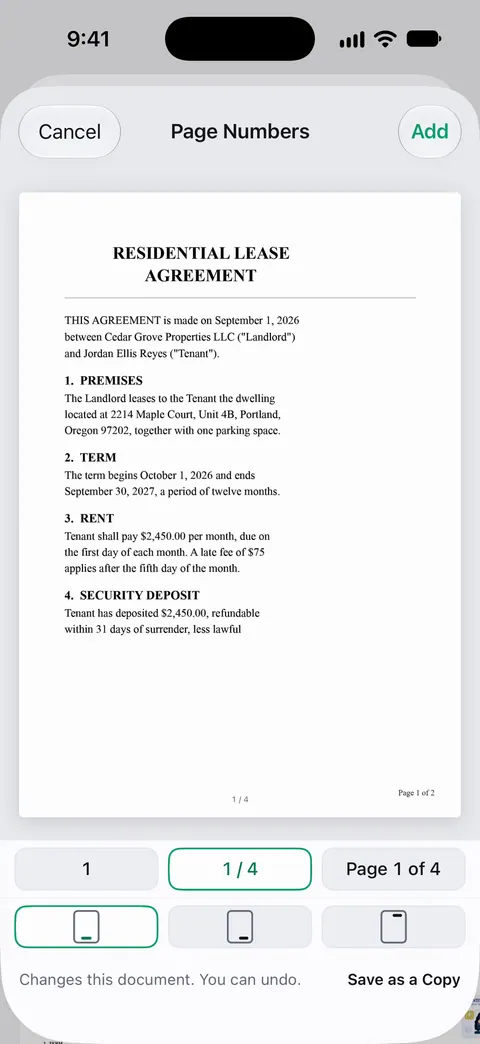
The limits, plainly:
- Page Numbers adds page numbers. For Bates numbers with a custom prefix, use a desktop PDF editor, and for “Plaintiff’s Exhibit 4” labels, use the markup text tool. You can sign and annotate documents.
- Free accounts can run the PDF tools and the Word, Excel and CSV exports 3 times a week, from one shared allowance. Pro removes every limit.
- On a free account, pages you share, print or export carry a small “Scanned with Scanner One” label at the bottom right. Pro removes it. A court filing should carry only what the court asks for, so check this before you file from a free account.
Questions and answers
What is Bates numbering?
A unique number stamped on every page of a set of documents, usually with a prefix, such as SMITH000001, SMITH000002 and so on, so any page can be cited exactly. Law firms use desktop software for it, and the court or the other side will say if you need it.
Do I label exhibits with numbers or letters?
It depends on your court. California’s self-help guide says plaintiffs traditionally use numbers and defendants letters, while some courts give plaintiffs 1 to 100 and defendants 101 and up. Your court’s instructions decide.
Should each exhibit be a separate PDF?
Many courts that accept electronic filing want one PDF per exhibit, and some want all exhibits in one file with an index. Check the filing instructions for your court and case type.
Where do the page numbers go?
Bottom right is the most common place in court instructions. Leave room so the label doesn’t cover the document’s own text, and don’t write over a page’s existing number.
Can Scanner One do Bates numbering?
Its Page Numbers tool adds page numbers with a choice of formats and positions. The PDF tools merge, split, compress, password-protect, add page numbers and watermarks, and extract text. For Bates numbers with a custom prefix across many files, use a desktop PDF editor.
Sources
What this page says about Scanner One was checked against the app on .
- Judicial Branch of California, Introduce exhibits at a trial (self-help guide) — plaintiff’s exhibits traditionally numbered and defendant’s lettered; check with your court; don’t mark exhibits before trial since you don’t know which will be admitted; bring copies for the witness and judge; undated, read 2026-11-13
- California Court of Appeal, Fifth District, Formatting Guidelines for Exhibits to a Motion/Request/Application — number pages consecutively from the cover page in Arabic numerals; page numbers in the index must match the PDF page counter; bookmarks for each exhibit; segments of 25 MB numbered as one sequence; updated 7/22/16, read 2026-11-13
- Oregon Circuit Court, Tillamook County, How to File Exhibits for an Upcoming Hearing or Trial — exhibit number and page number in the bottom right corner of each page; plaintiff 1 to 100, defendant 101 to 199; page numbers restart for each exhibit; exhibit list; separate PDFs for e-filing; dated August 2026, read 2026-11-13
- U.S. District Court, Western District of Wisconsin, Procedure for Marking Exhibits in Cases Involving Pro Se Litigants — exhibits numbered in the bottom right-hand corner; plaintiffs start at 1, defendants at 101; exhibit list with owner, number and description; dated 9/07, read 2026-11-13
- Apple iPhone User Guide, Add text, shapes, stickers, and more with Markup on iPhone — Add Text, font and size tools, the More button to copy or duplicate a text box, zooming; undated, read 2026-11-13
- Scanner One on the App Store — the app’s own listing: the PDF tools, page numbers and merge among them
Get Scanner One
Scanner One is free, with generous limits: scanning, clean PDFs and text search never stop.

Scanner OneScan, sign and ask anything
Scanner One is free, with generous limits: scanning, clean PDFs and text search never stop.