
Situation
Going to small claims court: how to organize your evidence
Collect everything that proves what happened and what it cost: the contract or lease, receipts, estimates, photos, and the texts and emails between you. Put it in date order, number every page, and add a one-page timeline and a list of exhibits on top. Print the number of copies your court asks for (San Mateo County, for example, says 3: one for the judge, one for the other side and one for you) and keep the originals clean. Hearings are short, so lead with your best page.

This page is about one job: turning a messy pile of texts, receipts and photos into evidence a judge can follow in a few minutes. For how to number pages as exhibits in more detail, see numbering pages for court.
This page is general information, not legal advice. Small claims rules differ by state and even by county: how many copies, how evidence is handed in, and whether you can send it ahead. Read your court’s small claims page, or ask the clerk.
Start with what you have to prove
Before you gather anything, write three lines:
- What happened, in one sentence.
- What it cost you, as a number, and how you got it.
- What you want the judge to order.
Every piece of evidence should support one of those lines. San Mateo County’s court suggests outlining your main points and what you’re asking for, and putting the facts in date order. If a page doesn’t help one of your three lines, leave it out.
Gather it all, in one place
Make a folder, on paper and on your phone, and collect:
- The agreement: a contract, lease, invoice, quote, or the message where the deal was made. In a landlord case, Santa Clara County says to bring the written lease.
- Proof of payment: receipts, bank or card statements, canceled checks, payment app history.
- Proof of the problem: dated photos and videos, inspection reports, police reports.
- Proof of the cost: repair estimates (San Mateo suggests at least 3), bills, replacement prices.
- The conversation: texts, emails and letters between you and the other side, especially where they admit something or refuse.
- Proof you own it, if the case is about property. Santa Clara County asks for the title or registration in car damage cases.
Turn texts and emails into pages
Judges read paper. For texts, take screenshots that show the other person’s name or number and the date and time on each message, and keep them in order. Our guide to saving text messages as a PDF covers a long thread, and turning screenshots into a PDF puts them on pages. For emails, save each as a PDF so the sender, date and subject print on top; see saving an email as a PDF.
Don’t crop out anything that makes you look worse. If the judge sees the full thread from the other side, a cropped version hurts you.
Build the packet
Put it together in this order:
- A one-page timeline. Dates down the left, one line each: “March 3: paid deposit (Exhibit 2)”. This is the page the judge will lean on.
- A list of exhibits. Exhibit 1, Exhibit 2, and what each is.
- The exhibits themselves, in date order, each with its number written or stamped on the first page.
- Your damages, added up: one page showing how you got to your number, pointing to the receipts and estimates.
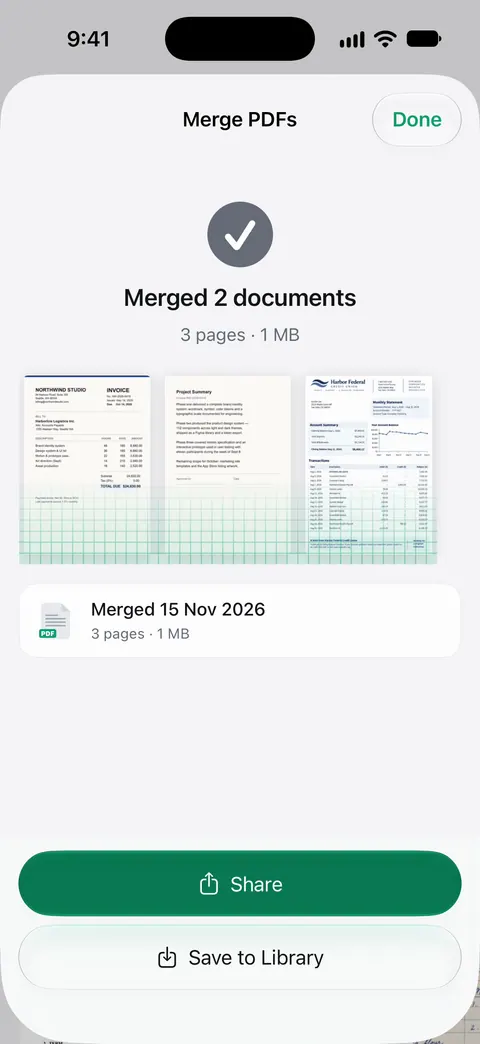
Then number every page in the corner, start to finish, so you can say “page 14” and everyone turns to the same page. Merging the scans into one PDF first makes numbering easy: our guide to merging PDFs on iPhone shows how.
On iPhone, the Notes app or the Files app scans paper receipts and letters: in Files, tap the More button, then Scan Documents, and save the scan where you keep the case.
Copies: follow your court
Courts differ, and it matters:
| Court (examples) | What they ask |
|---|---|
| San Mateo County, California | At least 3 copies of everything: one for the judge, one for each other party, one for you. Keep originals clean in case the judge asks. |
| Santa Clara County, California | One copy of each document, collected at the start of the hearing. Each side reviews the other’s before the case is heard. |
Look up your own court’s page. If your hearing is remote, ask the clerk how to hand in evidence.
Witnesses and written statements
A witness who saw what happened, or an expert such as a mechanic who inspected the car, can help. San Mateo County suggests avoiding friends and relatives unless they’re your only witness, since a judge may see them as biased. In California, a written statement signed under penalty of perjury (form MC-030) can stand in for a witness who can’t come. Make copies of it like any other exhibit.
On the day
- Bring the packet, a copy for yourself to mark up, and your phone charged if you’ll show a video.
- Lead with your timeline. Hearings are often 10 to 15 minutes.
- Answer the judge’s questions directly, and don’t interrupt.
Where Scanner One helps, and where it doesn’t
Scanner One can help you build the packet. It doesn’t give legal advice, and it can’t tell you what your court requires.
A scan can have many pages, and you can reorder them. The PDF tools merge, split, compress, password-protect, add page numbers and watermarks, and extract text. So scans, screenshots and PDFs can become one numbered file.
Search looks inside the text of every document and shows the matching line and page. That helps when you need the one text where the other side agreed to pay. The To PDF tool turns files and photos into PDFs.
Free accounts can run the PDF tools and the Word, Excel and CSV exports 3 times a week, from one shared allowance. On a free account, pages you share, print or export carry a small “Scanned with Scanner One” label at the bottom right. Pro removes it. For a court packet you may prefer pages without that label. The Files app’s scanner adds none, and you can write exhibit numbers on the printed pages by hand.
Questions and answers
What counts as evidence in small claims court?
Anything that helps show what happened and what it cost: contracts and leases, receipts, bills, repair estimates, photos, letters, emails and texts, police reports, and diagrams. Witnesses count too. San Mateo County’s court suggests bringing at least 3 repair estimates when you claim for damage.
How many copies of my evidence do I need?
It depends on the court. San Mateo County asks for at least 3 copies: the judge, the other side and you. Santa Clara County collects one copy of each document at the start of the hearing. Check your own court’s small claims page before you print.
Can I show text messages on my phone?
Bring them on paper. Santa Clara County strongly encourages hard copies of evidence. Screenshot the conversation so names, dates and times show, and print it in order. Video is different: that court lets you plug your own device into the courtroom projector.
How long is a small claims hearing?
Short. San Mateo County says trials last about 10 to 15 minutes, so put the most important document first and keep a short outline of your points.
What if the other side has documents I need?
In California you can ask the court to order them produced with a subpoena (form SC-107). Other states have their own forms; ask the small claims clerk.
Sources
What this page says about Scanner One was checked against the app on .
- Superior Court of California, County of San Mateo, Go to court (small claims) — types of evidence, at least 3 copies, labeling, clean originals, witnesses and written declarations (form MC-030), subpoenas for records (SC-107), trials of 10 to 15 minutes; notice on the page dated 2026-11-12
- Superior Court of California, County of Santa Clara, How to prepare for your small claims hearing (handout) — one copy of each document collected at the start, hard copies strongly encouraged, video shown from your own device, bring the lease in landlord cases and proof of ownership in car cases; revised 2024, file modified 2026-03-20
- California Courts Self-Help Guide, Prepare for and go to your small claims trial — gather your evidence and plan what you will say; no date shown, read 2026-11-13
- Scanner One on the App Store — the app’s own listing, for the closing section
Get Scanner One
Scanner One is free, with generous limits: scanning, clean PDFs and text search never stop.

Scanner OneScan, sign and ask anything
Scanner One is free, with generous limits: scanning, clean PDFs and text search never stop.