
Guide
Where to keep important documents on your iPhone
Use each place for what it does best. The Files app on iCloud Drive holds PDFs and scans in folders you can back up and share. Notes is quick for scanning and searches text in scans, but notes with PDFs in them can’t be locked. Wallet holds a driver’s license or state ID where that’s supported, plus passes and cards. Health keeps records your providers send. A document app adds search inside every page, filing and its own lock.

A quick comparison
| Place | Best for | Can you lock it? | Searches inside pages? | Easy to share or back up? |
|---|---|---|---|---|
| Files (iCloud Drive) | PDFs you keep for years, send or share | Lock the Files app with Face ID | Matches names, not page text | Yes |
| Notes | Fast scans, quick reference | Text notes yes; notes with scans no | Yes, text in scans | Shares notes and folders |
| Wallet | ID, cards, passes, tickets | Some items ask for Face ID when you present them | No | No |
| Health | Records from your providers | Health data is encrypted when iPhone is locked | Searches categories and data types | Shares with chosen people and apps |
| A document app | Scans you search, file and ask about | Depends on the app | Depends on the app | Depends on the app |
Most people end up using two or three: Wallet and Health for what they do best, plus one main home for papers.
Files and iCloud Drive
The Files app is the most flexible home for documents. Turn on iCloud Drive (Settings > your name > iCloud > Drive > Sync this iPhone) and keep your folders under iCloud Drive rather than On My iPhone. Apple says your iCloud Drive files are then available on your other devices, on a Mac, on Windows with iCloud for Windows, and at iCloud.com.
Good for: anything you’ll keep for years, send to someone, or want as an ordinary PDF. Weak at: finding a word inside a scan, because the search field matches names, folders and document types. Name files well (see naming scanned documents) and lock the Files app if others use your phone.
Notes
Notes is the quickest place to scan: in a note, tap the Attachments button, then Scan Documents. And its search finds text in scanned documents and handwriting, in supported languages.
The catch is locking. Apple says you can’t lock notes with PDF or file attachments, and a scan in Notes is a PDF in the note. So Notes suits household papers that aren’t secret (manuals, receipts, school letters) better than an ID or a medical result, unless you lock the whole Notes app.
Wallet
Wallet holds cards and passes, and in some places your ID. Apple says you can present an eligible driver’s license or state ID from Wallet in participating locations, at select businesses, venues and TSA checkpoints, and share identity information in participating apps and websites. You need an iPhone 8 or later with Face ID or Touch ID and Bluetooth on.
Wallet is for presenting, not storing: it isn’t the place for a scan of your passport or your Social Security card. And since a Wallet ID works only at participating places, keep carrying the card.
Health
If your hospital or clinic connects to the Health app, your allergies, medications, lab results and vaccinations download there automatically. Apple says Health data, apart from your Medical ID, is encrypted when your iPhone is locked. Scans of paper results and bills belong with your other documents. See keeping medical records on iPhone.
A document app
A scanner or document app earns its place when you have many papers and want to search inside them, have them named and filed, or ask questions about them. Before you trust one with important papers, check where it stores documents, whether it needs an account, whether it sends anything to the cloud, and whether it can be locked.
Keep the copies safe wherever they live
- Passcode and Face ID on the iPhone. Everything else depends on it.
- Lock the app that holds your scans: touch and hold its icon and tap Require Face ID. The guide to locking documents with Face ID covers every option.
- Protect iCloud. Apple’s iCloud security overview says that with standard data protection your iCloud data is encrypted and the keys are kept by Apple so it can help you recover data; with Advanced Data Protection, iCloud Drive, Notes and backups are end-to-end encrypted, and only your trusted devices can read them.
- Keep a second copy. See backing up scanned documents.
- Keep originals of vital papers in a safe place at home. A scan helps you replace a lost document; it doesn’t stand in for it.
Where Scanner One helps, and where it doesn’t
For a few important papers, the Files app with a Face ID lock is a fine home, and Wallet and Health do their own jobs well.
Scanner One is meant to be the main home for paper. Point your camera at any piece of paper. Scanner One finds the edges, straightens the page, cleans it up and saves a real PDF. Then it reads the text, names the document, tags it and puts it in the right folder. Search looks inside the text of every document and shows the matching line and page.
For important papers, these are the facts that matter:
- Documents stay on your iPhone unless you share them or turn on iCloud Sync.
- You can lock the app with Face ID.
- Scanner One needs no account and does no tracking.
- ID cards and passports are scanned with both sides on one printable page.
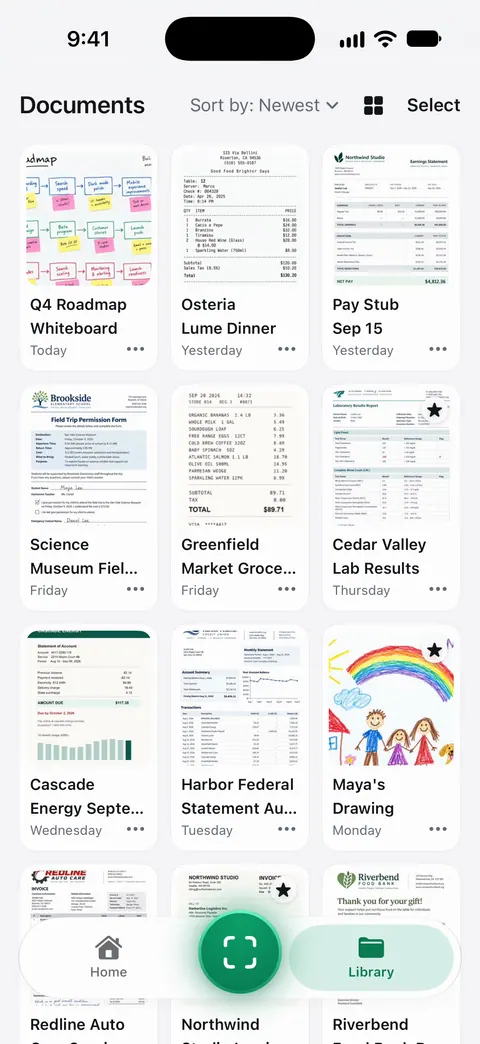
What it doesn’t do: it isn’t Wallet. A scan of your license is a copy for your records, not an ID you can present. And unless you turn on iCloud Sync or export copies, your documents are only on your iPhone, so set up a backup.
For a family emergency kit, the emergency document binder checklist lists what to gather.
Questions and answers
Is it safe to keep a copy of my passport on my iPhone?
It can be, with care: a passcode on the iPhone, the scan in an app you lock with Face ID, and iCloud protected by two-factor authentication or Advanced Data Protection. Don’t keep it in Photos, where it’s one swipe away from anyone you show a picture to.
Can I put my driver’s license in Apple Wallet?
Where it’s supported, yes. Apple says you can present an eligible license or ID from Wallet in participating locations, at select businesses, venues and TSA checkpoints. Since it works only at participating places, carry the card too.
Should I keep documents in Photos?
Not for long. Photos mixes documents with pictures, shares easily by accident, and doesn’t name or file them. Move document photos to Files, Notes or a document app, then delete them from Photos.
Where does Scanner One keep my documents?
Documents stay on your iPhone unless you share them or turn on iCloud Sync. You can lock the app with Face ID.
Sources
What this page says about Scanner One was checked against the app on .
- Apple iPhone User Guide, Set up iCloud Drive on iPhone — iCloud Drive in the Files app and on other devices; iOS 27 guide, undated, read 2026-11-13
- Apple iPhone User Guide, Lock your notes on iPhone — which notes can’t be locked, including those with PDF attachments; iOS 27 guide, undated, read 2026-11-13
- Apple iPhone User Guide, Search through your notes on iPhone — Notes searches text in scanned documents; iOS 27 guide, undated, read 2026-11-13
- Apple iPhone User Guide, Set up cards and passes in Wallet on iPhone — what Wallet can hold, including government-issued IDs; iOS 27 guide, undated, read 2026-11-13
- Apple Support, Present your driver’s license from Apple Wallet (article 118237) — where a Wallet ID can be presented (participating locations, select businesses and TSA checkpoints) and what you need; published 2026-10-26
- Apple iPhone User Guide, Download health records on iPhone — health records from providers in Health, and encryption when iPhone is locked; iOS 27 guide, undated, read 2026-11-13
- Apple iPhone User Guide, View health records in Health on iPhone — searching and sharing health records; iOS 27 guide, undated, read 2026-11-13
- Apple Support, iCloud data security overview (article 102651) — standard data protection and Advanced Data Protection for iCloud Drive, Notes and backups; published 2026-01-05
- Scanner One on the App Store — the app’s own listing: storage on the iPhone, search, filing and Face ID lock
Get Scanner One
Scanner One is free, with generous limits: scanning, clean PDFs and text search never stop.

Scanner OneScan, sign and ask anything
Scanner One is free, with generous limits: scanning, clean PDFs and text search never stop.