
Guide
Is it safe to email a copy of your passport or ID?
It’s a real risk, but sometimes unavoidable. Ordinary email isn’t end-to-end encrypted, and a copy can sit in inboxes and backups for years. Send one only when you started the process and know who is asking. Use their secure upload portal if they have one. Otherwise watermark the copy with who it’s for and the date, cover anything they don’t need, put a password on the PDF, send the password by text, and delete the copy from your Sent folder afterwards.

Landlords, employers, visa agents, hotels abroad and car rental desks all ask for a copy of your passport or ID, and the easy way is to snap a photo and email it. Usually nothing bad happens. But a passport copy is one of the most useful documents a fraudster can hold, and email was never built to keep secrets. This page is about the decision and the safer way to do it; the guide to sending documents securely covers other sensitive papers.
Why email is the weak spot
Two facts make an emailed ID copy riskier than it looks.
- It isn’t end-to-end encrypted. Apple says iCloud Mail is encrypted in transit and on its servers, but not end-to-end, “because of the need to interoperate with the global email system.” The same is true of most email. The provider can read it, and so can anyone who gets into either mailbox.
- It never really goes away. The copy stays in your Sent folder, the recipient’s inbox, their colleagues’ forwards, their downloads folder and every backup in between, long after your application is done.
The FTC tells people to lock up documents such as passports, birth certificates and Social Security cards. An emailed copy is the same document, left unlocked in places you don’t control.
When sending a copy is reasonable
Before you attach anything, check:
- Did you start this? A visa application, a lease, a job offer you accepted: yes. Someone who contacted you out of the blue asking for ID: stop.
- Do you know who is asking? Check the email address against the company’s website, or call their published number.
- Do they need the whole thing? Some only need to see your name and photo; a bank or immigration service needs every detail.
Ask whether they have a secure upload portal. Many banks, letting agents, employers and visa services do, and it is always better than email. Some can check ID in person or by video instead.
Warning signs: urgency (“today or you lose the flat”), a free email address for a company, a request for your passport and a selfie and your bank login, or a job that asks for ID before an interview.
How to send a safer copy
If email is the only way, take 5 minutes to make the copy useless to anyone else.
1. Scan it, don’t photograph it on the table
A flat, cropped scan is easier for the right person to read, so there is less back and forth. How to scan a passport covers glare and the photo page.
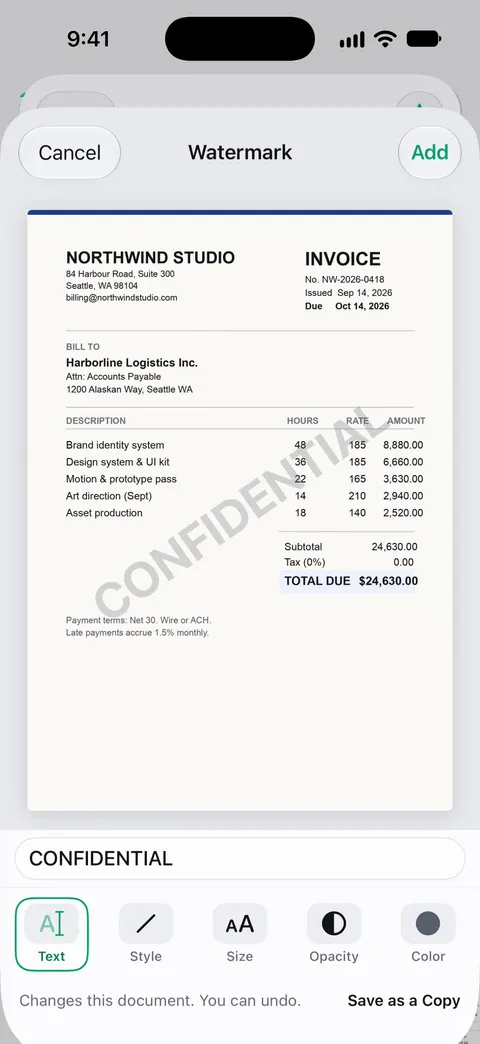
2. Add a watermark that says who it’s for
Write a line across the page such as: “Copy for [Company], [purpose] only, [date].” If the copy leaks, it is plainly marked for one use, and a fraudster can’t pass it off elsewhere without visible editing. In Markup (in Photos, Files or Notes), tap the Add button, then Add Text, type the line and place it across the page, away from the photo and the numbers. Or use our free ID copy watermark tool, which runs in your browser. The watermark guide has more on wording.
3. Cover what they don’t need
If a hotel only needs to see your name and photo, cover the passport number and signature. In Markup, Add Shape gives you a filled box. Be careful: a box drawn on top can sometimes be removed from a PDF. For real redaction, follow how to redact a passport or license copy, or use our redact image tool, and never cover anything the recipient has said they need.
4. Put a password on the PDF
Apple’s steps in Preview:
- Open the Preview app and open the PDF. To keep an unlocked copy, tap the Actions Menu button, then Duplicate, first.
- Tap the Actions Menu button next to the filename, then tap Lock.
- Enter the same password in Password and Verify, then tap Done.
Send the password a different way: by text or a phone call, never in the same email. Password-protect a PDF has more.
5. Clean up afterwards
Once the application is done, delete the email from your Sent folder and the copy from Downloads and Photos. You can also ask the recipient to delete it. In some countries data protection law gives you the right to ask.
If it went to the wrong person
Stay calm, and act the same day:
- Report it at IdentityTheft.gov. The FTC says to report it there if your information was used, and to follow the steps at IdentityTheft.gov/databreach if it was exposed but you aren’t sure it was used.
- Watch your credit reports and accounts for anything you didn’t open.
- If the passport itself is lost or stolen, report it to the office that issued it. A copy going astray doesn’t cancel your passport.
- Change any passwords you also sent, and turn on two-factor authentication.
Where Scanner One helps, and where it doesn’t
Scanner One can’t make email private, and it can’t tell you whether a request is genuine. Those calls are yours.
It does make the safer copy quick to produce. ID cards and passports are scanned with both sides on one printable page. The PDF tools merge, split, compress, password-protect, add page numbers and watermarks, and extract text. Redaction is permanent. Documents stay on your iPhone unless you share them or turn on iCloud Sync.
The limits, plainly:
- Free accounts can run the PDF tools and the Word, Excel and CSV exports 3 times a week, from one shared allowance. Pro removes every limit.
- Redaction is a Pro tool: Pro adds redaction, the smart eraser, edit text, auto-export and five alternate app icons.
- On a free account, pages you share, print or export carry a small “Scanned with Scanner One” label at the bottom right. Pro removes it. That label is not a substitute for your own “copy for” watermark.
- The steps above with Markup and Preview are free and enough for an occasional copy.
Questions and answers
Can someone steal my identity with a copy of my passport?
A copy alone usually isn’t enough to get a new passport, but it holds your full name, date of birth, nationality, photo and passport number, which fraudsters use to open accounts or build fake profiles. That’s why it’s worth limiting who gets one and marking each copy.
Is it safer to send my passport by WhatsApp or text than by email?
An end-to-end encrypted messenger protects the copy on the way, but it still lands on the other person’s phone and in their backups. Whatever the channel, the safer steps are the same: send only to someone you have verified, watermark the copy, and delete it when it’s done.
Should I put a watermark on my passport copy?
Yes, if the recipient can still read it. A line such as 'Copy for ABC Lettings, rental application, 13 Nov 2026' over the page, away from the photo and numbers, makes the copy far less useful to anyone else.
I emailed my passport to a scammer. What now?
Go to IdentityTheft.gov: the FTC says to report it there if your information was used, or follow the steps at IdentityTheft.gov/databreach if it was exposed but not yet used. Watch your credit reports, and contact your passport office if the passport itself is lost or stolen.
Sources
What this page says about Scanner One was checked against the app on .
- Apple Support, iCloud data security overview (article 102651) — iCloud Mail is encrypted in transit and on the server but not end-to-end, because of the need to interoperate with the global email system; read 2026-11-13
- Apple iPhone User Guide, Lock PDFs in Preview on iPhone — adding a password to a PDF in Preview, and duplicating it first; iOS 27 guide, undated, read 2026-11-13
- Apple iPhone User Guide, Add text, shapes, stickers, and more with Markup on iPhone — Add Text and Add Shape in Markup, used here for a watermark line and cover boxes; iOS 27 guide, undated, read 2026-11-13
- FTC Consumer Advice, What to do if you were scammed — report misuse at IdentityTheft.gov, or follow IdentityTheft.gov/databreach if your number was exposed but not used; dated June 2026
- FTC Consumer Alert, Protecting your personal information: which documents to keep and which to shred — lock up documents such as your passport, birth certificate and Social Security card; dated 2025-06-10
- Scanner One on the App Store — the app’s own listing: redaction, watermark, password and on-device storage
Get Scanner One
Scanner One is free, with generous limits: scanning, clean PDFs and text search never stop.

Scanner OneScan, sign and ask anything
Scanner One is free, with generous limits: scanning, clean PDFs and text search never stop.