
Situation
The IRS sent a letter asking for documents: what to do
Read the whole letter and find the notice number (CP or LTR) in the top right corner. Look it up on IRS.gov to see what it means, and note the reply date. Gather only the documents it asks for, scan them into one clearly labeled PDF, and send them the way the letter says: the IRS Document Upload Tool with the letter’s access code, fax, or mail. Keep a copy of everything you send, and reply by the due date even if you need more time.

Getting a letter from the IRS is unsettling, but most letters ask for something specific and have a clear way to answer. This page is about that answer: what to send, how to scan it, and how to keep proof. For how long to keep your tax papers afterwards, see how long to keep tax records.
This page is general information, not tax or legal advice. IRS procedures change. The letter you received and the IRS pages linked here are what count.
Before anything else: read it slowly and find three things
- The notice number. It’s in the top right corner and starts with CP or LTR. Search it on IRS.gov; each number has a page explaining what it means and what to do.
- The due date. Write it on your calendar now. The IRS asks you to act by the date in the letter, and replying on time protects your right to appeal.
- What it actually asks for. A list of documents, a signed form, a payment, or nothing at all. Some letters only tell you about a change and need no reply.
Then check that it’s real. The IRS says that if a letter doesn’t appear in its search or looks suspicious, call 800-829-1040 rather than any phone number printed in the letter. The IRS also says it never starts an audit by phone. If the letter has a link, it should start with https and contain irs.gov.
Common letters that ask for documents
| Letter | What it usually means | What you send |
|---|---|---|
| CP2000 | Income reported by employers or banks doesn’t match your return. It’s a proposed change, not a bill. | The signed response form, saying whether you agree, plus documents that support your side |
| Audit letter | The IRS is examining part of your return | The documents listed in the letter, nothing more |
| Request for information or verification | The IRS needs proof of something on the return before it finishes processing | What the letter names, often forms, receipts or ID |
For a CP2000, the IRS adds: if you agree and have nothing else to report, you don’t need to amend your return. If you disagree, explain why and attach proof, such as a corrected 1099 or a statement showing an amount was already reported elsewhere.
Gather only what it asks for
Sending your whole shoebox slows things down. Make a short list from the letter, one line per item, and tick them off.
- Missing a form? Ask the employer, bank or broker for a copy. You can view and download tax transcripts in your IRS Online Account, and Form 4506 requests a full copy of a past return.
- Missing receipts? Bank and card statements, emails and invoices can help show what you paid. Explain any gap in a short note.
- Someone used your identity? The CP2000 page points to Form 14039 for identity theft.
Scan it into one clear package
The person reading your reply has many files. Make yours easy:
- Put the IRS letter’s first page on top. Include its response form if it has one, signed.
- Add a one-page cover letter: your name, your taxpayer ID as the letter shows it, the tax year, the notice number, and a numbered list of what’s enclosed.
- Scan every document in the order of your list. Use good light and check each page is readable, especially small print on 1099s and receipts.
- Merge everything into one PDF if you’re uploading, so pages can’t get separated. Our guide to merging PDFs on iPhone shows how, including with the Files app.
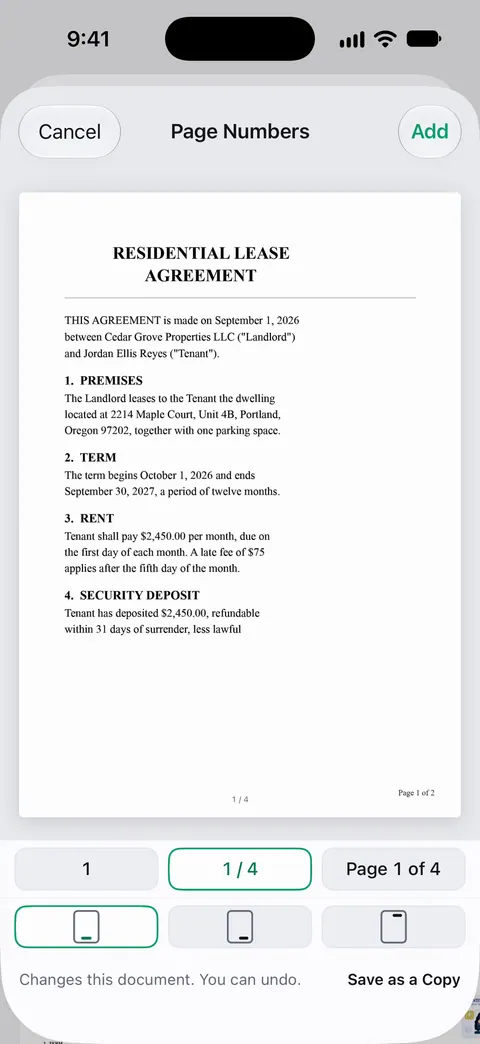
- Add page numbers so you can refer to “page 6” in the cover letter. See adding page numbers to a PDF.
- Keep a copy of the exact file you send.
The Notes app’s scanner is enough for this: open a note, tap the Attachment button, tap Scan Documents, and keep adding pages to one scan.
Send it the way the letter says
- Upload: the IRS Document Upload Tool takes JPG, PNG and PDF files. You’ll need the access code from the letter (or the notice number), the name on the notice, and your Social Security, ITIN or EIN. You get a confirmation that the IRS received your files. Don’t send tax returns this way. If your file is large, our guide to making a PDF fit a size limit helps.
- Fax: use the fax number the letter gives for its office. If you use an online fax service, the IRS suggests reading its privacy and security policy first.
- Mail: use the address in the letter. Certified mail with a return receipt gives you proof of the date.
If someone is helping you, such as a tax professional, they may need Form 2848. Our guide to sending documents to your accountant covers doing that securely.
Keep proof, and then wait
Make a folder for this letter: the letter, your reply, everything you sent, and the upload confirmation, fax report or mail receipt. Write down any call: date, name, and what was said. If the IRS writes again, you’ll have everything in one place.
If you owe money, the IRS suggests paying what you can by the due date to limit interest and penalties, and asking about a payment plan for the rest.
Next year
Keep your tax papers together as they arrive, and keep them for as long as the IRS can ask: generally at least 3 years, longer in some cases. Our tax documents checklist helps you gather them in one go.
Where Scanner One helps, and where it doesn’t
Scanner One can help you put the reply package together. It can’t tell you what to answer, and it doesn’t talk to the IRS for you.
The PDF tools merge, split, compress, password-protect, add page numbers and watermarks, and extract text. So you can merge your pages into one PDF and number them.
Search looks inside the text of every document and shows the matching line and page. That helps when you’re hunting for one receipt or one 1099 among last year’s scans. Documents stay on your iPhone unless you share them or turn on iCloud Sync.
Free accounts can run the PDF tools and the Word, Excel and CSV exports 3 times a week, from one shared allowance. On a free account, pages you share, print or export carry a small “Scanned with Scanner One” label at the bottom right. Pro removes it. If a small label on your pages matters to you, the Files app’s own scan and merge are enough for one letter.
Questions and answers
How do I know an IRS letter is real?
Look up the CP or LTR number from the top right corner on IRS.gov. If you can’t find it, or anything feels off, call the IRS at 800-829-1040 rather than any number in the letter. The IRS starts audits by mail, not by phone, and a link in a real notice contains irs.gov.
Can I upload documents to the IRS instead of mailing them?
Often, yes. If your letter gives an access code, the IRS Document Upload Tool takes JPG, PNG and PDF files and confirms that they arrived. Without a code you can enter the notice or letter number, picking it carefully from the list. Don’t send tax returns through it.
What if I can’t get the documents by the due date?
Reply by the due date anyway and ask for more time. The CP2000 page, for example, says you can send a written request for an extension. Replying on time protects your appeal rights.
Should I send originals?
Send copies and keep your originals. The IRS’s own pages talk about sending scans, photos or copies, and an original that goes missing in the mail can’t be replaced easily.
Do I need a tax professional?
Not for every letter. Many ask for one or two documents. If the amounts are large, the letter is an audit, or you don’t understand it, a tax professional can help, and Form 2848 lets them act for you.
Sources
What this page says about Scanner One was checked against the app on .
- IRS, Understanding your IRS notice or letter — find the CP or LTR number, respond by the due date, what to do if you agree, disagree or owe, and calling 800-829-1040 if a letter looks suspicious; last reviewed 2026-05-26
- IRS, Understanding your CP2000 notice — a proposed change, not a bill; the response form, supporting documents, upload, fax or mail; last reviewed 2026-07-14
- IRS, Document Upload Tool — the access code or notice number, JPG, PNG and PDF files, no tax returns, check that a link contains irs.gov; last reviewed 2026-08-27
- IRS, IRS audits — audits start by mail, never by phone; the written request lists the documents; some electronic records accepted; last reviewed 2026-02-17
- IRS, Get transcript — transcripts online or by mail, Form 4506 for a copy of a return; last reviewed 2026-06-27
- Scanner One on the App Store — the app’s own listing, for the closing section
Get Scanner One
Scanner One is free, with generous limits: scanning, clean PDFs and text search never stop.

Scanner OneScan, sign and ask anything
Scanner One is free, with generous limits: scanning, clean PDFs and text search never stop.