
Situation
Flying tomorrow: the documents to have on your phone
Tonight, put your boarding pass in Apple Wallet, then scan your passport photo page, your ID front and back, visas, travel insurance, hotel and car bookings and any prescriptions, and keep the scans locked on your phone with a copy in iCloud or with someone at home. Carry the real ID or passport: TSA accepts the documents on its list, and a photo of your ID is not on it. The scans are your backup if something is lost.

This page is for the night before a flight: what to have on your phone, and what still has to be the real thing. For the full list of papers for a trip abroad, including visas and entry rules, see the international travel documents checklist.
First: the originals go in your bag
A phone copy doesn’t get you on the plane. Put these in the bag you carry on, now:
- Your ID or passport. TSA lists what it accepts at the checkpoint, including a REAL ID driver’s license or state ID, a U.S. passport or passport card, a permanent resident card and a foreign passport. Since May 7, 2025, a license that isn’t REAL ID-compliant isn’t accepted, and a temporary paper license isn’t either.
- Visas and residence cards, if the trip needs them.
- For international trips, the passport itself. CBP reminds U.S. citizens abroad that they must meet each country’s own document rules.
Check the expiry dates tonight. TSA accepts listed IDs up to two years after they expire, but many countries want a passport valid well beyond your travel dates, and airlines check at the desk.
The boarding pass: Wallet first
Most airlines send a boarding pass you can add to Apple Wallet, from the check-in email or from the airline’s app. Apple notes that boarding passes can then appear on your Lock Screen near departure time, so there is nothing to search for at the gate.
As a backup, take a screenshot of the boarding pass and keep the airline’s app signed in. If your airline only issues paper at the desk, plan for that.
The copies to scan tonight
Scan these into one note or one folder called something like “Trip”. In Notes, open a new note, tap the Attachment button (the paperclip), tap Scan Documents, hold each page in view, tap Keep Scan, and tap Done at the end. Or use the Files app: tap the More button, then Scan Documents.
- Passport photo page, and the page with any visa
- Driver’s license or ID, front and back
- Travel insurance policy, with the 24-hour assistance number
- Hotel and car rental confirmations, flight itinerary
- Prescriptions and a list of medications with their generic names, plus any letter from your doctor about a device or condition
- Health insurance card, front and back
- Vaccination records, if your destination asks
- For a child traveling with one parent, a signed consent letter; our travel consent letter template helps
- Emergency contacts and your bank’s phone number from abroad, written on a scanned card or typed into the note
Our guide to scanning a passport covers getting the photo page sharp, and scanning tickets and boarding passes covers paper tickets.
Lock the scans, and keep one copy off the phone
A passport scan and a license scan together are a gift to an identity thief. Lock them:
- Go to Settings, tap Apps, tap Notes, tap Password, and choose Use Device Passcode. Turn on Face ID too.
- Open the note, tap the button at the top, and tap Lock.
Then make sure the copies exist somewhere other than the phone. If the phone is stolen with your bag, you lose both. Options: iCloud, a shared locked file with someone at home, or a password-protected PDF in your email. Our page on whether to email a copy of your passport weighs those choices.
Have these ready to read offline
Airport Wi-Fi and roaming fail at bad moments. Before you leave home:
- Open each booking once so it’s cached, or save it as a PDF
- In the Files app, touch and hold any file you need and tap Keep Downloaded, so it’s on the phone even without a connection
- Turn on Low Power Mode if your battery is old, and pack a charger
If something goes missing on the trip
The scans earn their place here. A lost passport abroad means a trip to the embassy or consulate, and having the number, issue date and a copy of the photo page speeds that up. Our page on losing your passport abroad walks through it. For stolen cards, the card scans tell you which numbers to call.
Before the next trip
Keep a standing “Travel” folder with your passport scan and insurance, and update it when you renew. Put your passport expiry date in your calendar with a reminder months ahead.
Where Scanner One helps, and where it doesn’t
The Notes app and Wallet cover the night before a flight. A scanner app adds tidier copies and a way to find them fast.
ID cards and passports are scanned with both sides on one printable page.
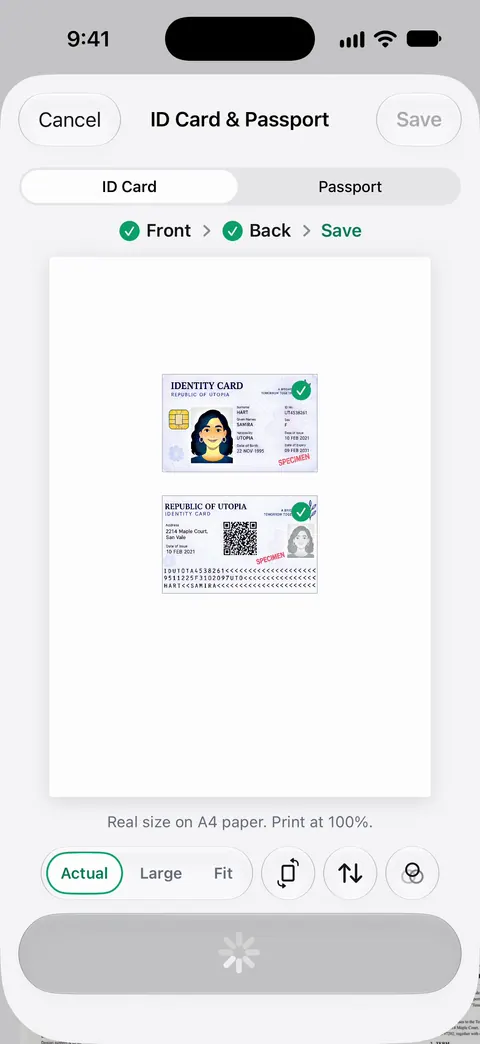
QR codes and barcodes are found on every page. That helps with a paper ticket or a printed booking that carries a code. You can lock the app with Face ID. Documents stay on your iPhone unless you share them or turn on iCloud Sync.
Before you book. Needs You gathers bills due, return windows and IDs about to expire on Home, from your own papers. So a passport close to expiring shows up before you buy the ticket.
What it doesn’t do: it doesn’t replace your passport or ID, it isn’t a boarding pass, and it doesn’t add anything to Apple Wallet. On a free account, pages you share, print or export carry a small “Scanned with Scanner One” label at the bottom right. Pro removes it.
Questions and answers
Can I use a photo of my passport or ID at the airport?
No. TSA lists the IDs it accepts, such as a REAL ID license, a passport or a passport card, and a photo or scan is not one of them. TSA is testing some digital IDs, including mobile driver’s licenses from approved states and Apple’s Digital ID, so check its page before relying on one.
Should I keep a digital copy of my passport when I travel?
Yes, as a backup. A scan of the photo page makes reporting a lost passport and applying for a replacement much faster. Keep it locked on your phone and in one place off the phone, such as iCloud or with someone at home.
What if I forget my ID at home?
TSA has a paid identity check called TSA ConfirmID for travelers without an acceptable ID; if TSA cannot confirm who you are, you won’t get through. See TSA’s identification page for the current details. It’s far easier to check your bag tonight.
Is it safe to email myself a copy of my passport?
It’s better than nothing, but email is a common target. A locked note, a password-protected PDF, or an app locked with Face ID is safer. Our guide on whether to email a copy of your passport covers the trade-offs.
Sources
What this page says about Scanner One was checked against the app on .
- TSA, Identification — the list of accepted IDs, REAL ID since May 7, 2025, IDs up to two years past expiration, mobile driver’s licenses from approved states, TSA ConfirmID if you forget your ID; no date shown, read 2026-11-13
- Apple iPhone User Guide, Set up cards and passes in Wallet on iPhone — boarding passes added from confirmation emails or apps, shown on the Lock Screen near departure; government IDs in Wallet; iOS 27 guide, undated, read 2026-11-13
- Apple Support, Scan documents on your iPhone or iPad (article 108963) — the Notes and Files scanning steps; published 2026-02-13
- Apple iPhone User Guide, Lock your notes on iPhone — locking a note with the device passcode or a custom password, and Face ID; iOS 27 guide, undated, read 2026-11-13
- Apple iPhone User Guide, Transfer files from iPhone to a storage device, a server, or the cloud — Keep Downloaded keeps a file on the iPhone for offline use; iOS 27 guide, undated, read 2026-11-13
- CBP, Know before you go — U.S. citizens abroad must meet each country’s document requirements; last modified 2025-06-10
- Scanner One on the App Store — the app’s own listing, for the closing section
Get Scanner One
Scanner One is free, with generous limits: scanning, clean PDFs and text search never stop.

Scanner OneScan, sign and ask anything
Scanner One is free, with generous limits: scanning, clean PDFs and text search never stop.