
Guide
Send your accountant everything in one clean PDF
Ask your accountant how they want files: most have a secure client portal. Scan each paper, name it plainly ("2026 W-2 Acme"), and merge them into one PDF in the order of their checklist, income first, then deductions. Check every page is readable, then upload it to the portal. If they only take email, lock the PDF with a password in Preview and tell them the password by phone.

This page is general information, not tax advice. What your return needs depends on your situation and the year’s rules: ask your accountant, and check IRS.gov for current guidance.
Tax season with an accountant usually goes one of two ways: a tidy package they can work through in an hour, or a trickle of photos and “oh, one more” emails. This guide is about the package: scanning, ordering, naming and sending it from an iPhone. For which papers to gather, use the tax documents checklist, or the freelancer tax checklist if you’re self-employed.
Ask two questions first
Before you scan anything, ask your accountant:
- How do you want files? Many firms have a secure client portal. IRS guidance for tax professionals tells them to use secure file transfer or password-protected, encrypted files rather than plain email, so a portal is often what they’d prefer anyway.
- What do you want them called, and in what order? Some firms send a checklist or organizer. If they do, follow its order: it’s how they’ll work through your papers.
Gather everything in one place first
Scanning goes faster when the papers are sorted before you start. Use the table, a few envelopes, or piles:
| Pile | Typical papers |
|---|---|
| Income | W-2s, 1099s, brokerage statements, K-1s, rental income |
| Deductions and credits | Mortgage interest (1098), property tax, charitable receipts, childcare, education (1098-T) |
| Health | 1095 forms, HSA statements |
| Business, if any | Income summary, expense receipts, mileage log |
| Letters | Anything from the IRS or state tax agency this year |
| Last year | Last year’s return, if this is a new accountant |
When a form is missing, most can be downloaded from the issuer’s website or your online account with them. Download the PDF rather than scanning a printout: it’s sharper and smaller.
Scan in order, one pile at a time
- Open Files, make a folder like “Taxes 2026”, and open it.
- Tap the More button, then Scan Documents.
- Scan one pile in one session, in order. In Auto mode iPhone captures each page by itself; or tap the shutter, fit the corners and tap Keep Scan.
- Tap Done, then Save. You now have one PDF for that pile.
- Repeat for the next pile.
Scan both sides when the back has anything on it. Brokerage statements often put the totals on a later page, so include all of them. Receipts fade: if you have a lot, the receipts for taxes guide has tips.
Name files so they explain themselves
Your accountant sees the file name before anything else. A good pattern is year, what it is, and who issued it:
- “2026 W-2 Acme Corp”
- “2026 1099-INT Main Street Bank”
- “2026 Deductions charitable receipts”
- “2026 IRS letter CP2000”
More on this in naming scanned documents.
Merge into one clean PDF, or a few
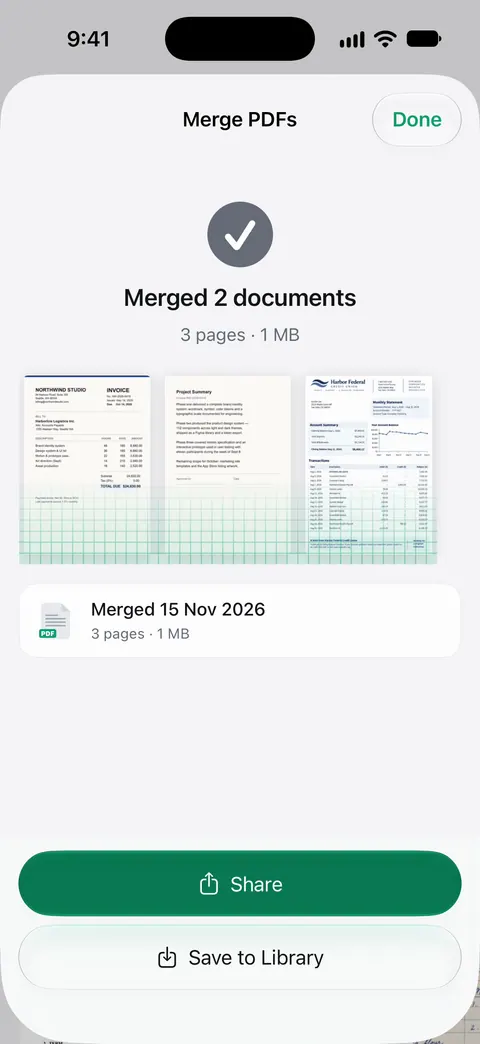
If your accountant wants one file, combine the piles in the order of their checklist: income first, then deductions, then everything else. The merge PDFs guide shows how on iPhone. If they’re happy with several, one PDF per pile is easier for both of you to search.
Then check the result:
- Every page is the right way up.
- The smallest numbers, like account numbers and box amounts, are readable when you zoom in.
- No page is in twice, and none is missing.
- Pages that don’t belong (a coupon, an ad insert, a blank back) are gone.
Send it safely
Through their portal. Sign in on the firm’s website or app, choose upload, then Choose Files or Browse, and pick your PDFs from the folder. The upload guide covers the iPhone upload menu.
By email, if that’s all they take:
- Open the PDF in Preview, tap the Actions Menu button, tap Duplicate to keep an unlocked copy.
- Tap the Actions Menu button again, tap Lock, enter the same password in Password and Verify, and tap Done.
- Attach the locked copy in Mail and send it. If it’s too big, Mail offers Mail Drop, which handles attachments up to 5 GB; the link lasts 30 days.
- Tell your accountant the password by phone, never in the same email.
For more on this, see sending documents securely.
Keep your own set
Keep the folder exactly as you sent it, plus your accountant’s confirmation. If a corrected form arrives in March, scan it, name it “corrected”, and send just that file with a short note. Keep the paper originals until your return is accepted, and then as long as your accountant advises; how long to keep tax records has the general rules. If you need to do all of this in a hurry, tax season papers in one evening is the fast version.
Where Scanner One helps, and where it doesn’t
The Files app scanner, Preview and your accountant’s portal are enough for a tidy package. Plenty of people do it that way every year.
Scanner One helps with the sorting and the last step. Then it reads the text, names the document, tags it and puts it in the right folder. Free accounts get smart filing for 10 documents a month. The PDF tools merge, split, compress, password-protect, add page numbers and watermarks, and extract text. So you can merge each pile and lock a copy for email in the same app.
Search looks inside the text of every document and shows the matching line and page. That helps when your accountant asks “what was the total on the 1099-DIV?” in April.
The limits, plainly:
- Free accounts can run the PDF tools and the Word, Excel and CSV exports 3 times a week, from one shared allowance. Pro removes every limit.
- On a free account, pages you share, print or export carry a small “Scanned with Scanner One” label at the bottom right. Pro removes it. Most accountants won’t mind, but it’s on every page you send.
- It doesn’t tell you which forms your return needs, and it isn’t tax software.
Seeing what’s missing. Packs: say what you’re applying for, like a visa, a lease or your taxes, and see which papers you have and what’s missing. Start a Pack for your taxes and it shows which papers you already have.
More tax and money checklists are in Checklists.
Questions and answers
Should I send my accountant one PDF or separate files?
Ask, but one PDF per category usually works best: one for income forms, one for deductions, one for anything else. A single huge file is hard to search, and fifty loose photos are hard to keep track of.
Is it OK to email tax documents to my accountant?
A secure client portal is better. IRS guidance for tax professionals tells them to use password-protected, encrypted files or secure file transfer rather than plain email. If email is the only option, lock the PDF and share the password by phone.
Can I send photos of my tax forms instead of scans?
Most accountants accept them, but scans are easier to read: cropped, straight and in one file. A blurry photo of a 1099 can mean a phone call to check a number.
Do I need to keep the paper originals after I send scans?
Keep them, at least until your return is filed and accepted,, and then for as long as your accountant advises.
Sources
What this page says about Scanner One was checked against the app on .
- IRS Publication 4557, Safeguarding Taxpayer Data (Rev. 6-2024) — tax professionals should encrypt sensitive files and emails, send only password-protected and encrypted documents by email, or use secure file transfer instead of email
- iPhone User Guide, Lock PDFs in Preview on iPhone — Actions Menu, Lock, Password and Verify; Duplicate to keep an unlocked copy; undated guide page, read 2026-11-13
- Apple Support, Scan documents on your iPhone or iPad (article 108963) — scanning steps in Files and Notes; published 2026-02-13
- Apple Support, Mail Drop limits (article 108329) — attachments up to 5 GB with Mail Drop; recipients have 30 days to download; published 2025-03-18
- Scanner One on the App Store — the app’s own listing: merge, password-protect, smart filing
Get Scanner One
Scanner One is free, with generous limits: scanning, clean PDFs and text search never stop.

Scanner OneScan, sign and ask anything
Scanner One is free, with generous limits: scanning, clean PDFs and text search never stop.