
Comparison
The best scanner apps for a small business
For one person filing invoices and receipts, a scanner that saves PDFs to a shared folder is enough. Genius Scan offers team licenses, from $40 to $20 per license a year, with settings you can enforce. Expensify reads receipts and runs expense approvals. Google Drive scans straight into Drive, Adobe Scan into Adobe Document Cloud. TurboScan Pro is $12.99 once with a Data Not Collected label. Scanner One, our app, reads and files each document on the phone, with auto-export in Pro.

Scanner One is our app and is one of the options below, with its limits stated. Facts about other apps come from their own App Store pages and developer sites, read on November 13, 2026. Nothing here is tax or legal advice.
What a small business needs from a scanner
A shop, a practice or a one-person studio scans the same few things: invoices, receipts, contracts, delivery notes, IDs for onboarding. What matters more than scan quality, which is good in every app here:
- Where the files land. A shared folder your bookkeeper can open beats PDFs stuck on one phone.
- Who can scan. One owner, or a few staff on their own phones.
- What the records are for. Taxes and audits want a readable copy, kept for the right number of years. See small business records to keep.
- Cost per person, since a subscription multiplies with every employee.
Small business scanner apps compared
Checked on November 13, 2026, on the US App Store and developer sites.
| App | Best for | Team features, per the developer | Price (US) | Where scans go | Data used to track you |
|---|---|---|---|---|---|
| Genius Scan | A few staff scanning | Teams: central licenses, enforced settings; MDM controls | Basic free; Ultra $39.99 a year; Teams $40 to $20 per license a year | Phone, or exports and Genius Cloud in Ultra | None |
| Expensify | Expense approvals | Approvals and reimbursements | Monthly Subscription $4.99 listed | Expensify | None; Financial Info and Location linked to you |
| Google Drive | Teams on Google | Scans upload into Drive | Free; storage plans from $1.99 listed | Google Drive | None; ten categories linked to you |
| Adobe Scan | Teams on Acrobat | Subscriptions shared with Reader and Acrobat on the web | Free; subscriptions $3.99 to $69.99 listed | Adobe Document Cloud | Identifiers |
| TurboScan Pro | One price, no data | Not described | $12.99 once | Phone and iCloud Drive | Data Not Collected |
| Scanner One (ours) | One owner, many papers | Not described | $4.99 a month, $29.99 a year, $59.99 once | Documents stay on your iPhone unless you share them or turn on iCloud Sync. | No account, no tracking |
Each app, honestly
Genius Scan: built for small teams
The Grizzly Labs’ pricing page lists Genius Scan for Teams: everything in Ultra plus centralized license management, volume discounts and the ability to enforce user settings, from $40 to $20 per license a year. Its App Store version notes mention MDM controls for turning off Genius Renaming and Genius Cloud sync. Ultra on its own adds OCR, auto-export to Box, Dropbox, Google Drive, OneDrive and others, and expense reports. Basic is free, with no document limit and no watermark. The label lists nothing used to track you.
Pick it if several people scan and you want one bill and one set of rules.
Expensify: when expenses need approval
Expensify’s description says SmartScan extracts the details from a photo of a receipt, and that the app handles distance tracking, approvals and reimbursements. A Monthly Subscription is listed at $4.99. Its label lists Financial Info, Location and more as linked to you, and the page says it may use your location even when it isn’t open. Pick it if staff submit expenses. Our receipt scanner comparison goes deeper.
Google Drive: scan into the shared folder
Google Drive’s description says it can scan and upload paper documents with the camera, straight into Drive. If your business runs on Google, that puts the scan where your team already looks. Storage plans start at $1.99 in its in-app purchase list. Its label lists ten categories of data linked to you, including Location and Contacts, and none used to track you.
Adobe Scan: for Acrobat offices
Adobe Scan is free; its description says scans save to Adobe Document Cloud automatically and that subscriptions work across Scan, Reader and Acrobat on the web. Pick it if your contracts already live in Acrobat.
TurboScan Pro: one price per phone
A $12.99 paid app with no in-app purchases and a Data Not Collected label. Its description lists folders, smart search, Face ID lock and iCloud Drive backup. It doesn’t describe team features. Pick it for a few staff phones without another subscription.
Scanner One: one owner, every paper read and filed
Then it reads the text, names the document, tags it and puts it in the right folder. Text recognition runs on every page for everyone, free or Pro. Scanner One exports to Word, keeping headings, lists and tables, and to Excel and CSV. Redaction is permanent. Pro adds redaction, the smart eraser, edit text, auto-export and five alternate app icons.
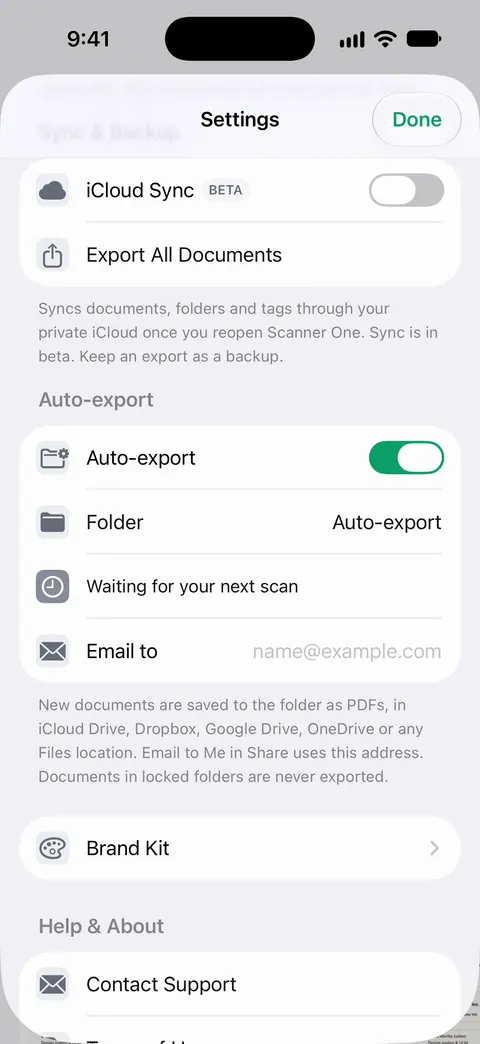
Folders can be shared through iCloud. Joining is free; sharing is part of Pro.
Pick this if
- Several staff scan: Genius Scan for Teams.
- Staff claim expenses: Expensify.
- Your files live in Google Drive: Drive’s own scanner.
- You want one price and no data collected: TurboScan Pro.
- You run the paperwork yourself and want it searchable: Scanner One.
Where Scanner One helps, and where it doesn’t
Where it helps a business owner: Search looks inside the text of every document and shows the matching line and page. Ask your documents anything. When does the lease end? What did I spend at the shop? The answer comes back with the page it came from. The PDF tools merge, split, compress, password-protect, add page numbers and watermarks, and extract text. Redaction is permanent. Scanner One needs no account and does no tracking.
Where it doesn’t: it has no team licenses or admin controls, so Genius Scan for Teams fits a staff of scanners better. On a free account, pages you share, print or export carry a small “Scanned with Scanner One” label at the bottom right. Pro removes it. That label would appear on invoices and documents you send to clients from a free account. Free accounts can run the PDF tools and the Word, Excel and CSV exports 3 times a week, from one shared allowance. Scanner One runs on iPhone and iPad. If you scan into Google Drive or OneDrive all day, their own scanners put files there directly.
Questions and answers
What scanner app works for a team?
Genius Scan’s pricing page lists Genius Scan for Teams: everything in Ultra, centralized license management, volume discounts and enforced user settings, from $40 to $20 per license a year. Its version notes also mention MDM controls.
Can scans go straight to a shared folder?
Google Drive’s scanner uploads scans into Drive, and Adobe Scan saves to Adobe Document Cloud. Genius Scan Ultra and Scanner Pro Plus auto-export to services like Dropbox, Google Drive and OneDrive. In Scanner One, auto-export is a Pro feature.
Do I need an expense app or a scanner?
If you only keep receipts and invoices, a scanner is enough. If employees submit expenses that someone approves and reimburses, an expense app such as Expensify is built for that.
How long should a business keep scanned records?
It depends on the record and your tax authority. Our guide to how long to keep business records links the official pages; this page doesn’t give tax advice.
Sources
What this page says about Scanner One was checked against the app on .
- The Grizzly Labs, Genius Scan pricing — Ultra $39.99 a year; Teams from $40 to $20 per license per year; read 2026-11-13
- Genius Scan on the App Store — MDM controls in version notes, privacy label; read 2026-11-13
- Expensify on the App Store — SmartScan, approvals, reimbursements, in-app purchase, privacy label; read 2026-11-13
- Google Drive on the App Store — scan and upload with the camera, storage plans, privacy label; read 2026-11-13
- TurboScan Pro on the App Store — $12.99 paid app, Data Not Collected; read 2026-11-13
- Scanner One on the App Store — the app’s own listing
Get Scanner One
Scanner One is free, with generous limits: scanning, clean PDFs and text search never stop.

Scanner OneScan, sign and ask anything
Scanner One is free, with generous limits: scanning, clean PDFs and text search never stop.