
Comparison
The best receipt scanner apps for iPhone
For a few receipts kept for returns or warranties, Notes or Files is enough: scan, save as a PDF, done. If you file expenses for work, Expensify reads the details from each receipt and builds reports. Genius Scan Ultra makes expense reports too, TurboScan puts several receipts on one page with a Data Not Collected label, Adobe Scan finds receipts already in your photos, and Scanner One, our app, has a Receipt filter and lets you ask what you spent.

Scanner One is our app. It is one of six options below, with its limits stated. Facts about other apps come from their own App Store pages and developer sites, read on November 13, 2026.
Two very different receipt jobs
“Receipt scanner” covers two jobs, and the best app depends on which is yours.
- Keeping receipts: proof of purchase for returns, warranties, insurance or taxes. You need a readable copy you can find later. A scanner does this.
- Filing expenses: you need the merchant, date and total pulled out, put in a report and sent to someone who pays you back. An expense app does this.
If you are not sure, you probably need the first. Our guides on scanning receipts and how long to keep receipts cover the keeping side.
Receipt apps compared
Checked on November 13, 2026, on the US App Store and developer sites.
| App | Best for | What it does with a receipt, per the developer | Price model | Data used to track you |
|---|---|---|---|---|
| Notes, Files (Apple) | Keeping a few | Scans to PDF; flash and image filters in iOS 26 | Built into iOS | Part of iOS |
| Expensify | Filing work expenses | SmartScan extracts the details; reports, approvals, reimbursement | Free download; Monthly Subscription $4.99 listed | None; Financial Info and Location are linked to you |
| Genius Scan | Expense reports from scans | Ultra scans receipts into an automatic expense report and exports to Expensify | Free Basic; Ultra $39.99 a year | None |
| TurboScan | Many small receipts | Arranges several receipts or cards on one PDF page | Free with one $14.99 purchase; Pro $12.99 | Data Not Collected |
| Adobe Scan | Receipts already in Photos | Finds documents and receipts in your photo library and turns them into PDFs | Free, subscriptions | Identifiers |
| Scanner One (ours) | Keeping and finding them | Scans come with Auto Clean, Color, Grayscale and Receipt filters. | Pro comes monthly, yearly with a free week, or once for life. | No account, no tracking |
Each app, honestly
Notes and Files: for the shoebox
Open Notes, tap the Attachment button, then Scan Documents. Apple says that in iOS 26 you can choose flash or an image filter while scanning; for a faint thermal receipt, a black and white filter usually reads best. Tap Done, and the scan is a PDF in the note. In Files, scan from the More button and save into a “Receipts” folder.
That is enough for a few receipts a month. It won’t read totals or sort by month for you.
Expensify: when someone reimburses you
Expensify’s description says SmartScan extracts the details from a photo of any receipt, and that the app also handles distance tracking, approvals and reimbursements. The App Store lists a Monthly Subscription at $4.99. Its privacy label lists Financial Info, Location, Contact Info and more as data linked to you, and the page says it may use your location even when it isn’t open.
Pick it if your employer or clients use it, or you file expenses every month. If your expense report is due tomorrow, see what to do tonight.
Genius Scan: scanner first, reports as an add-on
Genius Scan’s help center lists Expense Reporting, which scans receipts and generates an automatic expense report, among its Ultra features on iOS, along with export to Expensify. Ultra is $39.99 a year; the free Basic plan scans receipts without a document limit or watermark but without the report.
Pick it if you want one scanner for everything, with reports when you need them.
TurboScan: several receipts per page
TurboScan’s description lists arranging multiple receipts or cards on a single PDF page, which saves paper if you print them and pages if you send them. Its label says Data Not Collected. The free app lists one purchase, TurboScan Premium at $14.99; TurboScan Pro is a separate $12.99 paid app.
Pick it for small receipts in bulk and the shortest privacy label.
Adobe Scan: rescue the ones you photographed
If you already snapped receipts with the Camera, Adobe Scan’s description says its smart library finds documents and receipts in your photo library and turns them into PDFs. Scans save to Adobe Document Cloud automatically. Pick it to clean up a camera roll full of receipts.
Scanner One: receipts you can ask about
Scans come with Auto Clean, Color, Grayscale and Receipt filters. Then it reads the text, names the document, tags it and puts it in the right folder. Ask your documents anything. When does the lease end? What did I spend at the shop? The answer comes back with the page it came from.
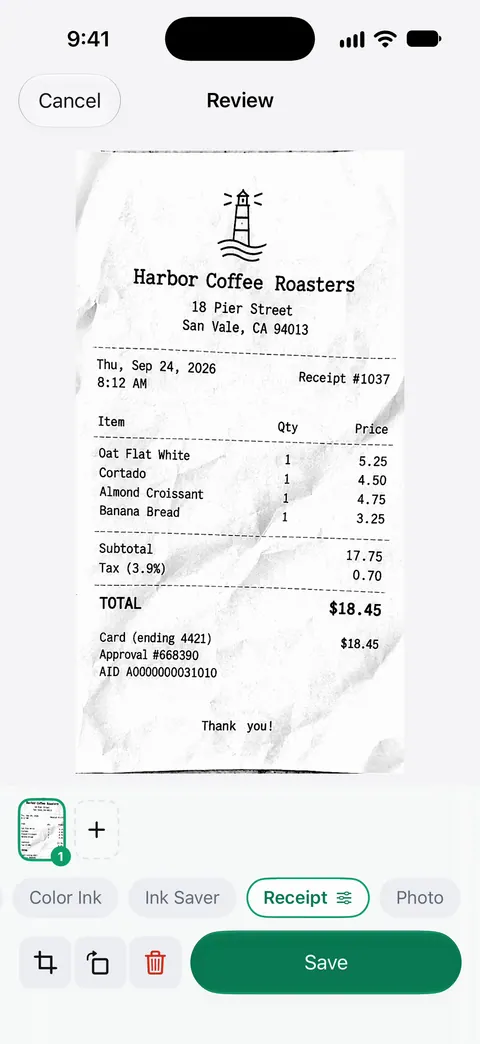
Keep receipts readable
- Scan soon. Thermal paper fades, especially in heat and sun. A scan the day you get it is the most readable one you will ever have.
- Flatten and light it evenly. Curled receipts and flash glare cause most unreadable scans.
- Name by date and shop, or let an app do it, so search finds them. See how to name scanned documents.
- For taxes, keep what your tax authority asks for and for as long as it asks. Our receipts for taxes guide links the official pages.
Where Scanner One helps, and where it doesn’t
Where it helps with receipts: Scans come with Auto Clean, Color, Grayscale and Receipt filters. Text recognition runs on every page for everyone, free or Pro. Search looks inside the text of every document and shows the matching line and page. Ask your documents anything. When does the lease end? What did I spend at the shop? The answer comes back with the page it came from. Free accounts get smart filing for 10 documents a month. Scanner One exports to Word, keeping headings, lists and tables, and to Excel and CSV.
Where it doesn’t: it is not an expense app. It doesn’t send reports for approval or reimburse anyone, so if that is your job, Expensify is built for it. Free accounts can ask the on-device AI 3 questions a day. Free accounts can run the PDF tools and the Word, Excel and CSV exports 3 times a week, from one shared allowance. On a free account, pages you share, print or export carry a small “Scanned with Scanner One” label at the bottom right. Pro removes it. So if you send receipts to an accountant from a free account, they will see that label. For a handful of receipts kept for returns, Notes is enough.
Questions and answers
Why do my receipt scans come out gray or faded?
Most till receipts are printed on thermal paper, which is faint to begin with. Scan in even light without flash glare, and use a black and white or receipt filter so the text stands out. In Scanner One: Scans come with Auto Clean, Color, Grayscale and Receipt filters.
Can a scanner app read the total and date from a receipt?
Expensify’s description says its SmartScan extracts the details from a photo of a receipt. In Scanner One: Ask your documents anything. When does the lease end? What did I spend at the shop? The answer comes back with the page it came from.
Is Notes good enough for receipts?
For keeping a few receipts, yes. In iOS 26 you can pick flash or an image filter while scanning in Notes or Files, and the result is a PDF. What Notes won’t do is total your expenses or file them by month for you.
Which receipt app keeps my data private?
TurboScan’s privacy label, read on November 13, 2026, says Data Not Collected. Expensify’s label lists Financial Info and Location among data linked to you, and its App Store page says it may use your location even when it isn’t open.
Sources
What this page says about Scanner One was checked against the app on .
- Expensify on the App Store — SmartScan, in-app purchase, privacy label, location use; read 2026-11-13
- Genius Scan Help Center, Plan Details & Comparison — Expense Reporting and Expensify export as Ultra features; no date on the page
- TurboScan on the App Store — several receipts on one PDF page, Data Not Collected; read 2026-11-13
- Adobe Scan on the App Store — finds receipts in your photo library; read 2026-11-13
- Apple Support, How to scan documents on your iPhone or iPad — Notes and Files scanning, flash and image filters in iOS 26; page published 2026-02-13
- Scanner One on the App Store — the app’s own listing
Get Scanner One
Scanner One is free, with generous limits: scanning, clean PDFs and text search never stop.

Scanner OneScan, sign and ask anything
Scanner One is free, with generous limits: scanning, clean PDFs and text search never stop.