
Comparison
Phone, flatbed or sheet-fed: which scanner do you need?
For everyday papers, a phone is enough: the iPhone 17's 24MP photos hold more pixels than the 300 dpi the Library of Congress suggests for documents, and USCIS accepts a scan or a photo of each document. Buy a flatbed if you scan photos to enlarge, fragile papers or anything that must be perfectly flat and evenly lit. Buy a sheet-fed scanner if you have hundreds of loose pages: Ricoh rates the ScanSnap iX1600 at 40 pages a minute, both sides.

This page compares methods, not apps: your phone against the two kinds of desktop scanner. For the resolution math in detail, see what DPI is a phone scan.
The short version
| Phone and a scanner app | Flatbed scanner | Sheet-fed scanner | |
|---|---|---|---|
| Example from the maker’s page | iPhone 17: 48MP Fusion Main camera, photos at 24MP or 48MP | Epson Perfection V39II: 4800 x 4800 dpi optical, A4 and Letter | Ricoh ScanSnap iX1600: 600 dpi optical, 40 pages a minute, both sides |
| Best at | A few pages, anywhere, sent right away | Photos, fragile papers, perfect light | Piles of loose pages |
| Speed | One page at a time, by hand | One page at a time, on the glass | 50-sheet feeder |
| Light | Whatever the room gives you | Even, built in | Even, built in |
| Fragile or bound originals | Gentle: nothing touches the page | Lid can crush oversized papers; use a copy stand for books | Not for fragile papers; photos need carrier sheets |
| Already own one | Yes | Usually not | Usually not |
Resolution: the phone is not the weak spot
People ask whether a phone is “as good as a scanner” because scanners advertise huge numbers. The Epson V39II lists 4800 x 4800 dpi. But the number you need is much lower. The Library of Congress suggests 300 dpi for documents and for 4x6 or 5x7 photos, 400 or 600 dpi to enlarge a print to 8x10 or more, and around 1900 dpi only for slides.
Apple’s specs say the iPhone 17’s Main camera takes photos at 24MP or 48MP. A 24MP photo is about 5,700 pixels on its long side. Stretch that across an 11-inch letter-size page that fills the frame and you get roughly 500 pixels per inch, well above 300. A scanner app may save fewer pixels than the camera captures to keep files small, so the app’s export settings matter more than the camera.
So resolution is rarely what separates the two. Light, flatness and speed are.
Where a phone falls short
- Uneven light. A ceiling lamp and your own hand can cast shadows across the page. Our guide to the best light for scanning documents fixes most of it.
- Glare on glossy paper, laminated cards and photos.
- Perspective. Unless you hold the phone square, the page comes out as a trapezoid. Scanner apps correct this, which is most of what makes a scan look like a scan. We explain the difference in scan vs photo of a document.
- Volume. Fifty pages by hand is tiring; five hundred is a weekend.
Where a flatbed wins
A flatbed presses the original against glass under its own light, so every scan is flat, sharp and evenly lit. That makes it the right tool for:
- Photos you want to reprint or enlarge, where 400 to 600 dpi and true color matter. See our honest picks for scanning old photos.
- Glossy or textured originals that reflect a phone’s light.
- Fragile papers that fit the glass. The National Archives cautions that the lid can crush and crease an original that doesn’t fit, and recommends a copy stand with supports rather than a flatbed for books.
A flatbed is slow for stacks, and it needs a computer and a place on the desk.
Where a sheet-fed scanner wins
A sheet-fed (document) scanner pulls paper through rollers and scans both sides at once. Ricoh rates the ScanSnap iX1600 at 40 pages a minute in color at 300 dpi, simplex or duplex, with a 50-sheet feeder. For clearing a filing cabinet, it is by far the fastest of the three; our guide to digitizing a filing cabinet covers the planning.
The trade-off is what it can’t take. The National Archives says automatic feeders aren’t suitable for fragile, weak, bent or valuable papers, which can jam and tear. Ricoh’s own page sends photos and odd sizes through carrier sheets sold separately, and limits cards to 0.76 mm thick.
Which one do you need?
- A few documents a week to send or keep: your phone.
- An official upload: your phone is accepted by USCIS, which says to use a scanner or photograph each document, as a clear PDF or JPG.
- Family photos to enlarge or restore: a flatbed.
- A book or bound record: a phone held square, or a copy stand. See scan a book without the curve.
- Boxes of loose paper: a sheet-fed scanner, or a scanning service.
Many people end up with a phone for daily papers and borrow or rent a desktop scanner for the one big project.
Where Scanner One helps, and where it doesn’t
Scanner One is our app, and it is a phone scanner, so it sits in the first column. Where it helps: Scanner One finds the edges of the page automatically and corrects the perspective. That handles the perspective problem above. Scans come with Auto Clean, Color, Grayscale and Receipt filters. Book spreads are split into two pages and curved lines are flattened. Text recognition runs on every page for everyone, free or Pro. So a phone scan becomes a searchable PDF without a computer.
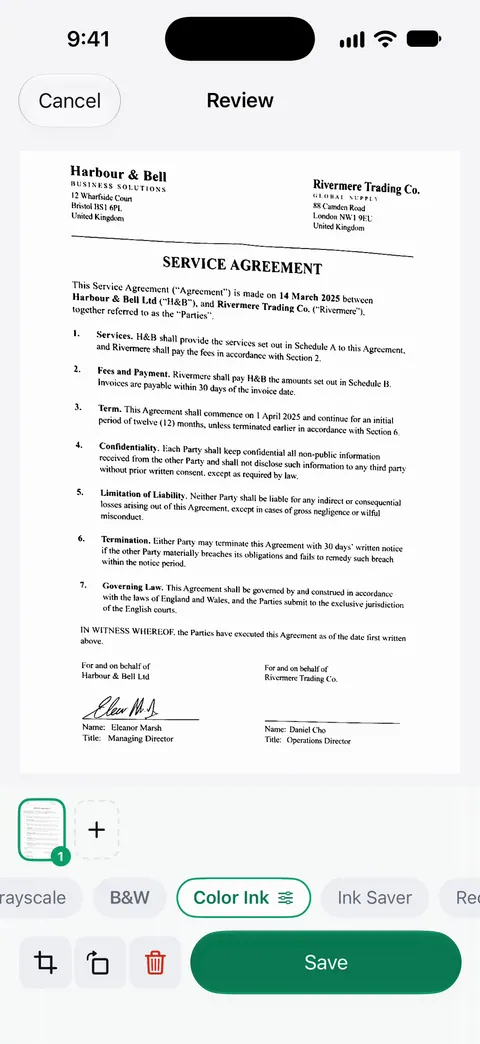
Where it doesn’t: it can’t give you a flatbed’s even light or a sheet-feeder’s speed, and it makes no claim about the resolution it saves at. For photos to enlarge or a cabinet of paper, a desktop scanner is the better tool. On a free account, pages you share, print or export carry a small “Scanned with Scanner One” label at the bottom right. Pro removes it. Scanner One runs on iPhone and iPad.
Questions and answers
Is an iPhone scan as good as a scanner?
For reading, sending and filing ordinary documents, yes in most cases: the camera captures more detail than the 300 dpi usually suggested for documents. A flatbed is still better for photos you want to enlarge, for fragile or glossy originals, and for perfectly even light.
Do I need a scanner for USCIS or other official uploads?
Not for USCIS. Its tips page says to use a scanner or photograph each document, with files as PDF, JPG or JPEG up to 12MB, every image clear and all text readable. Other agencies set their own rules, so check their upload page.
What DPI is a phone scan?
A phone has no fixed DPI: it depends on how many pixels the app saves and how big the page is. A 24MP photo of a letter-size page that fills the frame works out to roughly 450 to 500 pixels per inch. Our guide on what DPI a phone scan is explains the math.
Is a sheet-fed scanner worth it?
If you have a filing cabinet to clear, often yes. Ricoh rates the ScanSnap iX1600 at 40 pages a minute on both sides with a 50-sheet feeder. For a few pages a week, a phone is quicker to reach for.
Sources
What this page says about Scanner One was checked against the app on .
- Apple, iPhone 17 Tech Specs — 48MP Fusion Main camera, photos at 24MP and 48MP, 48MP macro photography; read 2026-11-13
- Library of Congress, Scanning Your Personal Collections (Personal Digital Archiving series) — 300 dpi for documents and 4x6 or 5x7 photos, 400 or 600 dpi to enlarge, about 1900 dpi for slides; undated handout
- National Archives, Digitizing Family Papers and Photographs — flatbed lids can crush papers that don’t fit, copy stands for books, automatic feeders unsuitable for fragile papers; last reviewed May 26, 2021
- Epson Australia, Perfection V39II specifications — flatbed, 4800 x 4800 dpi optical, A4 and Letter, USB bus power; read 2026-11-13
- Ricoh, ScanSnap iX1600 specifications — 40 ppm simplex or duplex at 300 dpi, 600 dpi optical, 50-sheet feeder, carrier sheets for photos; read 2026-11-13
- USCIS, Tips for Filing Forms Online — use a scanner or photograph each document; PDF, JPG or JPEG up to 12MB; last reviewed October 7, 2026
- Scanner One on the App Store — the app’s own listing
Get Scanner One
Scanner One is free, with generous limits: scanning, clean PDFs and text search never stop.

Scanner OneScan, sign and ask anything
Scanner One is free, with generous limits: scanning, clean PDFs and text search never stop.