
Comparison
Scanner One vs vFlat for scanning books
vFlat Scan is built for books: its App Store page lists AI curve correction, finger removal, auto-capture as you turn pages and splitting a spread into two pages, and it runs on iOS and Android. Its text recognition is sold in page packs beside the subscriptions. Scanner One also splits book spreads and flattens curved lines, reads text on the device in 29 languages for everyone, and keeps scans on the phone. Pick vFlat for long books you scan in one sitting; Scanner One if books are one job among many.

Scanner One is our app. Facts about vFlat come from its US App Store page and vflat.com, read on November 13, 2026.
This page is a head-to-head for people who already know vFlat and want to know how Scanner One compares for books. For a wider field of book scanners, see the best app to scan books.
The short answer
vFlat is a specialist. Everything on its App Store page is about getting many book pages into a clean file fast: curve correction for thick books, fingers erased from the shot, automatic capture when you turn the page, and splitting a spread into two ordered pages. If you scan whole textbooks, sheet music books or old family books in long sessions, that focus shows.
Scanner One is a general scanner and PDF app that also handles books. Book spreads are split into two pages and curved lines are flattened. It doesn’t promise vFlat’s capture speed, but text recognition, search, read-aloud and PDF tools are in the same app, and documents stay on your iPhone.
What vFlat says it does
From vFlat’s App Store description:
- Curve correction. AI curve correction flattens curved pages of thick books, manuals and sheet music, with the spine intact and no cutting.
- Finger removal. It removes your fingers from the scan when you hold a book open.
- Auto-capture. It captures when you hold still or turn the page; the listing says 100+ pages in minutes.
- Two-page spreads. It captures both open pages at once, then splits and saves each page separately.
- Text and export. It converts scans to editable, searchable text and exports PDF, JPG or TXT, with sharing to iCloud, Google Drive, Dropbox and email.
vFlat’s website adds that text recognition covers 100+ languages and that the app is free to start on iOS and Android.
What Scanner One does with a book
- Open the book on a table in even light, and tap Scan Now.
- Frame both pages. Scanner One finds the edges of the page automatically and corrects the perspective.
- On the review screen, Scanner One offers to split the spread into two pages.
- Keep going: A scan can have many pages, and you can reorder them.
- Save. Text is read on every page as it saves.
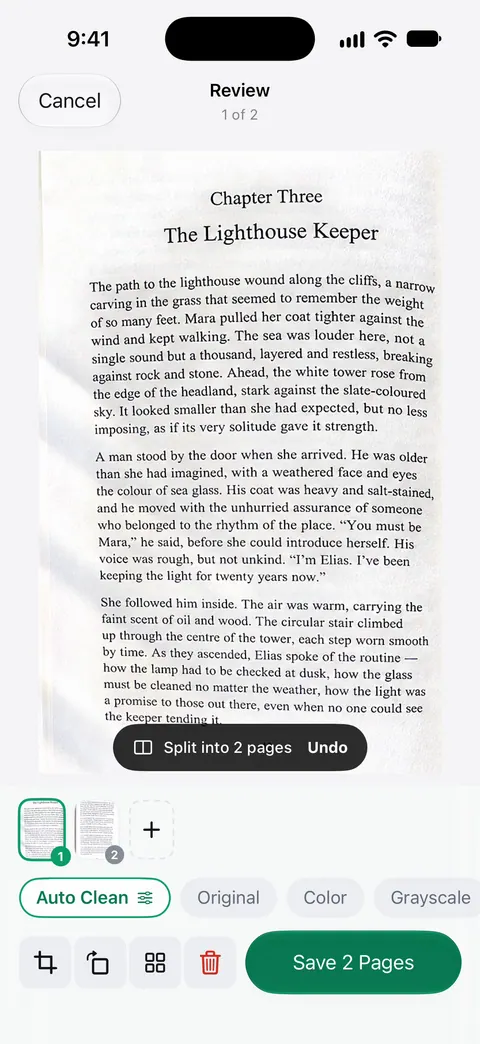
After that, the book is a normal document: Search looks inside the text of every document and shows the matching line and page. Listen reads any document aloud. The book scanning guide covers light, angle and holding the pages down, which matter more than any app.
Side by side, checked November 13, 2026
| vFlat Scan | Scanner One | |
|---|---|---|
| Price model | Free to start; subscriptions $3.99 to $4.99 a month, $4.99 a week, $35.90 to $39.99 a year | Free download. Pro at $4.99 a month, $29.99 a year or $59.99 once |
| Text recognition | Page packs: 1,000 for $5.90, 3,000 for $10.00, 10,000 for $20.00 | Text recognition runs on every page for everyone, free or Pro. |
| Free limits | Not stated on the App Store page | Scanner One is free, with generous limits: scanning, clean PDFs and text search never stop. |
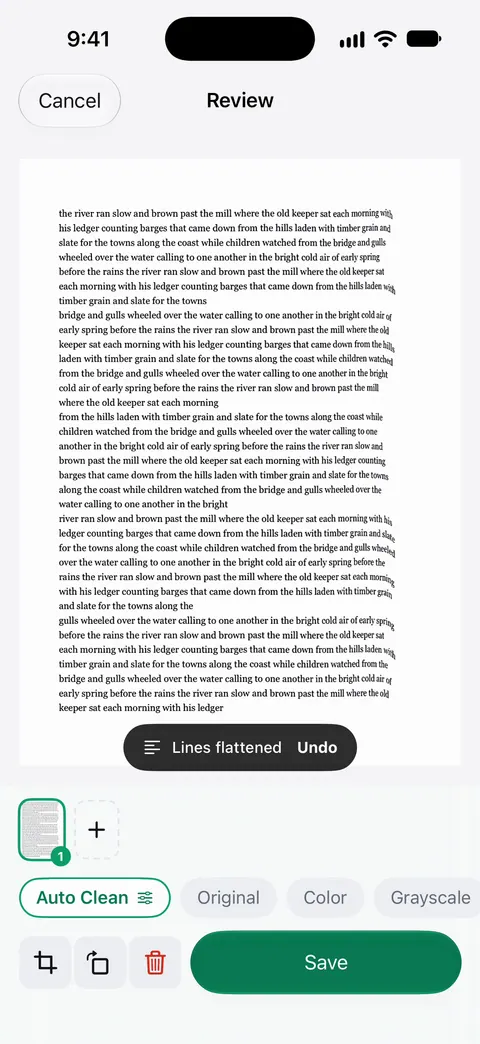
| Book tools | Curve correction, finger removal, page-turn auto-capture, spread splitting | Book spreads are split into two pages and curved lines are flattened. |
| Recognition languages | 100+, per vflat.com | 29 languages |
| Privacy label | Used to track you: Identifiers, Usage Data | No account, no tracking |
| Platforms | iPhone and iPad (iOS 17.2 or later), and Android | iPhone and iPad; iOS 17 or later |
| Export | PDF, JPG, TXT | PDF, Word, Excel, PowerPoint, JPG, PNG, text and more |
Speed versus everything after the scan
The deciding question is what happens after the pages are captured.
If you need a 300-page book in one evening and then you’re done, capture speed is everything. vFlat’s page-turn auto-capture and finger removal exist for exactly that, and Scanner One doesn’t list either.
If the book becomes something you read, search and quote from, the after matters more. In Scanner One, the recognized text feeds search across your whole Library, Listen reads chapters aloud, and the PDF tools split a long scan into chapters or compress it for email (The PDF tools merge, split, compress, password-protect, add page numbers and watermarks, and extract text.). You can also ask questions of it: Ask your documents anything. When does the lease end? What did I spend at the shop? The answer comes back with the page it came from.
Text recognition and price
Look closely at how each app charges for reading text, because for books it adds up.
vFlat’s in-app purchases list text recognition page packs next to its subscriptions: 1,000 pages for $5.90, 3,000 for $10.00 and 10,000 for $20.00. Its App Store page doesn’t say which plans include recognition, so check inside the app before a big project.
In Scanner One, Text recognition runs on every page for everyone, free or Pro. Where the free version stops: Free accounts can run the PDF tools and the Word, Excel and CSV exports 3 times a week, from one shared allowance. That allowance covers splitting a book into chapter PDFs or exporting it to Word, so a large book project on a free account may need Pro or patience.
Privacy, from the labels
vFlat’s App Store privacy label lists Identifiers and Usage Data as data used to track you, with Identifiers, Usage Data and Diagnostics listed for purposes including third-party advertising. Scanner One: Scanner One needs no account and does no tracking. Documents stay on your iPhone unless you share them or turn on iCloud Sync.
Neither matters much for a library book. It matters more if the book is a family diary or a notebook with personal details in it.
Before you pick either
The scanner in Notes or Files handles a flat page well and costs nothing. Apple’s steps: open a note, tap the Attachment button, then Scan Documents; in Auto mode each page scans when it is in view, and you tap Done at the end. It won’t split a spread or flatten a curve, so scan one page at a time and press the book flat. For a few pages from a cookbook, that is enough. For a single sheet of music, see scanning sheet music.
Which one to pick
- Whole books in long sessions: vFlat. Its capture tools are built for volume.
- You use Android too: vFlat; Scanner One is iPhone and iPad only.
- Books are one job among receipts, IDs and contracts: Scanner One.
- You want to search and listen to what you scanned: Scanner One, where recognition runs for free.
Where Scanner One helps, and where it doesn’t
Where it helps: Book spreads are split into two pages and curved lines are flattened. Text recognition runs on the device, in 29 languages. Scanner One makes searchable PDFs. Listen reads any document aloud. The same app scans receipts, IDs and contracts, and files them: Then it reads the text, names the document, tags it and puts it in the right folder.
Where it doesn’t:
- No finger removal or page-turn capture is listed for Scanner One. For long books that costs time.
- Platforms. Scanner One runs on iPhone and iPad. No Android or web version.
- Free caps and the label. Free accounts can run the PDF tools and the Word, Excel and CSV exports 3 times a week, from one shared allowance. On a free account, pages you share, print or export carry a small “Scanned with Scanner One” label at the bottom right. Pro removes it. Pro means no ads and no watermark.
- When the built-in scanner is enough. A few flat pages scan fine in Notes or Files.
Feature details are on book pages, and turning an old scanned PDF into searchable text is in make a scanned PDF searchable.
Questions and answers
Is vFlat free?
vFlat’s website says it is free to start on iOS and Android. Its US App Store page lists subscriptions from $3.99 a month to $39.99 a year and text recognition page packs (1,000 pages for $5.90). The App Store page doesn’t spell out what the free version limits.
Does Scanner One remove fingers from book scans like vFlat?
We don’t list finger removal as a Scanner One feature. What Scanner One does with books: Book spreads are split into two pages and curved lines are flattened. To keep fingers out, hold the book open at the edges or under a heavy object, as the book scanning guide shows.
Which app splits a two-page spread into separate pages?
Both. vFlat’s App Store page says it captures both open pages at once and saves each page separately. In Scanner One, Book spreads are split into two pages and curved lines are flattened.
Can I scan a book with the iPhone’s own scanner?
Yes, one page at a time. The Notes and Files scanner straightens a flat page but doesn’t split spreads or flatten a curved page, so scan each page on its own and press it as flat as you can.
Sources
What this page says about Scanner One was checked against the app on .
- vFlat Scan - PDF & OCR Scanner on the App Store — in-app purchases, privacy label, version 1.34.3, iOS 17.2 requirement, the book features and export formats; read 2026-11-13
- vFlat website — free to start on iOS and Android, text recognition in 100+ languages, the book scanning features; read 2026-11-13
- Apple Support, Scan documents on your iPhone or iPad (article 108963) — the Notes scanning steps and Auto mode; published 2026-02-13
- Scanner One on the App Store — the app’s own listing
Get Scanner One
Scanner One is free, with generous limits: scanning, clean PDFs and text search never stop.

Scanner OneScan, sign and ask anything
Scanner One is free, with generous limits: scanning, clean PDFs and text search never stop.