
Who it’s for
Document organization for small landlords
Keep one folder per property with four sections: leases and disclosures, tenant applications and screening, money (rent, deposits, receipts) and repairs. Scan papers as they arrive and name them by property, unit and date. Keep repair and improvement receipts for taxes, keep signed lead disclosures for pre-1978 units for 3 years, and destroy screening reports securely when you are done with them, as the FTC’s Disposal Rule requires.

This page is about the landlord’s side of the paperwork: organizing it, keeping what the IRS and the EPA expect, and handling applicants’ private data. For what you may ask applicants for in the first place, see what a landlord can ask for.
The papers a small landlord deals with
- Leases, renewals and addenda, including pet, parking and lead disclosure addenda.
- Rental applications with pay stubs, bank statements, IDs and references.
- Screening reports: credit, eviction and background checks.
- Move-in and move-out inspection checklists with photos.
- Rent records: ledgers, deposit slips, payment app statements.
- Security deposit records: the receipt, any interest, and the itemized deductions at move-out.
- Repair invoices, supply receipts and contractor W-9s.
- Property papers: insurance policies, tax bills, mortgage statements and the closing documents.
- Notices you send and receive, and tenant letters.
A folder system that holds up
One folder per property, and inside it:
| Section | What goes in it |
|---|---|
| Leases and disclosures | Signed leases, renewals, addenda, lead disclosure, move-in checklist |
| Applications and screening | Applications, decisions, notices; reports only until you are done with them |
| Money | Rent records, deposit records, tax bills, insurance, mortgage statements |
| Repairs and improvements | Invoices and receipts, labeled repair or improvement |
Name each file by property, unit, document and date: “14 Oak Unit B, lease renewal, 2026-11-01”. When a tenant moves out, move their folder to a closed-tenancies folder rather than deleting it.
A workflow from paper to filed
- Scan as papers arrive. In Notes or Files, use Scan Documents and keep every page of one document in one PDF.
- Sign and return leases and notices in the Files app: tap a field to type, or tap Add Signature, sign with your finger and drag it into place.
- Label receipts as repair or improvement when you scan them. It decides how they are treated at tax time.
- File the same day, in the property’s folder.
- Once a year, clear out what has passed its period and destroy it properly.
What the IRS, EPA and FTC expect
Taxes. Publication 527 says to keep accurate records of repairs and improvements separately, because improvement costs are capitalized and used for depreciation and when you sell. A security deposit you plan to return is not income; any part you keep because the tenant broke the lease is income in the year you keep it. Car and travel expenses need records that follow Publication 463. The IRS’s general period is 3 years after you file, but records about the property itself stay until the period ends for the year you sell it. The guide to keeping home purchase documents explains why.
Lead paint, pre-1978 units. The EPA says landlords give tenants the lead pamphlet, disclose known lead paint and hazards with any reports, and include a Lead Warning Statement in the lease. Keep a signed copy of the disclosure for 3 years after the lease begins. Leases of 100 days or less and some other housing are exempt.
Screening reports. The FTC says that if you deny an application or set worse terms based even partly on a consumer report, you must give the applicant an adverse action notice. Once you are done with a report, the Disposal Rule says to destroy it securely: burn, pulverize or shred paper, and dispose of electronic files so they can’t be read or reconstructed. That includes scans of the report on your phone.
This page is general information, not legal or tax advice. Landlord-tenant law, deposit rules and fair housing record rules differ by state and city and change; check the official pages under Sources and your state’s housing agency.
Privacy points for applicants’ papers
- Collect only what you need and tell applicants how you will keep it.
- Redact before you share. If a co-owner or property manager only needs to see income, cover account numbers and Social Security numbers first. A black box drawn on a PDF is not redaction; redact a PDF properly shows the difference. Our redact an image tool works on pictures in your browser.
- Delete rejected applicants’ screening reports when you are done with them, from the phone, the cloud and your email.
The mistakes that cost time
- Receipts in a shoebox until April, half of them faded.
- Repairs and improvements mixed, so every receipt has to be sorted again at tax time.
- No move-in record, which makes a deposit dispute your word against the tenant’s. Getting your deposit back shows what tenants keep; keep the same.
- The old lease version signed. Read the lease renewal checklist before renewals.
Where Scanner One helps, and where it doesn’t
Point your camera at any piece of paper. Scanner One finds the edges, straightens the page, cleans it up and saves a real PDF. Then it reads the text, names the document, tags it and puts it in the right folder. Search looks inside the text of every document and shows the matching line and page. That is how you find the lease clause about pets or the plumber’s invoice from last spring.
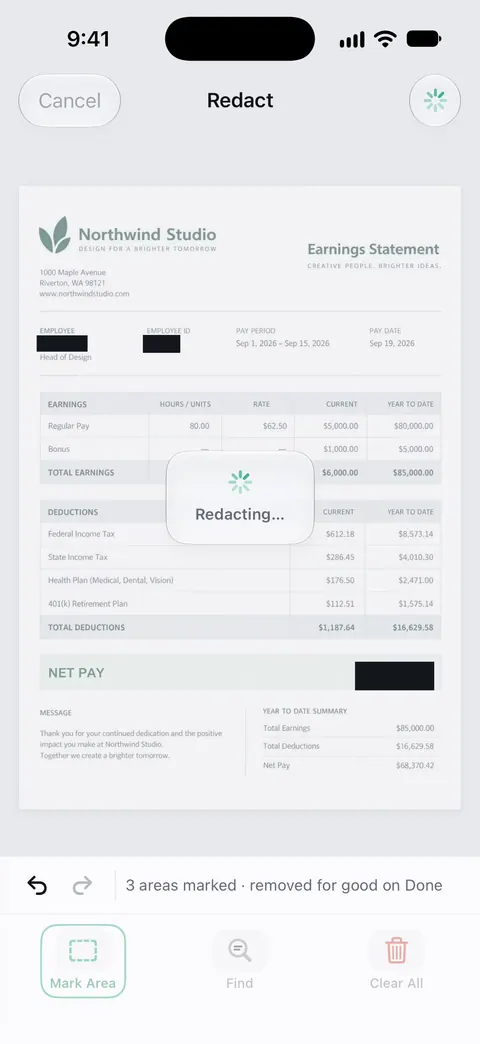
Redaction is permanent. Pro adds redaction, the smart eraser, edit text, auto-export and five alternate app icons. You can sign and annotate documents. Scanner One exports to Word, keeping headings, lists and tables, and to Excel and CSV. That helps with a year of rent and repair records in a spreadsheet.
What to know first:
- Redaction needs Pro. Free accounts can sign and mark up 3 documents a month.
- Free accounts get smart filing for 10 documents a month. Free accounts can run the PDF tools and the Word, Excel and CSV exports 3 times a week, from one shared allowance.
- On a free account, pages you share, print or export carry a small “Scanned with Scanner One” label at the bottom right. Pro removes it. Tenants will see it on notices sent from a free account.
- Scanner One Pro costs $29.99 a year in the US, with a one-week free trial. Scanner One Pro Lifetime is a one-time purchase of $59.99 in the US.
It is not property management software: it doesn’t collect rent, screen tenants or keep a ledger. If you own one or two units and scan a few papers a month, Notes and Files are enough.
Questions and answers
How long should a landlord keep rental application records?
There is no single federal period for every application. The FTC says screening reports must be destroyed securely once you are done with them. Fair housing and state rules may require you to keep application decisions for a time, so check your state’s rules and keep a short record of why each application was accepted or denied.
What receipts should a landlord keep for taxes?
Keep receipts for repairs, supplies, insurance, mortgage interest statements, property tax bills, utilities you pay, and anything you paid to improve the property. Publication 527 says improvements are capitalized, not deducted at once, so keep those receipts until the period ends for the year you sell.
Do I report a security deposit as income?
Publication 527 says not if you plan to return it at the end of the lease. If you keep part or all of it because the tenant broke the lease terms, include the amount you keep in income that year. A deposit meant as the last month’s rent is advance rent and is income when you receive it.
Can I sign a lease on my iPhone?
The Files app lets you fill in a PDF and add a signature. Whether that is valid for a lease depends on your state and what both parties agree to, so check your state’s rules for electronic signatures on leases.
Sources
What this page says about Scanner One was checked against the app on .
- FTC, Using Consumer Reports: What Landlords Need to Know — adverse action notices and the Disposal Rule: burn, pulverize or shred paper, and destroy electronic files so they can’t be read or reconstructed; dated July 2023
- IRS, Publication 527 (2025), Residential Rental Property — security deposits and advance rent, repairs versus improvements, and car and travel records under Pub. 463; last reviewed 2026-04-30
- IRS, How long should I keep records? — the 3, 6 and 7 year periods, property records until the period ends for the year you dispose of it, and nontax needs; last reviewed 2026-06-30
- U.S. EPA, Real Estate Disclosures about Potential Lead Hazards — landlords of pre-1978 housing give the pamphlet, disclose known hazards, include the Lead Warning Statement and keep signed disclosures 3 years after the lease begins; last updated 2026-05-27
- Apple iPhone User Guide, Fill out forms, sign documents, and create signatures on iPhone — filling fields and Add Signature in the Files app and Markup; read 2026-11-13
- Scanner One on the App Store — the app’s own listing: search inside documents, permanent redaction, signing
Get Scanner One
Scanner One is free, with generous limits: scanning, clean PDFs and text search never stop.

Scanner OneScan, sign and ask anything
Scanner One is free, with generous limits: scanning, clean PDFs and text search never stop.