
Who it’s for
Scanning and signing on iPhone for real estate agents
Scan paperwork with the iPhone’s Notes or Files app (Scan Documents), keep every page of one agreement in one PDF, and sign or fill forms with the Files app’s form tools and Markup’s Add Signature. Name each file by property address and document, keep a folder per transaction, and keep a signed copy of lead-paint disclosures for pre-1978 homes: the EPA says sellers and landlords keep them for 3 years. Your brokerage’s rules and e-signature platform come first for contracts.

This page is about the paper side of an agent’s week on an iPhone: what to scan, how to sign and send it, and how to keep a transaction file you can find later. If you are comparing apps for a whole office, the scanner apps for small business comparison covers that.
The papers that cross your desk every week
Most of it arrives on paper at a kitchen table or a showing, and has to be sent within the hour.
- Listing agreements and amendments, often initialed on every page.
- Seller disclosures, including the federal lead-based paint disclosure for homes built before 1978.
- Purchase offers, counteroffers and addenda that come back with handwritten changes.
- Pre-approval letters and proof of funds from buyers.
- Earnest money receipts and copies of checks.
- Inspection reports, repair requests and invoices from contractors.
- Showing feedback, sign-in sheets and open house notes.
- HOA documents, surveys and plats, sometimes on large paper.
- Your own business records: commission statements, mileage, marketing receipts and the W-9 you send to brokerages and title companies.
A workflow from paper to sent and filed
- Scan the whole document at once. In Notes, tap the Attachment button, then Scan Documents; in Files, tap the More button, then Scan Documents. Let Auto mode capture each page, drag the corners if needed, tap Keep Scan, and go on to the next page before you tap Done. One agreement, one PDF.
- Check every page before you leave the table: initials present, nothing cut off at the edges, page order right. The guide to initialing every page of a PDF helps when a form needs initials throughout.
- Sign or fill it. Open the PDF in Files and tap a blank field to type into it. To sign, tap Add Signature, sign with your finger and drag the signature into place. Markup in Notes and Photos also has Add Signature. The full steps are in how to sign a PDF on iPhone.
- Name it the way you will search for it: street address, document, date. “412 Elm St, counteroffer 2, 2026-11-13” beats “Scan 14”.
- Send it the way your brokerage requires. If a portal has an upload limit, check the size first; make a PDF under a size limit shows how, or try our upload size checker.
- File it in the transaction folder the same day, one folder per property.
What the iPhone already covers
For a few documents a week, the built-in apps are enough. Notes and Files scan clean, multi-page PDFs. The Files app fills form fields and adds a signature, and AutoFill can complete supported forms from the My Card in Contacts. Preview on iPhone can export a smaller PDF. Where the built-in way gets slow is volume: dozens of transactions, each with many versions, and finding last month’s addendum by a word inside it.
Disclosures and record rules
Lead-based paint, pre-1978 homes. The EPA says sellers and landlords must give buyers and renters the EPA pamphlet, disclose known lead paint and hazards with any reports, include a Lead Warning Statement in the contract or lease, and give buyers a 10-day window for an inspection unless they waive or change it in writing. Agents must tell sellers about these duties and share responsibility for compliance. Sellers and lessors keep a signed copy of the disclosures for 3 years after the sale closes or the lease begins. Keep a scanned copy in the transaction folder too.
Your own taxes. Many agents are paid as independent contractors. The IRS says expense records should show who you paid, how much, proof of payment, the date and what it was for, and that the same rules apply to electronic records as to paper. Its general period for keeping records is 3 years after you file. The guide to keeping business records has the other periods.
State and brokerage rules. Most states set their own file retention period for brokerages and their own rules on electronic signatures and records. Ask your managing broker for the written policy and follow the longest period that applies.
This page is general information, not legal or tax advice. Real estate rules differ by state and change; check your state’s licensing agency, your brokerage and the official pages listed under Sources.
Privacy points for clients’ papers
- IDs, bank statements and pre-approvals carry account numbers and dates of birth. Keep them out of your photo library and out of shared team folders unless the brokerage requires it.
- Send only what is needed. A lender may need a full statement; a seller’s agent usually needs only the proof-of-funds total. A redacted or watermarked copy is safer; our watermark an ID copy tool runs in your browser.
- Delete working copies from Downloads and Messages once the final version is filed.
The mistakes that cost time
- Missing pages. A counteroffer sent without its addendum comes back. Count pages before you send.
- One PDF per page. Ten attachments named IMG_2041 to IMG_2050 get lost in an inbox. Combine them; merge PDFs on iPhone shows how.
- Shadows and glare on glossy listing sheets. Turn the paper away from the window and scan on a dark table.
- Signing the wrong version. Put the version number in the file name.
- Personal and client files mixed in one folder. Keep a folder per transaction and one for your own business records.
Where Scanner One helps, and where it doesn’t
Point your camera at any piece of paper. Scanner One finds the edges, straightens the page, cleans it up and saves a real PDF. A scan can have many pages, and you can reorder them. That fits agreements that come back with pages out of order.
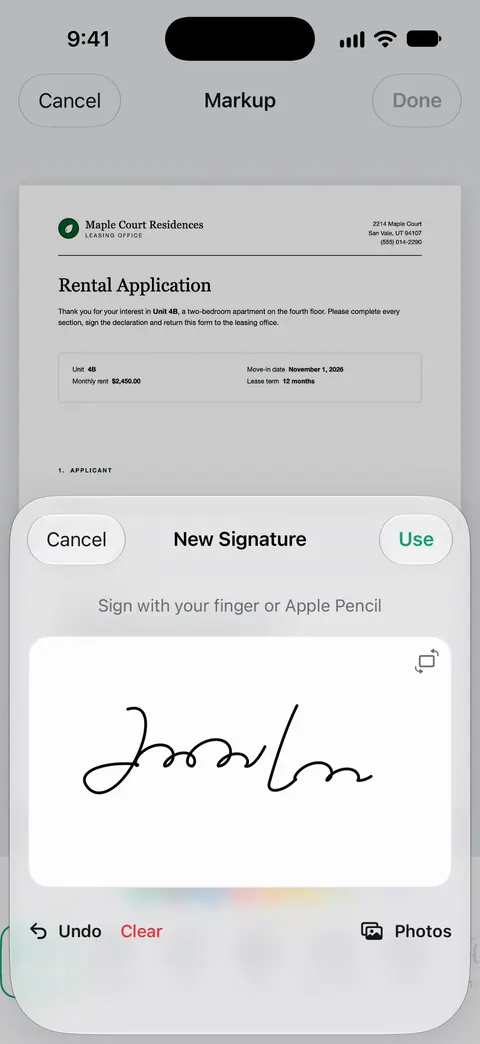
You can sign and annotate documents. The PDF tools merge, split, compress, password-protect, add page numbers and watermarks, and extract text. Search looks inside the text of every document and shows the matching line and page. That last part helps when you need the addendum that mentioned the roof, not the file called Scan 14.
What to know first:
- Free accounts can sign and mark up 3 documents a month. An agent signs more than that in a busy week.
- Free accounts can run the PDF tools and the Word, Excel and CSV exports 3 times a week, from one shared allowance.
- On a free account, pages you share, print or export carry a small “Scanned with Scanner One” label at the bottom right. Pro removes it. Clients and other agents will see it on anything you send from a free account.
- Pro removes every limit. Scanner One Pro costs $29.99 a year in the US, with a one-week free trial.
It is not a transaction management system or a legal e-signature platform: it doesn’t collect signatures from several parties, track who signed when, or replace the platform your brokerage requires. Use it for scanning, quick signatures on your own side and keeping your files searchable. If you send only a few documents a week, Notes and Files are enough.
Questions and answers
Can I sign a purchase agreement on my iPhone?
The iPhone’s form tools let you add a signature to a PDF and send it back. Whether that counts for a given contract depends on your state, your brokerage and what the other side agreed to. Many brokerages require their own e-signature platform for contracts, so check its rules first.
What is the best way to send a large disclosure packet from a phone?
Keep it as one PDF in page order, check the size against the limit of the email or portal, and compress it if needed. A scan made in black and white is usually much smaller than a color one.
How long should I keep transaction files?
For pre-1978 homes, the EPA says sellers and landlords keep the signed lead disclosure for 3 years, and agents share responsibility for compliance. For your own taxes, the IRS’s general period is 3 years after you file. Your state and brokerage often require longer, so follow the longest rule that applies.
Should I scan a client’s ID?
Only if your brokerage requires it, and then store it as carefully as you would the paper. Keep it out of shared folders and your photo library, and send a watermarked copy when someone only needs to see it.
Sources
What this page says about Scanner One was checked against the app on .
- Apple Support, Scan documents on your iPhone or iPad (article 108963) — Scan Documents in Notes and Files, Auto mode, Keep Scan and Save; page dated 2026-02-13
- Apple iPhone User Guide, Fill out forms, sign documents, and create signatures on iPhone — filling blank fields, Add Signature, Add Text Form Box, AutoFill from My Card, Export and Print; guide for iOS 26 and 27, read 2026-11-13
- Apple iPhone User Guide, Export or compress PDFs and images in Preview on iPhone — Preview’s Export options, including Optimize Images for Screen for a smaller PDF; guide for iOS 26 and 27, read 2026-11-13
- U.S. EPA, Real Estate Disclosures about Potential Lead Hazards — the pamphlet, disclosure, Lead Warning Statement and 10-day inspection window for pre-1978 housing; agents share responsibility; sellers and lessors keep signed disclosures 3 years; last updated 2026-05-27
- IRS, What kind of records should I keep — supporting documents for income and expenses, what an expense record should show, electronic records; last reviewed 2026-08-03
- IRS, About Form W-9 — giving your taxpayer identification number to someone who files an information return, including for real estate transactions; last reviewed 2026-06-27
- Scanner One on the App Store — the app’s own listing: multi-page scans, signing, PDF tools
Get Scanner One
Scanner One is free, with generous limits: scanning, clean PDFs and text search never stop.

Scanner OneScan, sign and ask anything
Scanner One is free, with generous limits: scanning, clean PDFs and text search never stop.