
Who it’s for
Scanning and redacting on iPhone for lawyers and paralegals
Use the iPhone for intake and on-the-go scans: Scan Documents in Notes or Files makes a clean multi-page PDF, and Preview’s Embed Text export makes it searchable. Before anything is filed, redact for real: federal court rules limit filings to the last four digits of Social Security and account numbers, the birth year and a minor’s initials, and courts warn that black boxes and highlighting don’t remove the text underneath. Follow your firm’s rules on where client files may live.

This page is about the practical side of paper in a law practice when you are away from the office scanner: intake, exhibits and redaction from an iPhone. The step-by-step method for redacting one PDF is in how to redact a PDF properly; this page covers the whole workflow around it.
The papers that cross a legal desk
- Client intake documents: IDs, leases, contracts, letters, medical bills, pay stubs.
- Signed engagement letters and fee agreements.
- Exhibits for motions, hearings and depositions.
- Court notices, orders and stamped filings.
- Discovery documents that arrive on paper.
- Notes from a meeting or a courthouse hallway, handwritten.
- Receipts for costs to bill back to the client.
A workflow from paper to filed
- Scan the complete document with Scan Documents in Notes or Files: every page, in order, including blank backs if they carry stamps. Drag the corners if the edge detection misses, tap Keep Scan, then Done.
- Make it searchable. In Preview on iPhone, export the PDF with Embed Text turned on; it runs text recognition so you can search and select the words. The searchable PDF guide has more methods.
- Name it for the file: matter, document, date. “Smith v. Jones, Ex. 4 lease, 2026-11-13”.
- Redact a copy, never the only copy. Keep the original in the client file and redact a duplicate for filing or sharing.
- Check the redaction. Search the redacted PDF for a name or number you removed, and try selecting text where the box sits. If anything comes back, it isn’t redacted.
- Number pages and exhibits if the court asks; number pages for court or exhibits shows how.
- Move it into the firm’s system and delete phone copies when your policy says to.
What the iPhone already covers
Notes and Files scan good PDFs. Preview exports a searchable PDF with Embed Text and a smaller one with Optimize Images for Screen. What Apple’s iPhone apps do not have is a redaction tool: a black shape drawn with Markup sits on top of the text, which is still there.
Redaction: what the courts say
Under Federal Rule of Civil Procedure 5.2, a filing that contains certain identifiers may include only:
| Identifier | What may stay |
|---|---|
| Social Security or taxpayer ID number | Last four digits |
| Date of birth | Year |
| Name of a minor | Initials |
| Financial account number | Last four digits |
The federal judiciary’s privacy policy applies the same identifiers across the Appellate, Bankruptcy, Civil and Criminal Rules, adds home addresses in criminal cases, and sets the steps for redacting transcripts. State courts set their own lists.
The District of New Jersey’s guidance is blunt about technique: black boxes and black highlighting in a word processor or PDF editor don’t hide the data underneath, white text can be recovered, and metadata such as the author, file path and earlier revisions can stay in the file. Its best method is to leave the information out of the original; otherwise use a true redaction tool and flatten the result. It also says the responsibility for redacting rests with the parties, not the court clerk.
This page is general information, not legal advice or an ethics opinion. Court rules and professional conduct rules differ by jurisdiction and change; check the court’s rules, your state bar and the official pages listed under Sources.
Confidentiality on a phone
- Follow your firm’s written policy on devices, approved apps and cloud storage. If there isn’t one, ask before client papers go on a personal phone.
- Lock the device with a passcode and Face ID, and keep client scans out of the photo library, which may sync to shared albums.
- Know where files go. An app that keeps documents on the device and uploads nothing unless you share is easier to fit into a policy than one that syncs to its own servers by default.
- Send securely. Email is the default in many practices, but a password-protected PDF or the firm’s portal is safer for sensitive files. See send documents securely.
The mistakes that cost time
- Redacting with a highlighter. It fails the search test and has to be refiled.
- Missing pages in a scanned exhibit, discovered at the hearing.
- Unsearchable scans that make a 300-page production unusable on a phone.
- The redacted copy saved over the original.
- Files named Scan 0001, which no one can find in the matter folder.
Where Scanner One helps, and where it doesn’t
Point your camera at any piece of paper. Scanner One finds the edges, straightens the page, cleans it up and saves a real PDF. Scanner One makes searchable PDFs. Search looks inside the text of every document and shows the matching line and page.
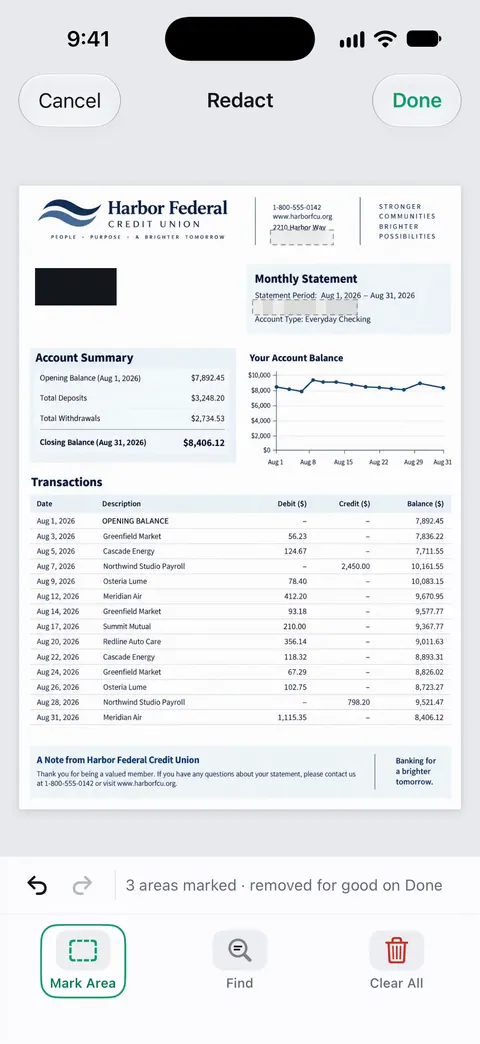
Redaction is permanent. Redaction is part of Pro: Pro adds redaction, the smart eraser, edit text, auto-export and five alternate app icons. The PDF tools merge, split, compress, password-protect, add page numbers and watermarks, and extract text. That covers password-protecting a copy and adding page numbers.
Documents stay on your iPhone unless you share them or turn on iCloud Sync. Cloud AI is off until you switch it on, and page images are a separate permission. You can lock the app with Face ID. Scanner One needs no account and does no tracking.
What to know first:
- Free accounts can run the PDF tools and the Word, Excel and CSV exports 3 times a week, from one shared allowance. Free accounts can sign and mark up 3 documents a month.
- On a free account, pages you share, print or export carry a small “Scanned with Scanner One” label at the bottom right. Pro removes it. Don’t file or send a document from a free account if that label would be a problem.
- Scanner One Pro costs $29.99 a year in the US, with a one-week free trial. Scanner One Pro Lifetime is a one-time purchase of $59.99 in the US.
It is not a document management system, an e-discovery tool or a court e-filing client: it doesn’t keep matter numbers, audit trails or Bates numbering. Whether it fits your firm’s confidentiality policy is a decision for the firm. Always run the search check on a redacted copy before it leaves your hands.
Questions and answers
What must be redacted in a federal court filing?
Under Rule 5.2 of the Federal Rules of Civil Procedure, a filing may generally include only the last four digits of a Social Security or taxpayer number, the year of birth, a minor’s initials and the last four digits of a financial account number. Criminal cases also protect home addresses. State courts have their own rules.
Is a black box in Markup enough to redact a PDF?
No. Courts warn that black boxes, black highlighting and white text only cover the words; the text stays in the file and can be copied out. Use a real redaction tool, then search the result for the hidden words to check.
Can I scan exhibits on my iPhone?
Yes, for many purposes, if the scan is legible and complete. Check the court’s e-filing rules for format, size and page numbering, and keep the originals as your firm’s policy requires.
Where should client documents live on my phone?
Where your firm’s policy says. Keep them out of your photo library and personal cloud folders, lock the device, and use the firm’s approved document system for anything that becomes part of the file.
Sources
What this page says about Scanner One was checked against the app on .
- Federal Rule of Civil Procedure 5.2, Privacy Protection for Filings Made with the Court (Cornell LII) — filings may include only the last four digits of Social Security, taxpayer and financial account numbers, the birth year and a minor’s initials; read 2026-11-13
- U.S. Courts, Privacy Policy for Electronic Case Files — the identifiers redacted under the Appellate, Bankruptcy, Civil and Criminal Rules (home addresses too in criminal cases) and the transcript redaction steps; policy approved March 2008, read 2026-11-13
- U.S. District Court for the District of New Jersey, Personal-Identity and Metadata Redaction Techniques for E-Filing — black boxes, black highlighting and white text don’t hide data; metadata risks; omit the data or use true redaction tools; redaction is the parties' responsibility; undated, read 2026-11-13
- Apple Support, Scan documents on your iPhone or iPad (article 108963) — Scan Documents in Notes and Files; page dated 2026-02-13
- Apple iPhone User Guide, Export or compress PDFs and images in Preview on iPhone — Embed Text runs OCR to make a PDF searchable; Optimize Images for Screen for a smaller file; read 2026-11-13
- Scanner One on the App Store — the app’s own listing: permanent redaction, on-device documents, searchable PDFs
Get Scanner One
Scanner One is free, with generous limits: scanning, clean PDFs and text search never stop.

Scanner OneScan, sign and ask anything
Scanner One is free, with generous limits: scanning, clean PDFs and text search never stop.