
Who it’s for
Scanning bills of lading and rate cons on iPhone
Scan each bill of lading as soon as it is signed: lay it flat in good light, use the Notes or Files app’s Scan Documents, keep all pages of one load in one PDF, and check that signatures, seal and load numbers are readable. Name it by load number and send it the way your carrier or broker asks. FMCSA rules say drivers submit supporting documents such as bills of lading and expense receipts to their carrier within 13 days, and carriers keep them for 6 months.

This page is about the paperwork in the cab: getting a bill of lading, rate confirmation and receipts from paper to the people who pay you, readable the first time. For a fleet office choosing software, see the scanner apps for small business comparison.
The papers a driver handles every week
- Bills of lading (BOLs), signed at pickup and delivery, often multi-part carbon copies with stamps and seal numbers.
- Rate confirmations from brokers, usually emailed as PDFs to sign and send back.
- Proof of delivery (POD), the signed BOL or a separate delivery receipt.
- Lumper receipts, scale tickets and detention or layover records.
- Fuel, toll, parking and repair receipts.
- Trip sheets, dispatch records and settlement statements.
- Inspection reports and, for owner-operators, permits, insurance cards and registration.
A workflow from paper to paid
- Scan before you pull out. The BOL is easiest to read while it is still flat and clean. Set it on the dash or a clipboard, out of the sun’s glare, or use the cab light.
- Use Scan Documents, not the camera. In Notes, tap the Attachment button, then Scan Documents; in Files, tap the More button, then Scan Documents. On iOS 26 you can turn on the flash or choose a filter before you scan. In Auto mode the page is captured on its own; otherwise tap the Shutter button or press a Volume button, drag the corners, and tap Keep Scan.
- Keep one load in one PDF: the BOL pages, the POD and the lumper receipt together, in order. Scan multiple pages into one PDF shows how.
- Check it before you send. Zoom in on the signature, date, seal number, piece count and any exceptions written in. If you can’t read it on the phone, billing can’t either.
- Name it by load number, for example “Load 48213 BOL POD 2026-11-13”.
- Send it the way the carrier or broker asks: their app, email or a factoring portal. Scan and email a document covers the email route.
- Keep your copy in a folder per month, so a short-pay or a detention dispute three weeks later takes a minute.
What the iPhone already covers
Notes and Files make clean multi-page PDFs and email them from the share button, and that is enough for many drivers. Receipts scan the same way; scan receipts on iPhone has tips for faded thermal paper. Where it gets slow is finding a specific load later: scans in Notes are searchable, but a month of loads named “Scanned Document” takes scrolling.
The FMCSA rules on supporting documents
Hours-of-service rules treat some of your paperwork as evidence for your log. Under 49 CFR 395.11, supporting documents fall into five categories:
| Category | Examples |
|---|---|
| Trip origin and destination | Bills of lading, itineraries, schedules |
| Dispatch | Dispatch records, trip records |
| Expenses | Receipts for on-duty not driving time |
| Fleet communications | Messages through a fleet management system |
| Pay | Payroll records, settlement sheets |
What the rule asks:
- Each document should show the driver’s name, PIN or a unit number tied to the driver, the date, the location (the nearest city, town or village) and a time.
- Drivers submit them to the employing carrier within 13 days of the 24-hour period they cover, or of the day the driver got them, whichever is later.
- Carriers keep records of duty status and supporting documents for at least 6 months (49 CFR 395.8(k)). A carrier need not keep more than 8 supporting documents for one driver’s 24-hour period.
- Drivers on paper logs keep the previous 7 consecutive days of records of duty status with them while on duty.
Owner-operators also keep business records for taxes. The IRS says expense records should show who you paid, how much, proof of payment, the date and what it was for, and that electronic records follow the same rules as paper. The general period is 3 years after you file; records for a truck or trailer stay until the period ends for the year you sell it.
This page is general information, not legal or tax advice. FMCSA and IRS rules change, and your carrier may have stricter policies; check the regulations and pages listed under Sources.
The mistakes that cost time
- Photos instead of scans. A tilted photo with the dash in the frame is harder to read and larger to send.
- Cut-off edges. Seal numbers and signatures are often at the margins. Leave a little space around the page.
- Faint carbon copies. Try a black-and-white or grayscale filter, and check the result is readable.
- One file per page. Billing asks for the whole load; send one PDF.
- No copy kept. If the broker says it never arrived, you resend in a minute instead of calling the shipper. See why a scan comes out blurry for the other common faults.
Where Scanner One helps, and where it doesn’t
Point your camera at any piece of paper. Scanner One finds the edges, straightens the page, cleans it up and saves a real PDF. A scan can have many pages, and you can reorder them. Scans come with Auto Clean, Color, Grayscale and Receipt filters. The Receipt filter is made for fuel and lumper receipts.
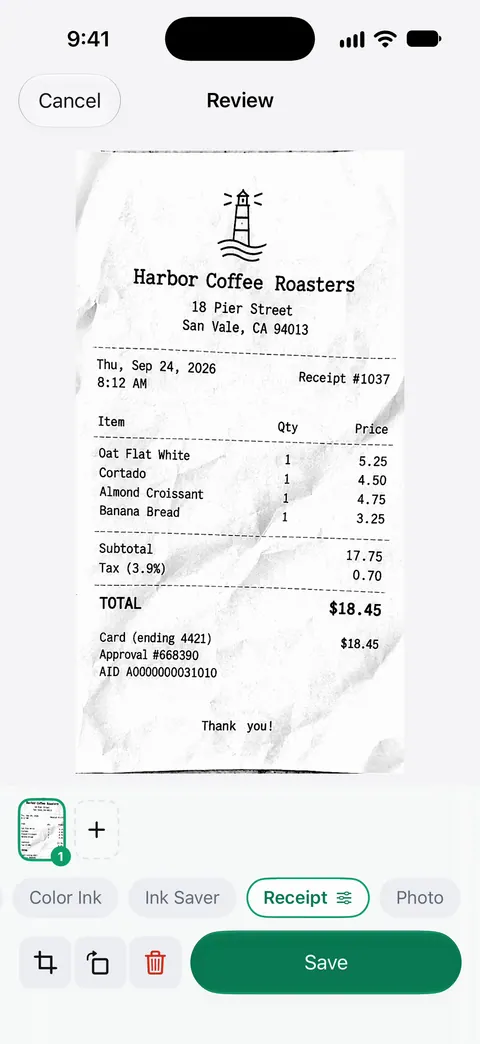
Share & Export can also print a document or email it to you. Search looks inside the text of every document and shows the matching line and page. That helps when a broker asks about a load number weeks later. Scanner One needs no account and does no tracking.
What to know first:
- On a free account, pages you share, print or export carry a small “Scanned with Scanner One” label at the bottom right. Pro removes it. A broker or factoring company will see that label on paperwork sent from a free account.
- Free accounts get smart filing for 10 documents a month. Free accounts can run the PDF tools and the Word, Excel and CSV exports 3 times a week, from one shared allowance.
- Pro removes every limit. Pro comes monthly, yearly with a free week, or once for life.
It is not an ELD, a load board or a factoring app: it doesn’t log hours, submit documents to a carrier’s system for you, or track payment. If your carrier’s app takes document photos directly, use it for submission and keep your own copy for disputes. For a few loads a week, Notes or Files is enough.
Questions and answers
Is a phone scan of a bill of lading accepted?
Most carriers, brokers and factoring companies take a clear scanned PDF, and many ask for one through their app or email. Each sets its own rules, such as one load per file or a signed delivery receipt, so check what yours asks before you rely on a photo or scan.
How long do I have to turn in my supporting documents?
Under 49 CFR 395.11, a driver submits supporting documents to the employing carrier within 13 days of the 24-hour period they cover, or of the day the driver received them, whichever is later.
What counts as a supporting document for hours of service?
The rule lists five kinds: bills of lading, itineraries or schedules showing origin and destination; dispatch or trip records; expense receipts for on-duty not driving time; fleet management system messages; and payroll or settlement records.
Why does my scanned bill of lading come out gray or blurry?
Usually low light, a shaky hand or a carbon copy. Scan on a flat, dark surface under a cab light or with the flash, hold the phone parallel to the page, and use a black-and-white filter for faint carbon copies.
Sources
What this page says about Scanner One was checked against the app on .
- 49 CFR 395.11, Supporting documents (Cornell LII copy of the eCFR) — the five categories of supporting documents, what each must show (driver, date, location, time), the 13-day submission rule and the 8-document cap per 24 hours; read 2026-11-13
- 49 CFR 395.8, Driver’s record of duty status (Cornell LII copy of the eCFR) — paragraph (k): carriers keep records of duty status and supporting documents at least 6 months; drivers keep the previous 7 days on hand; read 2026-11-13
- Apple Support, Scan documents on your iPhone or iPad (article 108963) — Scan Documents in Notes and Files, flash and filters on iOS 26, Auto mode and Keep Scan; page dated 2026-02-13
- IRS, What kind of records should I keep — supporting documents for income and expenses, travel and transportation records, electronic records; last reviewed 2026-08-03
- IRS, How long should I keep records? — the 3, 6 and 7 year periods and property records; last reviewed 2026-06-30
- Scanner One on the App Store — the app’s own listing: multi-page scans, filters, print and email
Get Scanner One
Scanner One is free, with generous limits: scanning, clean PDFs and text search never stop.

Scanner OneScan, sign and ask anything
Scanner One is free, with generous limits: scanning, clean PDFs and text search never stop.