
Guide
Organize receipts for a small business
Give every receipt one way in: scan paper ones the day you get them and save emailed ones as PDFs to the same place. File them by year and month, or by expense category, with names like 2026-03-14 Staples 48.20 Supplies. Once a month, match them against your business bank and card statements and note the business purpose on anything unclear. Keep them at least as long as the IRS can examine the return they support.

This page is about the system: where receipts go, how they’re named, how they’re checked each month and how long they’re kept. For the scanning itself and what each receipt must show, see scanning receipts for taxes. For every kind of business record, not just receipts, see records a small business should keep.
What a receipt system has to do
The IRS doesn’t require a particular system. Its recordkeeping publication says you can choose any system suited to your business that clearly shows your income and expenses. For expenses, your records should show the amount paid and that it was for a business expense. A good receipt system does three things:
- Catches every receipt, paper or email, in one place.
- Proves what each one was for, not just that you paid.
- Finds any receipt in under a minute, for your accountant or an examiner, years later.
One inbox for every receipt
Receipts arrive in pockets, glove boxes, inboxes and supplier portals. Pick one destination and send them all there.
- Paper: scan it the same day, before thermal paper fades, then drop the paper in a single envelope for the month.
- Email: save the receipt or invoice as a PDF into the same folder. Saving an email as a PDF shows how.
- Supplier portals and apps: download the monthly invoice as a PDF on the first of the month.
- No receipt at all (a parking meter, a cash tip): write a short note with the date, amount, place and purpose, and scan or save it.
Folders that work
| Approach | Folder example | Best for |
|---|---|---|
| By month | Receipts, 2026, 2026-03 | Matching against statements every month |
| By category | Receipts, 2026, Supplies | Handing totals to your accountant |
| Both | Receipts, 2026, 2026-03, with the category in the file name | Most small businesses |
Use the same categories your bookkeeping or tax form uses, so nothing needs translating later: for example supplies, software, travel, meals, vehicle, rent, utilities, advertising, contractors and equipment. Keep equipment and other big purchases in their own folder: they’re kept longer, as you’ll see below.
Name every file the same way
Date, vendor, amount, category:
- 2026-03-14 Staples 48.20 Supplies
- 2026-03-18 Delta 412.60 Travel
- 2026-03-31 Adobe 22.99 Software
The date first makes files sort in order. The amount lets you match a statement line without opening anything. More patterns are in naming scanned documents.
Write down the business purpose
A receipt for lunch or a hotel says what you paid, not why. The IRS points out that proof of payment alone doesn’t establish a deduction. Add the purpose while you remember it:
- write it on the paper before you scan (“client meeting, J. Ortiz, kitchen remodel bid”)
- or add it to the file name or a note on the PDF
This matters most for meals, travel, gifts, and anything that could look personal.
Match receipts to statements once a month
Pick a day, such as the 5th, and block 30 minutes:
- Open your business bank and card statements for last month.
- Go down each line and find its receipt by date and amount.
- Mark lines with no receipt. Look in your email, ask the vendor for a copy, or write a note explaining the expense.
- Check for receipts with no statement line: a personal card used by mistake, or a refund still due.
- Save the statements in the same month folder.
A separate business bank account and card make this far easier: every line on the statement is a business line.
How long to keep receipts
The IRS ties keeping periods to how long a return can be examined:
- Most receipts: 3 years after you file the return they support.
- 6 years if income was underreported by more than 25%, and 7 years for a bad debt or worthless securities deduction.
- Equipment and property: until the period runs out for the year you sell or dispose of it, since they affect depreciation and gain or loss.
- Payroll and employment tax records: at least 4 years after the tax is due or paid.
Many owners simply keep seven years of receipts to be safe. Details are in how long a small business should keep records.
Hand it all to your accountant
At year end, send the year’s folder as one organized set, not a pile. A spreadsheet of receipts (date, vendor, amount, category) on top saves your accountant hours. Turning a PDF or scan into an Excel sheet shows how to get one from your scans.
Where Scanner One helps, and where it doesn’t
Scans come with Auto Clean, Color, Grayscale and Receipt filters. The Receipt filter turns a gray slip into crisp black text on white, as the screenshot shows.
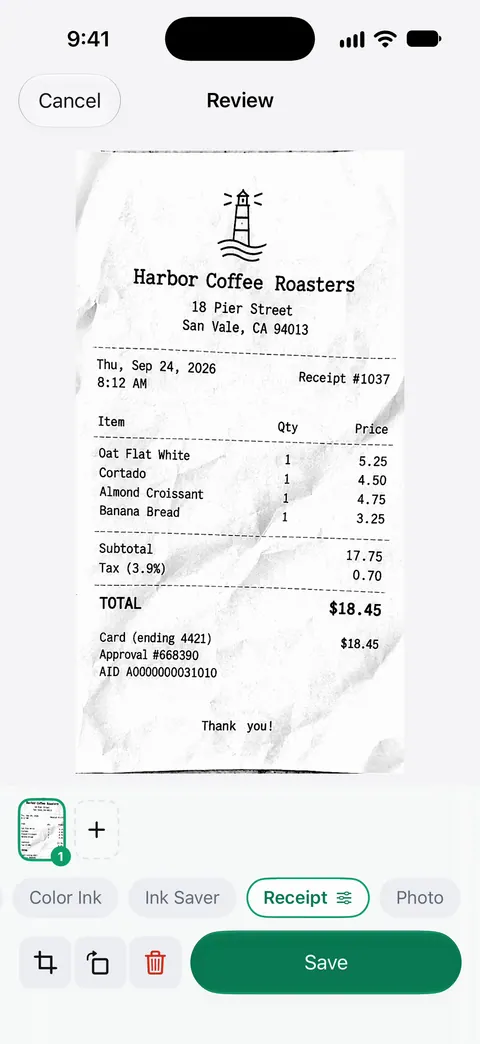
Then it reads the text, names the document, tags it and puts it in the right folder. Search looks inside the text of every document and shows the matching line and page. That means you can search for a vendor or an amount instead of opening folders. Scanner One exports to Word, keeping headings, lists and tables, and to Excel and CSV. That helps when you need a spreadsheet of receipts for your bookkeeping.
Free limits: Free accounts get smart filing for 10 documents a month. Free accounts can run the PDF tools and the Word, Excel and CSV exports 3 times a week, from one shared allowance. On a free account, pages you share, print or export carry a small “Scanned with Scanner One” label at the bottom right. Pro removes it. If you send receipts to an accountant or a client, that label is on every page until you upgrade.
What it doesn’t do: it isn’t accounting software. It won’t reconcile your bank feed or file your taxes. It keeps the receipts readable and findable.
When the built-in way is enough: if you have a few receipts a week, Notes or Files and a naming habit work fine. For more on the paperwork side of self-employment, see receipts, invoices and contracts for freelancers.
Questions and answers
Do I need to keep paper receipts if I’ve scanned them?
The IRS says the requirements for paper records also apply to electronic records, so a complete, readable scan can serve as your copy. Its publication on recordkeeping says paper originals may be destroyed once an electronic storage system has been tested and meets the rules in Revenue Procedure 97-22. If you’re unsure, ask your accountant before shredding.
Is a bank statement enough instead of a receipt?
A statement shows you paid, but the IRS notes that proof of payment alone doesn’t establish a deduction. Keep something that shows what the expense was, like the receipt, an invoice or an order email.
Should I organize receipts by month or by category?
Either works if you stick to it. By month makes the monthly match against statements easy; by category makes tax time easy. Many owners file by year and month and put the category in the file name.
How long should a small business keep receipts?
At least as long as the return they support can be examined, usually 3 years after filing, and longer in some cases. Receipts for equipment and other property stay until that period ends for the year you sell or dispose of it. Employment tax records stay at least 4 years.
Sources
What this page says about Scanner One was checked against the app on .
- IRS, What kind of records should I keep — supporting documents for purchases and expenses; requirements for paper records also apply to electronic records; last reviewed 3 August 2026
- IRS, Publication 583 (12/2024), Starting a Business and Keeping Records — expense records should show the amount paid and that it was for a business expense; proof of payment alone does not establish a deduction; any recordkeeping system that clearly shows income and expenses; revised December 2024
- IRS, How long should I keep records? — 3, 6 and 7 year periods; employment tax records at least 4 years; property records; last reviewed 30 June 2026
- Scanner One on the App Store — the app’s own listing
Get Scanner One
Scanner One is free, with generous limits: scanning, clean PDFs and text search never stop.

Scanner OneScan, sign and ask anything
Scanner One is free, with generous limits: scanning, clean PDFs and text search never stop.