
Guide
Turn a PDF or a scan into an Excel sheet
iPhone has no built-in way to convert a PDF to Excel. For a small table, select its text in Preview (or copy it from the paper with Live Text), paste it into Numbers, put the values back into columns, then export the sheet as Excel or CSV. For more than a few rows, an app that reads the table saves the retyping. Scanner One exports to Word, keeping headings, lists and tables, and to Excel and CSV.

What iPhone can and can’t do
No Apple app on iPhone converts a PDF into a spreadsheet. Preview reads and exports PDFs, and Numbers exports its own sheets as Excel or CSV, but nothing in between turns a table on a PDF page into rows and columns.
The built-in route is to move the values yourself: copy them out of the PDF, paste them into Numbers, rebuild the columns, and export. For a short table of 10 or 20 rows, that is manageable. For a bank statement with 200 transactions, it is an evening of tidying.
Before you start on a statement, look on your bank’s website or app for a download option. When there is one, the numbers come straight from the bank and need no checking.
Copy a table into Numbers and export it as Excel
- Open the Preview app and open the PDF.
- Touch and hold the first cell of the table, then drag the grab points to the last cell.
- Tap Copy.
- Open Numbers, start a blank spreadsheet, tap the first cell and paste.
- Put the values back into their columns. Copied PDF text often arrives as one line per row, so you may need to move amounts and dates into their own cells.
- Tap the More button in the toolbar, tap Export, then tap Excel (or CSV).
- If the spreadsheet has more than one table, choose whether each sheet or each table becomes its own worksheet.
- Choose where to save or send the copy.
Copying one column at a time sometimes works better than the whole table: you paste the dates, then the descriptions, then the amounts, each into its own column.
Tables from a scan or a photo
A scanned PDF has no text to select, so step 2 above won’t work. Get the text out first:
- Preview on iOS 27: open the scan, tap the Actions Menu button next to the filename, tap Export, choose PDF and turn on Embed Text. Apple’s page says this runs OCR and makes the PDF searchable; the new copy has text you can select. More on this in the guide to making a scanned PDF searchable.
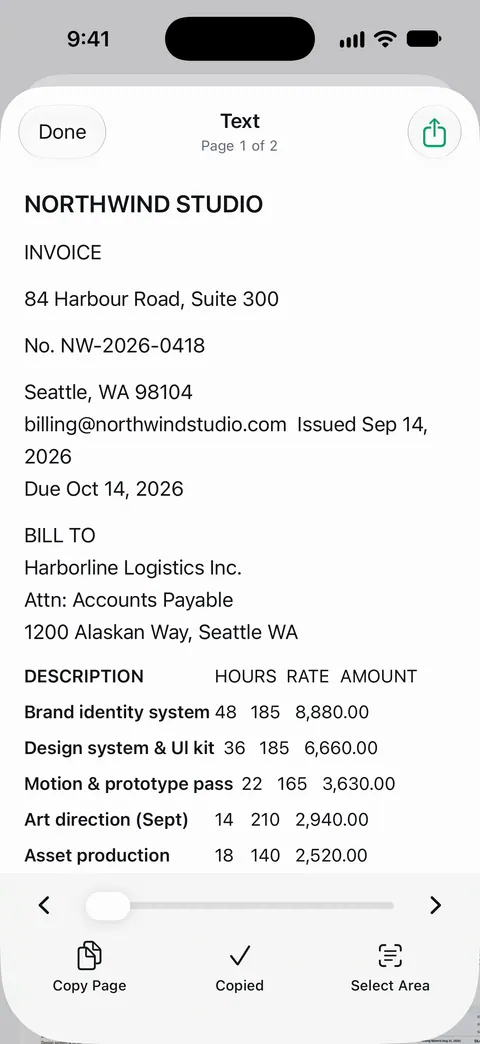
- Live Text: with the paper in front of you, open Camera, point it at the table, tap the Detect Text button when the yellow frame appears, then select the text and tap Copy.
Text recognition reads tables line by line. It is good with printed numbers and weaker with faint receipts, handwriting and very small print, so read every value back against the paper. For receipts in particular, the guide to scanning receipts for taxes explains how to get a scan sharp enough to read.
Excel or CSV: which to pick
Numbers exports both, and so do most apps that convert PDFs.
| Pick | When | What you get |
|---|---|---|
| Excel (.xlsx) | A person will open it in Excel or Google Sheets | Formatting, several worksheets, formulas you add |
| CSV | Another program will import it: accounting, budgeting, a bank or tax tool | Only the values, separated by commas, one sheet |
| TSV | The importer asks for tab-separated values | Only the values, separated by tabs |
If an upload page says “CSV”, give it CSV even if Excel looks nicer. An importer reads the plain values and ignores the rest.
Check the numbers before you use them
A spreadsheet from a PDF looks finished long before it is right. Check these before you total anything:
- Decimal points and commas. A European statement writes 1.234,56 where a US one writes 1,234.56. Pasted into the wrong locale, amounts change by a factor of 1,000 or become text.
- Negative numbers. Statements show them as -45.00, (45.00) or 45.00 in a debit column. Make them one style so sums work.
- Dates. 03/04 is March 4 in the US and 3 April in most of the world. Set the column’s date format and spot-check a few rows.
- Repeated headers. A table that runs over several pages repeats its header row on each page. Delete the extra ones.
- Leading zeros. Account numbers and ZIP codes that start with 0 can lose it when a spreadsheet treats them as numbers. Format those columns as text.
- The total. Add up the column and compare it with the total printed on the PDF. If they match, the rows are almost certainly right.
Common jobs
- An expense report: receipts in, one row per receipt. If it is due tomorrow, this step-by-step page gets it done tonight.
- A budget review: statements and bills into one sheet. The checklist of papers for a budget review lists what to gather.
- Prose, not a table: if what you need is paragraphs, convert the PDF to Word instead.
Where Scanner One helps, and where it doesn’t
For a short table you copy once, Preview and Numbers are enough, and free.
Scanner One saves the retyping when tables come from paper. Scanner One exports to Word, keeping headings, lists and tables, and to Excel and CSV. Text recognition runs on every page for everyone, free or Pro. Text recognition runs on the device, in 29 languages.
The limits:
- Free accounts can run the PDF tools and the Word, Excel and CSV exports 3 times a week, from one shared allowance. Pro removes every limit.
- On a free account, pages you share, print or export carry a small “Scanned with Scanner One” label at the bottom right. Pro removes it.
- Reading a table from a picture is never perfect. Check the totals against the paper, as above, whichever tool you use.
The Word, Excel and CSV feature page shows the export options in the app.
Questions and answers
Can Numbers open a PDF and turn it into a spreadsheet?
Not that Apple documents. Numbers exports its own sheets as Excel, CSV or TSV, but the table has to get into Numbers first, by pasting or typing it in.
Should I save as Excel or CSV?
Use Excel when the sheet will be opened by a person in Excel and you want formatting and several sheets. Use CSV when another program will import it, such as an accounting or budgeting tool: it is just the values, separated by commas.
Why did all my numbers land in one column?
Copied PDF text often arrives as lines, not cells. Split the values into columns by hand, or copy one column at a time, then check that each row still lines up.
Is Excel export free in Scanner One?
Free accounts can run the PDF tools and the Word, Excel and CSV exports 3 times a week, from one shared allowance. Pro removes every limit.
Sources
What this page says about Scanner One was checked against the app on .
- Apple iPhone User Guide, Annotate a PDF or image in Preview on iPhone — selecting and copying text in a PDF with Preview; undated guide page for iOS 26 and 27, read 2026-11-13
- Apple Numbers User Guide for iPhone, Export to other file formats in Numbers on iPhone — exporting a sheet as Excel, CSV or TSV, one worksheet per sheet or per table; undated guide page, read 2026-11-13
- Apple iPhone User Guide, Use Live Text with your iPhone camera — copying text from paper with the Camera; not available in all regions or languages; undated guide page for iOS 26 and 27, read 2026-11-13
- Apple iPhone User Guide, Export or compress PDFs and images in Preview on iPhone — on iOS 27, the Embed Text option runs OCR and makes a scanned PDF searchable; undated guide page for iOS 26 and 27, read 2026-11-13
- Scanner One on the App Store — the app’s own listing: Excel and CSV export
Get Scanner One
Scanner One is free, with generous limits: scanning, clean PDFs and text search never stop.

Scanner OneScan, sign and ask anything
Scanner One is free, with generous limits: scanning, clean PDFs and text search never stop.