
Situation
A job offer wants your documents by Friday
Read the onboarding email and list what it asks for. For the Form I-9, you choose your documents: one from List A, such as a passport, or one from List B, such as a driver’s license, plus one from List C, such as a Social Security card. The employer examines the real documents within 3 business days of your start, in person or, for some E-Verify employers, on a video call after you send copies. Scan everything else, such as diplomas, certifications and direct deposit forms, into clear PDFs and upload them through the employer’s portal.

This page is for the week between saying yes and your first day, when an onboarding email lists a pile of documents and a deadline. For the I-9 lists explained in full, see the I-9 documents checklist; for the forms you’ll fill in on day one, see the new job paperwork checklist.
First: sort the email into two piles
Onboarding requests mix two different things:
- Documents the employer must see in person or on video: your I-9 identity and work authorization documents.
- Documents you can upload: diplomas, transcripts, licenses, certifications, a voided check or bank letter for direct deposit, signed policy forms, and sometimes a résumé or references.
Make a list from the email with both piles, and tick off each item as you go.
The I-9: which documents, and when
Every U.S. employer completes Form I-9 with each new hire. You choose what to show from USCIS’s lists:
| Option | What to bring | Examples |
|---|---|---|
| One from List A | A single document that proves identity and work authorization | U.S. passport or passport card, green card, employment authorization card |
| One from List B plus one from List C | One for identity, one for work authorization | Driver’s license or state ID (B) with a Social Security card or a certified U.S. birth certificate (C) |
USCIS is clear that you choose. If you present a List A document, you shouldn’t be asked for anything else. Documents must be unexpired, and a birth certificate must be an original or a certified copy.
The timing:
- Section 1, your part, is due by your first day of work. You can fill it in any time after accepting the offer.
- Section 2, the employer’s review of your documents, must be done within 3 business days of your start date.
If they ask you to send copies
Some employers enrolled in E-Verify use an optional remote procedure. You send copies of your documents, front and back, then show the same originals on a live video call. Scan both sides clearly and keep the originals within reach for the call. Our guide to scanning an ID front and back on one page helps.
If you lost a document, USCIS accepts a receipt for its replacement for a limited time, or you can pick another combination.
Scan the upload pile tonight
On iPhone, the Files app scans straight to a PDF:
- Open Files and tap the More button.
- Tap Scan Documents, hold the page in view, and tap Keep Scan for each page.
- Tap Done, choose a folder, and tap Save.
Make one PDF per item, named so the HR person knows what it is at a glance: “Jordan Lee, BS diploma.pdf”, “Jordan Lee, RN license.pdf”. If the portal only takes photos or you have photos already, our guide to turning photos into a PDF shows how.
Before you upload
- Check the size limit. Many portals cap files. Our guide to making a PDF fit a size limit helps, and our free upload size checker tells you before you try.
- Open each PDF once to check every page is readable and right side up.
- Use the portal, not email, for anything with your Social Security number, bank details or ID. Our guide to uploading a scanned document to a website covers the common snags.
Background checks
If the offer depends on a background check through a reporting company, the FTC says the employer must tell you in a separate written notice and get your written consent. If something in the report leads to a no, you get a copy first and can dispute mistakes with the reporting company.
A word on scams
The FTC warns that being asked for your Social Security number or bank details before an interview can be a sign of a job scam. A real offer usually comes after interviews, from a company email address, with a portal on the company’s own site. If anything feels off, call the company’s main number to check.
Where Scanner One helps, and where it doesn’t
Scanner One doesn’t fill in or submit your I-9, and a scan never replaces showing the originals. It helps you get the upload pile done quickly.
ID cards and passports are scanned with both sides on one printable page. Handy if your employer uses the remote procedure and asks for copies front and back.
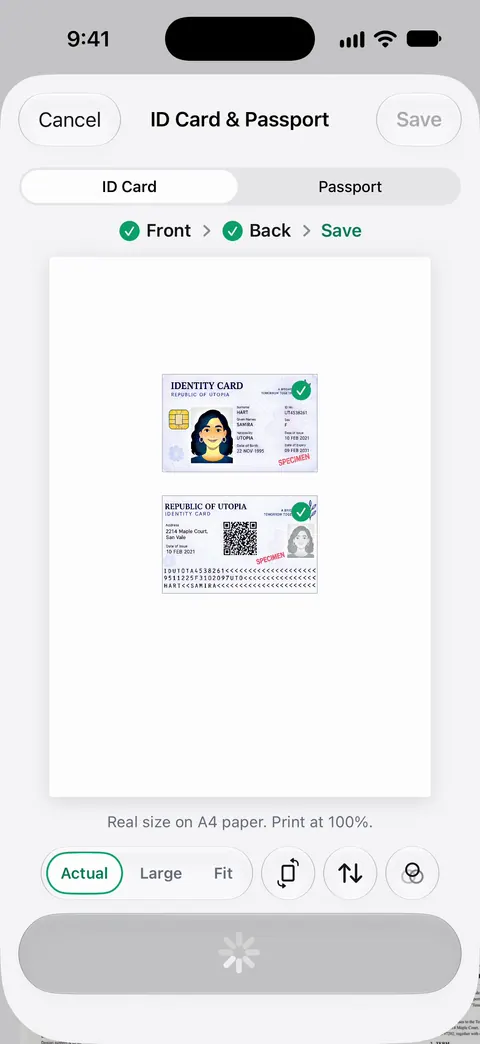
The To PDF tool turns files and photos into PDFs. So a photo of your license from last year becomes the PDF the portal asks for. Fill Form lets you type into the fields of a PDF form. You can sign and annotate documents.
Free accounts can sign and mark up 3 documents a month. On a free account, pages you share, print or export carry a small “Scanned with Scanner One” label at the bottom right. Pro removes it. If you’d rather an employer not see that label, the Files app’s scanner is enough for a few PDFs.
Questions and answers
What documents do I need for a new job?
For the I-9, either one List A document (such as a U.S. passport or a green card) or one List B document (such as a driver’s license) plus one List C document (such as a Social Security card or a certified birth certificate). Employers may also ask for a direct deposit form, a tax withholding form, and copies of diplomas, licenses or certifications.
Can I just email a photo of my passport for the I-9?
Not as a substitute for the real thing. The employer has to examine the actual documents. Some employers enrolled in E-Verify use an optional remote procedure: you send copies, front and back, then show the same documents on a live video call.
Can my employer tell me which documents to bring?
No. USCIS says the employee chooses which acceptable documents to present. An employer may give you the lists, but not insist on a particular document, such as a passport, if your choice is on the list.
Does a background check need my permission?
When an employer uses a background reporting company, the FTC says it must tell you in a separate written notice and get your written consent. You can refuse, though you might not get the job. If a report leads to a no, you get a copy and can dispute errors.
What if I lost my Social Security card?
USCIS accepts a receipt for a replacement of a lost, stolen or damaged document for a limited time. You can also choose a different combination from the lists, such as a passport alone.
Sources
What this page says about Scanner One was checked against the app on .
- USCIS, Form I-9 acceptable documents — Lists A, B and C, the employee chooses which to present, a List A document is enough on its own, birth certificates as originals or certified copies, receipts for replacements; last updated 2026-10-05
- USCIS, Completing Section 1, Employee Information and Attestation — Section 1 by the first day of work, at any time after accepting the offer; Section 2 within 3 business days of the hire date; last reviewed 2026-09-11
- USCIS, Remote examination of documents — the optional alternative procedure for E-Verify employers: copies front and back, then a live video showing the same documents; last reviewed 2025-09-26
- FTC Consumer Advice, Employer background checks and your rights — written notice and consent before a background report, a copy of the report before an adverse decision, disputing errors, Social Security or bank details before an interview as a scam sign; dated August 2025
- Scanner One on the App Store — the app’s own listing, for the closing section
Get Scanner One
Scanner One is free, with generous limits: scanning, clean PDFs and text search never stop.

Scanner OneScan, sign and ask anything
Scanner One is free, with generous limits: scanning, clean PDFs and text search never stop.