
Situation
An expense report is due tomorrow and the receipts are in your bag
Empty your bag onto a table, sort the receipts by date or trip, and set aside anything personal. Flatten each one and scan it, one receipt per page, in good light, so the amount, date and place can be read. Enter each expense in your company’s tool or template with its business purpose and attach the scan. For a missing receipt, find the booking email or card statement and use your company’s missing-receipt process. Keep the scans until you have been paid.

Tonight, in 45 minutes
- Find the rules. Open your company’s expense policy or tool and check the deadline, the categories, and whether it wants scans attached to each line.
- Gather everything. Your bag, wallet and coat pockets, the car, and your email: hotel folios, airline and rail tickets, ride receipts and online orders often arrive by email.
- Sort. Lay the receipts out by date or by trip. Put personal purchases in a separate pile now, so they don’t slip in.
- Scan. One receipt per page, straight and readable (how, below).
- Enter and attach. Each expense as its own line, with the date, amount, category and business purpose, and its scan attached.
- Check the total against your card statement before you submit.
What a good receipt shows
A receipt that answers four questions rarely comes back: how much, when, where, and what for. IRS Publication 463 uses the same test for business travel records: documentary evidence is ordinarily adequate if it shows the amount, date, place and essential character of the expense. Its examples:
- A hotel receipt: the hotel’s name and location, the dates you stayed, and separate amounts for the room, meals and calls.
- A restaurant receipt: the restaurant’s name and location, the number of people served, and the date and amount. If it covers more than food and drink, it should say so.
What a receipt doesn’t show, you write: the business purpose. “Dinner with the Acme team to plan the March launch” is enough. A card slip with only a total is weaker than the itemized receipt, so ask for the itemized one at the till next time.
Scan receipts so they stay readable
Receipts are small, curled and often printed faintly, so they need a little care:
- Flatten them. A few minutes under a heavy book helps a curled receipt.
- Use a dark background so the edges stand out, and good, even light without your shadow on it.
- One receipt per page. It makes each line easy to match.
- Long receipts: scan the whole length, in two parts if you have to, and keep them together.
- Do it tonight. Faint print gets harder to read, not easier.
With the built-in scanner, open Notes, tap the Attachment button and choose Scan Documents, or in Files tap the More button and choose Scan Documents. Capture each receipt, tap Keep Scan, and keep adding pages before you tap Done. Our guide to scanning receipts on iPhone covers faded and long ones.
Missing a receipt
It happens to everyone. In order:
- Search your email for the merchant’s name: many receipts were emailed too.
- Ask for a copy. Hotels, airlines and many shops can resend one.
- Find the charge on your card or bank statement.
- Use your company’s missing-receipt process. Many have a form or a signed note with the date, place, amount and purpose.
Don’t guess an amount. The IRS is plain that you can’t deduct amounts you approximate or estimate, and finance teams think the same way. If records were destroyed for reasons beyond your control, such as a fire or flood, the IRS allows you to reconstruct them.
Why the deadline matters
For employees, the deadline is about more than your manager’s patience. Under an accountable plan, reimbursements aren’t counted as pay. The IRS rules for such a plan include accounting for your expenses within a reasonable period and returning any excess advance. Publication 463 treats it as reasonable if you account for expenses within 60 days after they were paid or incurred, and return any excess within 120 days. Late reports can end up treated differently, so file on time.
After you submit
- Keep the scans until the money arrives and it matches what you claimed.
- Keep the paper for as long as your company’s policy says.
- File them by trip or month, so a question from finance in March takes a minute. Our guide on how long to keep receipts explains the rest.
Next trip: scan as you go
Each evening on a trip, scan that day’s receipts and write the purpose on each one. A report that is half done before you get home takes ten minutes to finish. If you also claim expenses on your own taxes, the guide to scanning receipts for taxes shows how to keep one set of scans for both.
This page is general information, not tax advice. Your company’s expense policy decides what it reimburses and when, and tax rules change: check IRS Publication 463 for the details.
Where Scanner One helps, and where it doesn’t
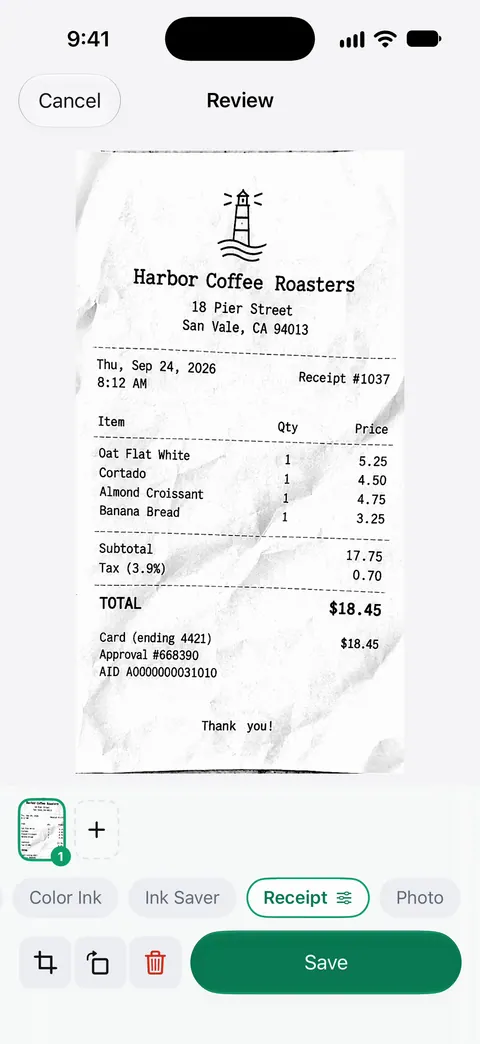
Tonight’s job is many small scans, which is where a scanner app saves real time. Scans come with Auto Clean, Color, Grayscale and Receipt filters. This is a receipt after the Receipt filter:
A scan can have many pages, and you can reorder them. Search looks inside the text of every document and shows the matching line and page. Ask your documents anything. When does the lease end? What did I spend at the shop? The answer comes back with the page it came from. Free accounts can ask the on-device AI 3 questions a day.
Scanner One exports to Word, keeping headings, lists and tables, and to Excel and CSV. Free accounts can run the PDF tools and the Word, Excel and CSV exports 3 times a week, from one shared allowance. So you can turn the receipts into a sheet to check your totals; see turning a PDF into an Excel sheet.
The limits: On a free account, pages you share, print or export carry a small “Scanned with Scanner One” label at the bottom right. Pro removes it. It doesn’t submit the report to your company’s expense tool for you: you attach the scans there yourself.
Questions and answers
What does a receipt need to show for an expense report?
The amount, the date, the place and what it was for. The IRS says a hotel receipt should show the hotel’s name and location, the dates you stayed and the separate charges; a restaurant receipt should show the name and location, the number of people served, and the date and amount.
What do I do if I lost a receipt?
Look for the email confirmation or booking, ask the merchant or hotel for a copy, and find the charge on your card statement. Then follow your company’s missing-receipt process, which often asks for a signed note with the details. Don’t estimate amounts.
Can I submit scanned receipts instead of the paper ones?
Most companies take scans or photos in their expense tool; check your policy. For tax records, the IRS says the same requirements apply to electronic records as to paper ones, so a clear, complete scan is what matters.
How long do I have to submit an expense report?
Your company’s policy sets the deadline. For a plan that keeps reimbursements tax-free, the IRS treats accounting for expenses within 60 days after they were paid as within a reasonable period, and returning any excess advance within 120 days.
Should I keep the paper receipts after scanning?
Keep them until you have been reimbursed and your company’s policy allows you to discard them. Some companies want originals kept for a while; our guide on throwing away originals after scanning goes through when it is safe.
Sources
What this page says about Scanner One was checked against the app on .
- IRS, Publication 463 (2025), Travel, Gift, and Car Expenses — chapter 5, what adequate records and documentary evidence are, timely kept records, the business purpose, destroyed records; chapter 6, accountable plans and the time periods for accounting and returning advances; page last reviewed 2026-04-30
- IRS, What kind of records should I keep — the same requirements apply to electronic records as to paper; page last reviewed 2026-08-03
- Apple Support, How to scan documents on your iPhone or iPad (article 108963) — Scan Documents in Notes and Files, Keep Scan, adding more pages; published 2026-02-13
- Scanner One on the App Store — the app’s own listing: Receipt filter, multi-page scans, Excel and CSV export
Get Scanner One
Scanner One is free, with generous limits: scanning, clean PDFs and text search never stop.

Scanner OneScan, sign and ask anything
Scanner One is free, with generous limits: scanning, clean PDFs and text search never stop.