
Comparison
Scanner One vs QuickScan
QuickScan (QuickScan:PDF OCR Text Scanner, by iSolid) is free: its App Store page says donations don’t restrict any feature, it has no ads, collects no data and processes everything on the device, with OCR, searchable PDFs, signatures and Shortcuts. Scanner One also keeps documents on the phone and reads text for free, and adds automatic naming and filing, Library search, PDF tools and Office export, with free limits and a label on shared pages. Pick QuickScan to scan and export for free; Scanner One to organize.

Scanner One is our app. Facts about QuickScan come from its US App Store page and its developer’s website, read on November 13, 2026.
This page compares one well-liked free scanner with Scanner One. For the wider field of free scanners, see the best free scanner app for iPhone.
Which QuickScan
Several App Store apps use the name. This page is about QuickScan:PDF OCR Text Scanner by iSolid (seller iSolid SPRL), the free one supported by donations. A different app, QuickScan: PDF & OCR Scanner by Technostacks, sells subscriptions at $3.99 a month, $9.99 for 3 months and $29.99 a year; nothing below applies to it.
What QuickScan offers
QuickScan’s App Store description is unusually direct:
- Price. “The app is 100% FREE, with NO ads and NO data collection.” The in-app purchases are donations, and the description says they don’t restrict the app’s functionality.
- On the device. Everything is processed on your device, no internet connection is required, and the app does not use any server.
- Scanning. Automatic document detection and automatic angle correction.
- Text. OCR on images and existing PDFs, with automatic language detection and dictionary matching. iSolid’s website says 30+ OCR languages.
- Exports. PDF with recognized text, plain text, and images with optional grayscale or black-and-white filters, plus cloud destinations through Export Favorites.
- Extras. Signatures with a finger or Apple Pencil, filename patterns, widgets and Siri Shortcuts.
Its privacy label says Data Not Collected. It runs on iPhone and iPad with iOS 16.4 or later.
That’s a strong free offer. If what you need is a clean, searchable PDF sent somewhere, QuickScan does it without asking for anything.
What Scanner One adds
Scanner One scans and reads the same way, and the difference is what happens next.
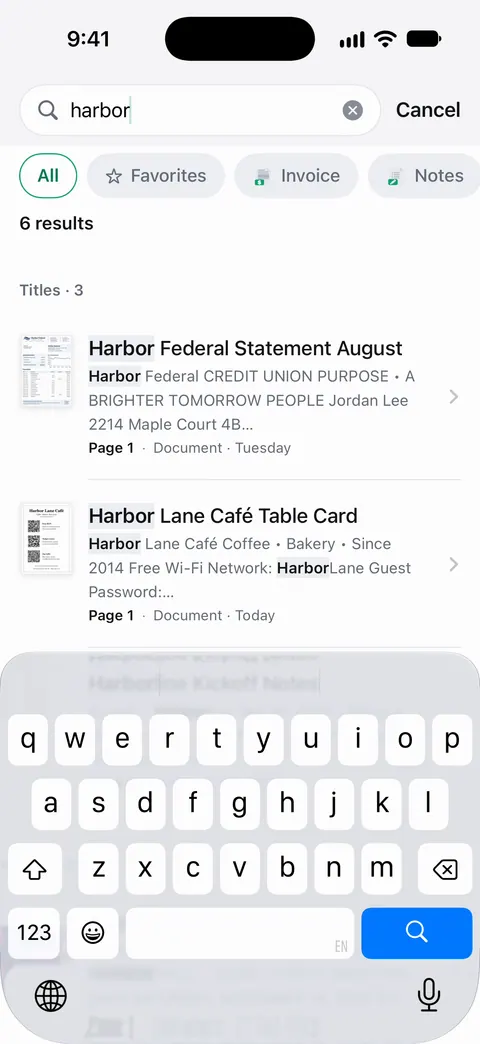
Point your camera at any piece of paper. Scanner One finds the edges, straightens the page, cleans it up and saves a real PDF. Then it reads the text, names the document, tags it and puts it in the right folder. Search looks inside the text of every document and shows the matching line and page.
Beyond the scan:
- PDF tools. The PDF tools merge, split, compress, password-protect, add page numbers and watermarks, and extract text.
- Office export. Scanner One exports to Word, keeping headings, lists and tables, and to Excel and CSV.
- Special papers. ID cards and passports are scanned with both sides on one printable page. Book spreads are split into two pages and curved lines are flattened. Business cards go straight to Contacts.
- Questions. Ask your documents anything. When does the lease end? What did I spend at the shop? The answer comes back with the page it came from.
- Reading. Listen reads any document aloud.
Privacy is close: Documents stay on your iPhone unless you share them or turn on iCloud Sync. Scanner One needs no account and does no tracking.
Side by side, checked November 13, 2026
| QuickScan (iSolid) | Scanner One | |
|---|---|---|
| Price model | Free; optional donations $4.99 to $49.99 that don’t restrict features | Free download. Pro at $4.99 a month, $29.99 a year or $59.99 once |
| Free limits | None, per the description | Scanner One is free, with generous limits: scanning, clean PDFs and text search never stop. Tools: 3 a week |
| Watermark | Not mentioned on its page | Free: “Scanned with Scanner One” label; Pro removes it |
| Text recognition | On images and PDFs, 30+ languages per iSolid | Text recognition runs on the device, in 29 languages. |
| Automatic filing | Filename patterns | Then it reads the text, names the document, tags it and puts it in the right folder. |
| PDF tools and Office export | Not listed on its page | The PDF tools merge, split, compress, password-protect, add page numbers and watermarks, and extract text. |
| Privacy label | Data Not Collected | Scanner One’s privacy manifest declares no tracking. |
| Platforms | iPhone and iPad; iOS 16.4 or later | iPhone and iPad; iOS 17 or later |
Where each one fits
QuickScan fits if you scan, export and you’re done: the PDF goes to email, a cloud folder or Files, and you organize it there. Its filename patterns and Export Favorites make that quick, and it costs nothing.
Scanner One fits if you want the scanner to be where your papers live. It names, tags and files each document, search reads inside every page, and the tools to merge, compress or split sit on the document, with redaction in Pro. If you have years of bills and letters to find again, that saves time. How to name scanned documents and find a document by a word inside it show what that looks like in practice.
The honest catch. Scanner One’s free version has limits QuickScan doesn’t: Free accounts can run the PDF tools and the Word, Excel and CSV exports 3 times a week, from one shared allowance. On a free account, pages you share, print or export carry a small “Scanned with Scanner One” label at the bottom right. Pro removes it. If you send scans to other people every day and won’t pay, QuickScan is the easier free choice.
Before either: Notes and Files
If you scan a page a month, you don’t need either. In Notes, open a note, tap the Attachment button and tap Scan Documents; in Files, tap the More button and tap Scan Documents, then choose a folder and tap Save. The how to scan documents on iPhone guide covers both.
Which one to pick
- Free, unlimited, no strings: QuickScan.
- No data collected, per the label: QuickScan says Data Not Collected; Scanner One’s manifest declares no tracking and it needs no account.
- Automatic naming and filing, Library search, PDF tools: Scanner One.
- ID cards on one page, book spreads, business cards to Contacts: Scanner One.
The privacy labels of more scanners are compared on scanner apps and their privacy labels.
Where Scanner One helps, and where it doesn’t
Where it helps: everything after the scan. Then it reads the text, names the document, tags it and puts it in the right folder. Search looks inside the text of every document and shows the matching line and page. The PDF tools merge, split, compress, password-protect, add page numbers and watermarks, and extract text. Text recognition runs on every page for everyone, free or Pro.
Where it doesn’t:
- It isn’t free without limits. Free accounts can run the PDF tools and the Word, Excel and CSV exports 3 times a week, from one shared allowance. Free accounts can sign and mark up 3 documents a month. QuickScan says it has none.
- The label. On a free account, pages you share, print or export carry a small “Scanned with Scanner One” label at the bottom right. Pro removes it. Pro means no ads and no watermark.
- Platforms. Scanner One runs on iPhone and iPad. No Android, Mac or web version.
- When Notes or QuickScan is enough. For scanning and sending, both are free.
Questions and answers
Is QuickScan really free?
Its App Store page says the app is 100% free, with no ads and no data collection. The in-app purchases are donations, from $4.99 to $49.99, and the description says they do not restrict the app’s functionality.
Which QuickScan is this?
QuickScan:PDF OCR Text Scanner by iSolid, App Store id 1513790291. A different app, QuickScan: PDF & OCR Scanner by Technostacks, sells subscriptions from $3.99 a month. Check the developer name before you install.
Does QuickScan work offline?
Yes, per its App Store page: everything is processed on the device, no internet connection is required, and the app does not use any server.
Does Scanner One put a label on free scans?
Yes. On a free account, pages you share, print or export carry a small "Scanned with Scanner One" label at the bottom right. Pro removes it. QuickScan’s App Store page doesn’t mention a watermark.
Sources
What this page says about Scanner One was checked against the app on .
- QuickScan:PDF OCR Text Scanner on the App Store — free with donations, no ads, no data collection, on-device processing, OCR, exports, signatures, Shortcuts, privacy label, version 9.7.7, iOS 16.4 requirement; read 2026-11-13
- iSolid apps website — QuickScan as a document scanner with OCR for iPhone and iPad, 30+ OCR languages, no data collection; read 2026-11-13
- QuickScan: PDF & OCR Scanner on the App Store — a different app with a similar name, by Technostacks, with subscriptions; read 2026-11-13
- Scanner One on the App Store — the app’s own listing
Get Scanner One
Scanner One is free, with generous limits: scanning, clean PDFs and text search never stop.

Scanner OneScan, sign and ask anything
Scanner One is free, with generous limits: scanning, clean PDFs and text search never stop.