
Who it’s for
Paperwork for international students
Scan every page of your passport, visa, Form I-20, admission letter, transcripts and financial documents into one folder on your iPhone, named so you can find each in seconds, and back it up. Carry the signed originals in your hand luggage: Study in the States says to keep originals with you and out of checked bags. Make extra copies for family and your school, and keep translations next to the documents they translate.

This page is about keeping a student’s papers in order across two countries: before you leave, at the border, and during your studies. For the visa application list itself, see the F-1 student visa documents checklist or the UK student visa checklist.
The papers an international student deals with
- Passport and the student visa.
- Form I-20 (for F and M students in the US), signed by you and your designated school official, or the equivalent letter from a school in another country.
- Admission letter and any scholarship letters.
- SEVIS I-901 fee receipt for US study.
- Financial documents: bank statements, sponsor letters, scholarship award letters.
- Academic records: transcripts, diplomas, test scores, and their translations.
- Health papers: vaccination records, insurance cards, medical reports.
- After arrival: lease, bank account papers, I-94 record, work authorization letters, Social Security number papers if you get one.
What Study in the States says about the I-20
The Department of Homeland Security’s Study in the States site says:
- All F and M students need a Form I-20. Your school’s designated school official issues it after you are accepted, and you and the DSO both sign it; parents sign for students under 18.
- Your visa type must match the I-20 (F-1 or M-1).
- You need details from the I-20 to pay the I-901 SEVIS fee before you enter the US.
- Keep the signed original safe and have it with you at the visa interview and when you enter the country. Don’t pack it in checked luggage.
- Carry your passport, visa and I-20 on arrival, originals with you, and make at least two sets of copies: one for family at home, one for your school officials.
- Bring the I-20 when you apply for a driver’s license or a Social Security number. If it is lost, ask your DSO for a new one.
This page is general information, not immigration or legal advice. Visa rules, fees and required documents change and differ by country and consulate; check Study in the States, your consulate and your school’s international office before you apply or travel.
A workflow before you leave
- Scan every document with Scan Documents in Notes or Files: all passport pages with stamps, both sides of cards, every page of the I-20. Keep each document as one PDF.
- Name files in English, with the document and date: “I-20 signed 2026-07-15”, “Bank statement June 2026”. An officer or advisor reading over your shoulder can follow.
- Put translations next to originals: “Transcript 2025 (original)” and “Transcript 2025 (English translation)”.
- Back up the folder to a cloud account you can reach from any computer, in case the phone is lost.
- Share copies with family at home and send your school the set it asks for.
- Pack originals in hand luggage, in one folder, with the I-20 on top.
Translations
For your own understanding, Live Text in Apple’s Preview app can translate text in an image: select the text, tap Translate, and choose a language. Apple notes translation isn’t available in every language or region. The translate a document on iPhone guide covers the other ways.
For applications, a machine translation is rarely enough. Schools, embassies and agencies usually set their own rules: a complete translation, sometimes by a certified translator, sometimes with the translator’s statement attached. Ask each office before you pay for one.
Uploads and portals
Visa systems, schools and banks each have upload portals with size limits and file types. Keep each document under the limit and in PDF where allowed. Preview on iPhone can export a smaller PDF, and make a PDF under a size limit has the steps. Think before emailing passport copies around; should you email a copy of your passport weighs it up.
The mistakes that cost time
- Originals in checked luggage. Lost bags happen at the worst moment.
- Only the photo page scanned, when an office asks for every stamped page.
- Files named in your own language that an advisor can’t read.
- Out-of-date bank statements. Many offices want recent ones; rescan before each application.
- A phone with the only copy. Back it up before you fly.
The new to a country paperwork guide covers the weeks after you land.
Where Scanner One helps, and where it doesn’t
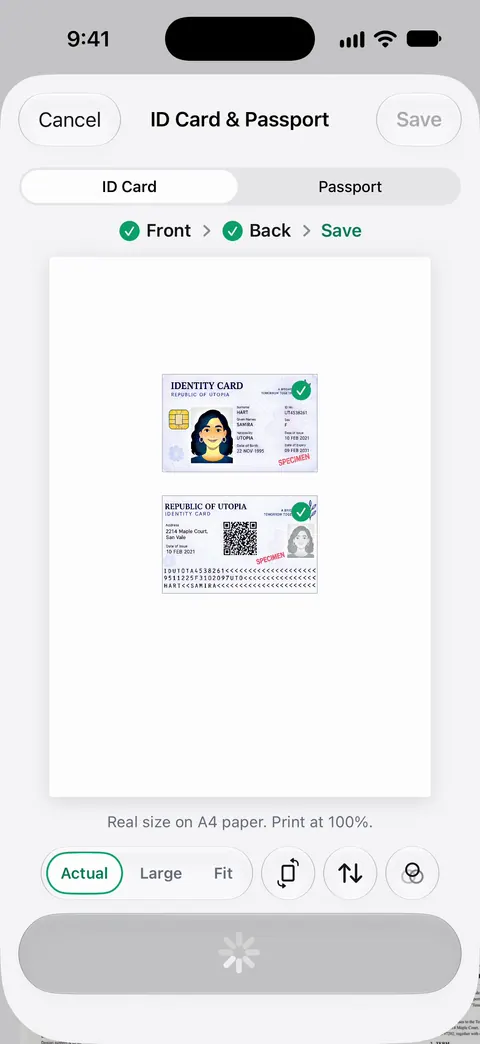
Point your camera at any piece of paper. Scanner One finds the edges, straightens the page, cleans it up and saves a real PDF. ID cards and passports are scanned with both sides on one printable page. Text recognition runs on the device, in 29 languages. Search looks inside the text of every document and shows the matching line and page. That helps when an officer asks for your SEVIS number and you can find the page in seconds.
Scanner One is available in 34 languages, including English, Spanish, Portuguese, French, German, Italian, Dutch, Swedish, Danish, Norwegian, Finnish, Polish, Czech, Greek, Ukrainian, Russian, Turkish, Arabic, Hebrew, Hindi, Thai, Vietnamese, Indonesian, Japanese, Korean and Chinese. The PDF tools merge, split, compress, password-protect, add page numbers and watermarks, and extract text. Documents stay on your iPhone unless you share them or turn on iCloud Sync. You can lock the app with Face ID.
A checklist from your own papers. Packs: say what you’re applying for, like a visa, a lease or your taxes, and see which papers you have and what’s missing. Pro checks each paper in a Pack against what’s asked.
What to know first:
- Free accounts can run the PDF tools and the Word, Excel and CSV exports 3 times a week, from one shared allowance. On a free account, pages you share, print or export carry a small “Scanned with Scanner One” label at the bottom right. Pro removes it. Check whether an office will accept a copy with that label before you upload from a free account.
- Pro removes every limit. Scanner One Pro costs $29.99 a year in the US, with a one-week free trial.
It is not a translation service or an immigration advisor, and a scan never replaces the originals you are asked to carry. For a handful of documents, Notes and Files are enough.
Questions and answers
Is a scan of my I-20 enough when I travel?
No. Study in the States says to have the signed original Form I-20 with you at your visa interview and when you enter the United States, and to keep it out of checked luggage. A scan is a backup and a quick reference, not a replacement.
What documents should an international student keep copies of?
Your passport photo page and visa, Form I-20 or your country’s equivalent, admission letter, SEVIS fee receipt, transcripts and diplomas, test scores, financial documents, and health and insurance papers. Study in the States suggests at least two sets of copies: one for family at home and one for your school.
Can I translate my documents with my iPhone?
For understanding a document, yes: Live Text in Preview can translate selected text in an image, in supported languages. For an application, a school, embassy or agency usually needs a complete translation that meets its own rules, sometimes certified. Check what each office asks for.
What do I do if I lose my Form I-20?
Study in the States says to ask your designated school official (DSO) for a new one. Your scan helps you give the DSO the details quickly.
Sources
What this page says about Scanner One was checked against the app on .
- Study in the States (DHS), Students and the Form I-20 — what the I-20 is, who signs it, keeping the signed original safe and out of luggage, the visa type matching the I-20, the I-901 SEVIS fee, bringing it for a driver’s license or Social Security number; last updated 2025-04-29
- Study in the States (DHS), Arriving in the United States — carry passport, visa and Form I-20, originals with you and not in checked baggage; at least two sets of copies; I-94 records; last updated 2023-05-25
- Apple Support, Scan documents on your iPhone or iPad (article 108963) — Scan Documents in Notes and Files; page dated 2026-02-13
- Apple iPhone User Guide, Interact with text in an image in Preview on iPhone — Live Text in Preview: copy or translate text in an image; translation isn’t available in all languages or regions; read 2026-11-13
- Apple iPhone User Guide, Export or compress PDFs and images in Preview on iPhone — exporting a smaller PDF for upload limits; read 2026-11-13
- Scanner One on the App Store — the app’s own listing: text recognition languages, app languages
Get Scanner One
Scanner One is free, with generous limits: scanning, clean PDFs and text search never stop.

Scanner OneScan, sign and ask anything
Scanner One is free, with generous limits: scanning, clean PDFs and text search never stop.