
Glossary
What is a HEIC file, and how do you open it?
A HEIC file is a photo saved in HEIF, the High Efficiency Image File Format, with HEVC compression. iPhones have used it by default since iOS 11 because it compresses photos better than JPEG at similar quality. Macs and iPhones open it natively; Windows needs Microsoft’s HEIF extension, and many upload forms only take JPEG or PDF. You can switch the camera to JPEG, or convert a HEIC to JPEG or PDF before you send it.

This page explains the format. If you only need to change a file, the step-by-step guides are HEIC to JPG on iPhone and HEIC to PDF on iPhone.
What HEIC is
HEIC is a file extension, like .jpg or .pdf. Behind it is HEIF, the High Efficiency Image File Format, an international standard (ISO/IEC 23008-12). The Library of Congress describes HEIF as a container: a box that can hold images compressed in different ways. The .heic extension, introduced by Apple, means the image inside was compressed with HEVC, a modern codec also used for video.
Apple announced the switch in June 2017 and made it the default capture format starting with iOS 11. Apple’s support article lists the devices that capture it: iPhone 7 and later, and many iPads from the sixth generation on.
Why Apple uses it
Apple’s article says HEIF compresses photos better than JPEG while keeping similar visual quality. Smaller files add up across thousands of photos. A HEIF file can also carry extra layers: Microsoft’s documentation notes depth information and, in files from recent iPhones, brightness (gain) information used for HDR.
Why HEIC causes trouble when you send papers
The format is efficient, but support outside Apple is patchy:
- Windows. Microsoft’s documentation points to the HEIF Image Extension in the Microsoft Store, and notes that the HEVC codec it uses might not be available on all PCs. Without them, the Photos app can’t show the file.
- Upload forms. Many government, school and job portals accept only PDF, JPG or PNG. A HEIC file is rejected, or uploads and shows as a blank page to the reviewer.
- Older software. The Library of Congress notes limited support in some editing programs and that HEIF is not on its list of recommended formats for long-term keeping.
Apple works around some of this for you. Its article says that when you share by AirDrop, Messages or email, or import over USB to a computer, the iPhone may convert the photo to a more compatible format automatically. Uploading through a website is where HEIC files most often slip through unchanged.
How to check and change it on iPhone
To see which format your camera uses, and to switch:
- Open Settings and tap Camera.
- Tap Formats.
- High Efficiency captures HEIF (HEIC files). Most Compatible captures JPEG.
Changing this only affects new photos. Photos you already took stay HEIC.
To control what happens when you copy photos to a computer over USB, Apple’s article points to Settings > Apps > Photos: tap Keep Originals if you want the HEIC files copied as they are instead of converted.
To convert a file you already have, use the guides linked above, or our free HEIC to JPG tool, which runs in your browser.
Confusions people have
- HEIC vs HEIF. HEIF is the format; HEIC is HEIF with HEVC compression, the version iPhones save. People use the names interchangeably.
- HEIC vs HEVC. HEVC is the compression method, used for both photos and video. A HEVC video is not a HEIC photo.
- HEIC vs a scan. A photo of a page saved as HEIC is still just a photo. A scan crops, straightens and usually saves as PDF. PDF vs JPG for documents covers which to send.
- Renaming. Changing “.heic” to “.jpg” in the file name doesn’t convert anything. The file stays HEIC inside and many apps will refuse it.
Where Scanner One helps, and where it doesn’t
If you only need one photo as a JPEG now and then, the Camera setting or a share by email is enough.
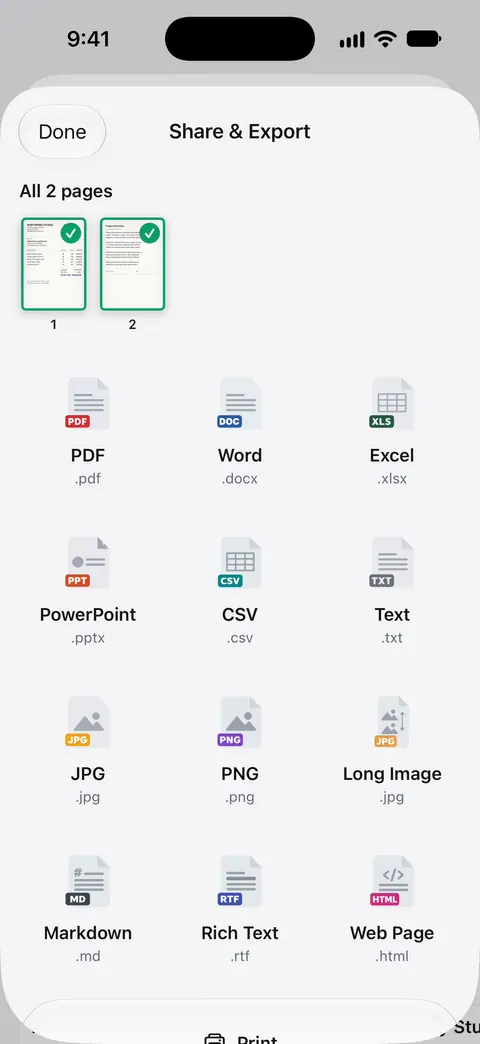
Scanner One helps when a HEIC photo of a document needs to become something an office accepts. From Home you can bring in pictures from Photos and files from the Files app, or scan an ID card. The To PDF tool turns files and photos into PDFs. Share & Export saves a document as a PDF, Word, Excel, PowerPoint, JPG, PNG, a long image, plain text, Markdown, Rich Text, a web page or CSV.
What it doesn’t do: it doesn’t change your Camera’s format or convert your whole photo library. Free accounts can run the PDF tools and the Word, Excel and CSV exports 3 times a week, from one shared allowance. On a free account, pages you share, print or export carry a small “Scanned with Scanner One” label at the bottom right. Pro removes it.
Questions and answers
Why are my iPhone photos HEIC?
Because the Camera’s format is set to High Efficiency, the default on iPhone 7 and later. It saves space. To capture JPEG instead, go to Settings > Camera > Formats and choose Most Compatible.
Can I open a HEIC file on Windows?
Yes, with Microsoft’s HEIF Image Extension from the Microsoft Store. Microsoft notes that the HEVC codec it relies on might not be installed on every PC; it is also available from the Store.
Does converting HEIC to JPEG lose quality?
A little, because JPEG compresses differently and the file usually grows. For documents and everyday photos the difference is hard to see.
Is HEIC good for scanned documents?
It works for keeping a photo of a page, but most offices, portals and printers expect PDF or JPEG. For anything you will send, convert to PDF first.
Sources
What this page says about Scanner One was checked against the app on .
- Library of Congress, Sustainability of Digital Formats: High Efficiency Image File Format (HEIF) — HEIF is ISO/IEC 23008-12, a container that can hold HEVC, AVC or JPEG images; .heic means HEIF with HEVC-coded images and was introduced by Apple; Apple adopted it in iOS 11 (2017); read 2026-11-13
- Apple Support, Using HEIF or HEVC media on Apple devices (article 116944) — devices that capture HEIF; Settings > Camera > Formats, High Efficiency or Most Compatible; conversion to JPEG on import or sharing; Keep Originals; read 2026-11-13
- Microsoft Learn, HEIF extension codec — the HEIF Image Extension from the Microsoft Store; HEIF compressed with HEVC typically uses .heic; HEVC codecs might not be on all PCs; updated 2025-03-11, read 2026-11-13
- Scanner One on the App Store — the app’s own listing: To PDF and export formats
Get Scanner One
Scanner One is free, with generous limits: scanning, clean PDFs and text search never stop.

Scanner OneScan, sign and ask anything
Scanner One is free, with generous limits: scanning, clean PDFs and text search never stop.