
Comparison
PDF vs JPG for documents: which should you send?
Send a PDF for documents: it keeps every page in one file, can carry searchable text, and is accepted by most portals, including USCIS and the IRS upload tool. Send a JPG when you’re asked for an image, for a single photo or a one-page ID where a portal wants a picture, or when someone will view it in a chat. If a portal lists both, PDF is the safer pick for anything with more than one page.

This page helps you pick a format. For the steps to save a scan as an image, see save a scan as JPG.
PDF vs JPG at a glance
| JPG | ||
|---|---|---|
| Pages per file | As many as you need | One |
| Searchable text | Can include a text layer | No, it’s only a picture |
| Looks the same everywhere | Yes, page size and order are fixed | Yes, but each page is separate |
| Opens in chats and email previews | Usually as a file to tap | Usually right in the message |
| Good for | Letters, forms, leases, statements, anything with pages | Photos, a single ID side, a picture a form asks for |
| Password protection | Possible, but many portals refuse locked files | Not available |
Why PDF is the default for documents
- One file, every page, in order. A 4-page bank statement is one PDF. As JPGs it’s four files that can arrive out of order or not at all. The IRS upload tool, for instance, takes up to 40 files per upload, with each PDF up to 120 pages, so a long document fits in one PDF far more easily than as separate pictures.
- Searchable text. A PDF can carry a hidden text layer under the page image, so the person receiving it can search for a name or an amount. Preview on iOS 26 and later adds one when you export with Embed Text, which Apple says runs OCR on the images.
- It’s what offices expect. USCIS says files generally must be PDFs, JPGs or JPEGs; the IRS upload tool takes JPEG, PNG or PDF. When both are allowed, a single PDF is easier for the person on the other end to review.
- Archivists use it for documents too. The Library of Congress’s scanning handout says documents can be saved as PDF files, and suggests JPEG for photos.
When JPG is the better choice
- A photo. Old prints and pictures of objects are images, and JPEG is the everyday format for them. The Library of Congress suggests medium-quality JPEG for color scans and high quality if you plan to reprint.
- A form asks for an image. Some uploads, such as a profile or ID picture, accept only JPG or PNG.
- One page viewed in a chat. A JPG opens right in the message; a PDF usually needs a tap. For a quick “here’s the receipt”, a JPG is friendlier.
Rules that apply to both
- Read the portal’s list first. USCIS’s limit is 12MB per file; the IRS tool’s is 15 MB. Other sites differ. Our upload size checker tells you whether a file fits.
- Don’t lock it. USCIS says not to encrypt or password-protect files.
- Make it readable. USCIS also says every image must be clear and all text readable. The format can’t fix a blurry page.
- Watch for HEIC. iPhone photos may be saved as HEIC, which portals rarely list. Export as JPG or put them in a PDF. See what a HEIC file is.
Color, gray or black and white
The format is half the choice; the color mode is the other half, and it changes the file size more than PDF vs JPG does. The Library of Congress handout describes three modes:
- Bitonal (pure black and white): suitable for printed and handwritten text, and the smallest files.
- Grayscale: up to 256 gray tones. It suits black and white photos, and the handout notes it may capture handwriting details better than bitonal.
- Color: for photos, maps, diagrams and anything where color carries meaning, such as a stamp, a seal or a highlighted line.
For a typed letter or a bank statement, grayscale or black and white keeps the file small and the text crisp. For an ID, a birth certificate with a colored seal or anything an office will check for authenticity, keep color.
What to keep for your own records
For your own files, keep the PDF. It holds the whole document, its pages stay together, and a searchable PDF can be found later by a word inside it. Make a JPG copy only when someone asks for one; you can always export it again from the PDF.
How to switch formats on iPhone
PDF to JPG with Preview (iOS 26 and 27):
- Open the PDF in Preview.
- Tap the menu next to the file name, then tap Export.
- Choose JPEG. Set the Resolution in pixels per inch; higher is sharper and larger.
- Tap the save button, choose a location and tap Save.
Images to PDF: in Preview, export an image as PDF, or use our free photos to PDF tool, or follow photos to PDF on iPhone. If a PDF is too big to upload, Preview’s Optimize Images for Screen and Save Images as JPEG options make it smaller; making a PDF under a size limit covers more ways.
Where Scanner One helps, and where it doesn’t
Scanner One is our app. Where it helps: Scanner One makes searchable PDFs. Share & Export saves a document as a PDF, Word, Excel, PowerPoint, JPG, PNG, a long image, plain text, Markdown, Rich Text, a web page or CSV. So you can keep one scan and send it as whatever the portal asks for. The PDF tools merge, split, compress, password-protect, add page numbers and watermarks, and extract text.
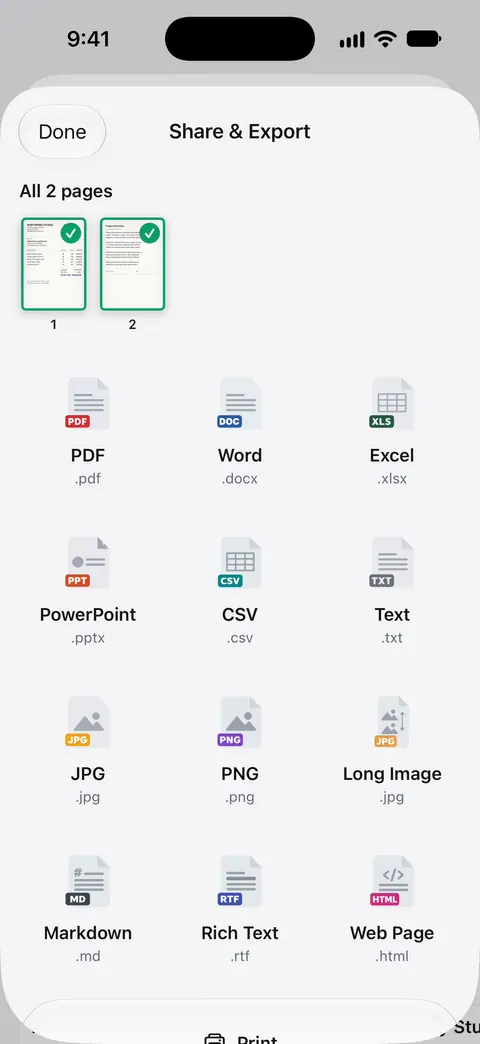
Where it doesn’t: Preview already converts between PDF and JPG for free on iOS 26 and 27, so you don’t need an app just for that. Free accounts can run the PDF tools and the Word, Excel and CSV exports 3 times a week, from one shared allowance. On a free account, pages you share, print or export carry a small “Scanned with Scanner One” label at the bottom right. Pro removes it. That label appears on exported JPGs as well as PDFs from a free account, which matters if the file is going to an office. Scanner One runs on iPhone and iPad.
Questions and answers
Is PDF or JPG better for scanned documents?
PDF, in most cases. One PDF holds every page in order, can include searchable text, and opens the same way on any computer. JPG is better for a single photo or when a form specifically asks for an image.
Does USCIS accept JPG?
Yes. Its tips page says files generally must be PDFs, JPGs or JPEGs, no larger than 12MB, and not encrypted or password protected. Some forms also take TIF or TIFF.
Is a PDF bigger than a JPG?
Not necessarily. A scanned PDF is usually one image per page inside a PDF wrapper, so one page as PDF and as JPG are often close in size. Preview can make a PDF smaller with Optimize Images for Screen and Save Images as JPEG.
Can I convert a PDF to JPG on my iPhone?
Yes. In Preview, open the PDF, tap the menu next to the file name, tap Export, choose JPEG and set the Resolution. Our free PDF to JPG tool also runs in your browser.
Sources
What this page says about Scanner One was checked against the app on .
- USCIS, Tips for Filing Forms Online — files generally PDF, JPG or JPEG, TIF or TIFF for some forms, up to 12MB, no password protection; last reviewed October 7, 2026
- IRS, Fact sheet FS-2023-05 on the Documentation Upload Tool — JPEG, PNG or PDF, 15 MB per file, up to 40 files, PDFs limited to 120 pages each; dated February 2023
- Library of Congress, Scanning Your Personal Collections (Personal Digital Archiving series) — JPEG for grayscale and color scans, documents can be saved as PDF; undated handout
- Apple iPhone User Guide, Export or compress PDFs and images in Preview — export to HEIC, JPEG, PDF, PNG or TIFF, Resolution, Embed Text, Optimize Images for Screen; guide for iOS 26 and 27, read 2026-11-13
- Scanner One on the App Store — the app’s own listing
Get Scanner One
Scanner One is free, with generous limits: scanning, clean PDFs and text search never stop.

Scanner OneScan, sign and ask anything
Scanner One is free, with generous limits: scanning, clean PDFs and text search never stop.