
Glossary
What is the MRZ on a passport?
The MRZ, or machine readable zone, is the two lines of capital letters, digits and < signs printed at the bottom of a passport’s photo page. Each line has 44 characters, laid out by the ICAO standard Doc 9303, and they repeat your name, passport number, nationality, date of birth, sex and expiry date, with check digits, so machines at borders can read them. It matters because the MRZ packs your key details into one easy-to-copy strip.

This page explains what the MRZ is and what it says. To cover it and other details on a copy, follow redact a driver’s license or passport copy.
What the MRZ is
Open your passport to the page with your photo. At the bottom are two lines that look like gibberish: capital letters, numbers and rows of < signs. That is the machine readable zone. The International Civil Aviation Organization (ICAO) sets its layout in Doc 9303, the standard for machine readable travel documents; Part 4 covers passports. The current text is the eighth edition, from 2021.
The MRZ lets a reader at a border, an airline counter or a hotel desk capture your details in a second, the same way in every country, instead of someone typing them in.
What each line says
The upper line, 44 characters:
| Positions | What it holds |
|---|---|
| 1 to 2 | Document code: P for passport, then a letter for the type, or < |
| 3 to 5 | Issuing country, as a three-letter code |
| 6 to 44 | Your name: surname, then <<, then given names, with < for spaces |
The lower line, also 44 characters:
| Positions | What it holds |
|---|---|
| 1 to 9 | Passport number |
| 10 | Check digit |
| 11 to 13 | Nationality, as a three-letter code |
| 14 to 19 | Date of birth, as year, month, day |
| 20 | Check digit |
| 21 | Sex: F, M or < for unspecified |
| 22 to 27 | Expiry date |
| 28 | Check digit |
| 29 to 42 | Optional personal number, or < fillers |
| 43 | Check digit |
| 44 | Composite check digit for the whole line |
Long names are cut short to fit, and the standard says the name field must end with a letter in position 44 to show it may be truncated.
Why it matters when you share a copy
Hotels, landlords, employers and online services sometimes ask for a passport copy. The visible part of the page already shows your details, but the MRZ repeats the most useful ones in a form any software can read and check instantly, check digits included. A copy with a clean MRZ is easier to misuse than one without.
If the recipient only needs to see your name and photo, covering the MRZ costs nothing. Cover it properly. The District of New Jersey’s e-filing guide warns that a black box or black highlight drawn over data “will not protect the data,” because the text can still be there underneath. On a photo of a passport, a box painted into the image itself is what counts; a box sitting on top as an annotation can be removed.
How to check your own MRZ on an iPhone
- Scan or photograph the photo page in good light, flat, with no glare across the bottom lines.
- Zoom in on the MRZ. Each character should be sharp; a blurry MRZ is why some online checks reject an upload.
- Read the lower line against the page: positions 14 to 19 should match your date of birth, and 22 to 27 your expiry date.
- If you’re redacting a copy, search the finished file for your passport number. If search finds it, it’s still in there.
For when sending a copy is wise at all, see should you email a copy of your passport.
Confusions people have
- MRZ vs chip. Modern passports also carry a chip, covered by other parts of Doc 9303. The MRZ is the printed zone, and Part 4 lists it as mandatory.
- MRZ vs passport number. The passport number printed elsewhere on the page is the same as positions 1 to 9 of the lower line. Covering one and not the other hides nothing.
- Passport vs other documents. Visas and ID cards follow other parts of Doc 9303, with their own MRZ layouts, so the tables above apply to passports only.
Where Scanner One helps, and where it doesn’t
For a quick photo of your passport, the Camera or Notes is enough. Covering the MRZ properly is the harder part.
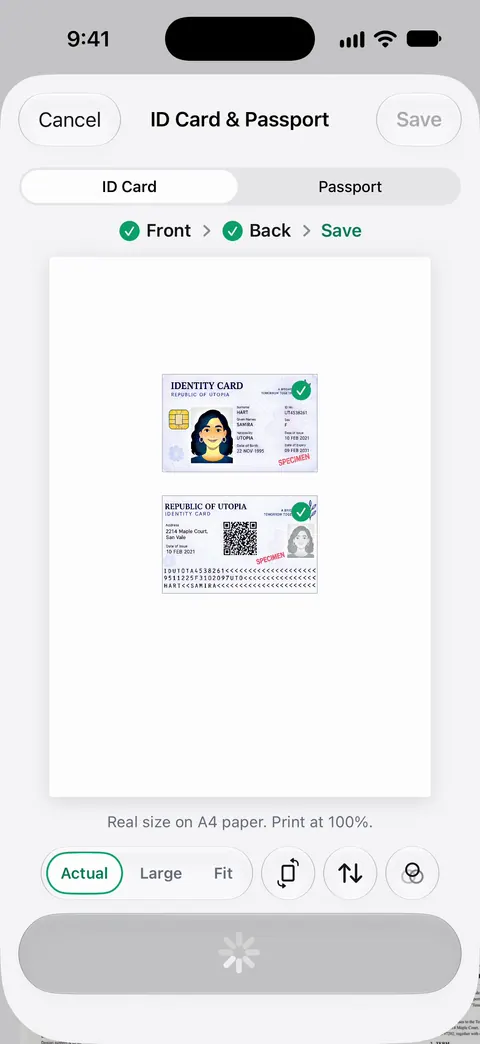
Scanner One handles both halves. ID cards and passports are scanned with both sides on one printable page. Redaction is permanent. Pro adds redaction, the smart eraser, edit text, auto-export and five alternate app icons. See ID cards and passports.
The limits: redaction removes only what you mark, so check the passport number at the top as well as the MRZ. Redaction is part of Pro. On a free account, pages you share, print or export carry a small “Scanned with Scanner One” label at the bottom right. Pro removes it.
Questions and answers
What do the < symbols on a passport mean?
They are filler characters. Doc 9303 uses < to fill empty positions and to separate parts of the name: a double << separates the surname from the given names, and a single < stands in for spaces.
Should I cover the MRZ when I send a passport copy?
If the person doesn’t need it, covering it is a sensible precaution, because it repeats your number, birth date and expiry in a form software reads instantly. If an airline, bank or government office asks for a full copy, send what they ask for, through their own secure channel.
What is the check digit in the MRZ?
A digit calculated from the characters before it, so a machine can tell if a number was misread. The lower line has five: after the passport number, the date of birth, the expiry date, the personal number, and one composite digit for the whole line.
Do ID cards have an MRZ too?
Many do. Doc 9303 also has parts for smaller travel documents in the TD1 and TD2 sizes, the sizes many ID cards use, and for visas. Their MRZ layouts differ from the passport’s two lines of 44.
Sources
What this page says about Scanner One was checked against the app on .
- ICAO, Doc 9303 Machine Readable Travel Documents (series page) — the 13 parts of the specification for machine readable travel documents, including Part 4 for passports; read 2026-11-13
- ICAO, Doc 9303 Part 4: Specifications for Machine Readable Passports (MRPs) and other TD3 size MRTDs, Eighth Edition, 2021 — section 4.2: the MRZ is on the front of the data page; the upper line’s document code, issuing state and name; the lower line’s passport number, nationality, date of birth, sex, expiry date, optional personal number and five check digits, positions 1 to 44; read 2026-11-13
- U.S. District Court for the District of New Jersey, Personal-Identity and Metadata Redaction Techniques for E-Filing — a black box or highlight over data does not protect it; undated, read 2026-11-13
- Scanner One on the App Store — the app’s own listing: ID cards and passports, permanent redaction
Get Scanner One
Scanner One is free, with generous limits: scanning, clean PDFs and text search never stop.

Scanner OneScan, sign and ask anything
Scanner One is free, with generous limits: scanning, clean PDFs and text search never stop.