
Comparison
Scanner One vs Adobe Acrobat Reader on iPhone
Acrobat Reader on iPhone is free to open, read, fill in and sign PDFs, per its App Store page. Creating PDFs, editing text, converting to Word or Excel, merging, compressing, OCR and passwords need Acrobat Premium, listed from $9.99 a week to $69.99 a year. Scanner One scans paper, reads text for free, and includes those PDF tools with a free allowance of 3 a week; Pro removes the limits for $29.99 a year or $59.99 once. Keep Acrobat Reader if you only read and sign; compare costs if you convert and merge often.

Scanner One is our app. Facts about Acrobat Reader come from its US App Store page and Adobe’s Acrobat Reader mobile page, read on November 13, 2026.
This page compares the two apps as PDF tools on the iPhone: reading, filling, signing, converting and editing. If you want to compare scanners, Scanner One vs Adobe Scan covers Adobe’s scanning app.
The free line in Acrobat Reader
Acrobat Reader is free to download, and its App Store description is clear about where the free part ends.
Free: open, read, fill in and sign PDFs. Liquid Mode, highlights, comments and sticky notes, sharing, and free read-aloud voices. You don’t need an Adobe account to read PDFs; a free Adobe account adds Document Cloud storage and access across devices.
Acrobat Premium: creating PDFs from photos, Office files or web pages; editing text and images; converting PDFs to Word, Excel, PowerPoint or images; merging, compressing and page management (insert, reorder, rotate, delete, extract, crop, split); OCR for searchable text; password protection; and higher-quality voices. The description says you can start with a free trial.
So if your PDF life is reading statements and signing the odd form, Acrobat Reader costs nothing. The moment you need to merge two files or shrink one for email, you’re looking at Premium.
What those Premium jobs look like in Scanner One
The PDF tools merge, split, compress, password-protect, add page numbers and watermarks, and extract text. Scanner One exports to Word, keeping headings, lists and tables, and to Excel and CSV. You can sign and annotate documents. Fill Form lets you type into the fields of a PDF form.
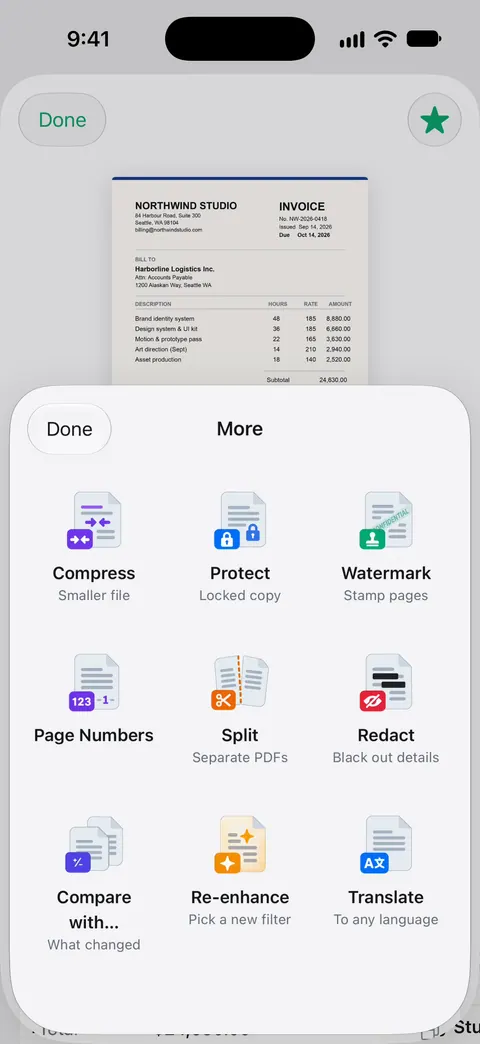
Those tools sit on every document. Free accounts get a shared allowance: Free accounts can run the PDF tools and the Word, Excel and CSV exports 3 times a week, from one shared allowance. Signing has its own: Free accounts can sign and mark up 3 documents a month. Pro removes both. Pro removes every limit.
Scanner One also starts where Acrobat Reader doesn’t: with paper. Point your camera at any piece of paper. Scanner One finds the edges, straightens the page, cleans it up and saves a real PDF. Text recognition runs on every page for everyone, free or Pro.
Side by side, checked November 13, 2026
| Acrobat Reader | Scanner One | |
|---|---|---|
| Price model | Free; Premium listed at $9.99 a week, $12.99 to $14.99 a month, $48.99 to $69.99 a year; AI Assistant add-on $6.99 | Free download. Pro at $4.99 a month, $29.99 a year or $59.99 once |
| Free | Read, fill in, sign, comment, Liquid Mode | Scanner One is free, with generous limits: scanning, clean PDFs and text search never stop. |
| Merge, compress, split | Premium | Included; free allowance 3 a week |
| PDF to Word or Excel | Premium | Scanner One exports to Word, keeping headings, lists and tables, and to Excel and CSV. |
| OCR (searchable text) | Premium | Text recognition runs on every page for everyone, free or Pro. |
| Password protection | Premium | In the PDF tools |
| Scan paper | Create PDFs from photos is Premium | Scanner One finds the edges of the page automatically and corrects the perspective. |
| Account | None needed to read; free Adobe account for cloud | No account, no tracking |
| Privacy label | Used to track you: Identifiers; linked to you: Purchases, Contact Info, Contacts, User Content, Search History, Identifiers, Usage Data, Diagnostics, Other Data | Scanner One’s privacy manifest declares no tracking. |
| Platforms | iPhone, iPad, Apple Vision; iOS 18.3 or later | iPhone and iPad; iOS 17 or later |
Doing the common jobs on the iPhone first
Before paying for either, check what the iPhone already does. Apple’s Notes steps sign a scanned document for free:
- Open Notes, then tap the document in the note.
- Tap the Markup button.
- Tap the Add button, then tap Signature, and add a saved one or create a new one.
- Tap Done.
Files scans paper to a PDF in any folder with Scan Documents behind the More button. For merging, our free merge PDF tool runs in your browser, and merge PDFs on iPhone shows the built-in routes. For shrinking a file to email, see make a PDF smaller to email.
Converting to Word
This is the most common reason people hit Acrobat’s paywall. In Acrobat Reader, converting PDFs to Word, Excel or PowerPoint is a Premium feature. In Scanner One, Scanner One exports to Word, keeping headings, lists and tables, and to Excel and CSV.
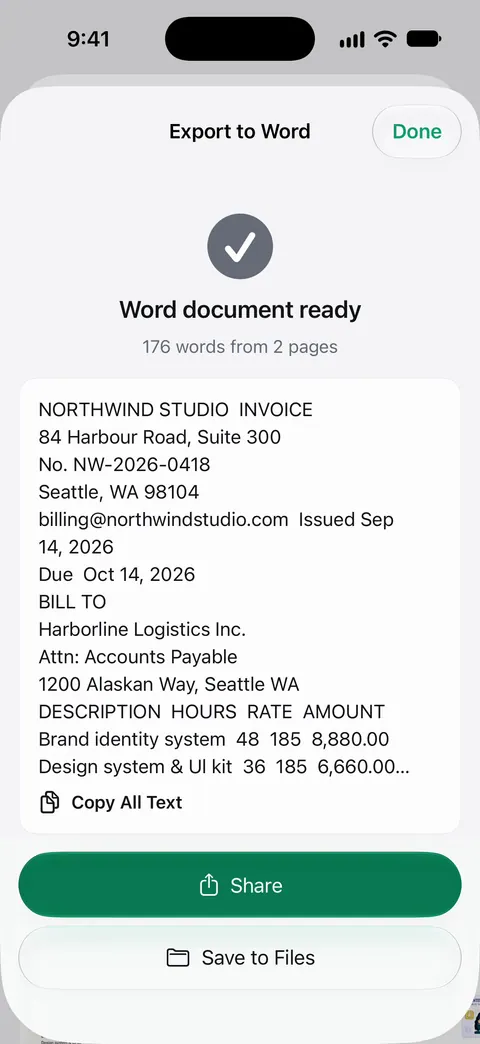
A scanned page needs its text read first; Scanner One does that on every page, so a scan converts like any other PDF. The PDF to Word guide covers what survives conversion and what to check after.
Privacy and accounts
Acrobat Reader’s privacy label lists Identifiers as data used to track you, and a longer list linked to you, including Contacts and Search History. You can read PDFs without an Adobe account; cloud storage needs one.
For Scanner One: Scanner One needs no account and does no tracking. Documents stay on your iPhone unless you share them or turn on iCloud Sync. Cloud AI is off until you switch it on, and page images are a separate permission.
Which one to pick
- You read and sign PDFs, nothing more: Acrobat Reader’s free tier, or Notes and Files, are enough.
- You already pay for Acrobat on a computer: keep Acrobat Reader. Adobe’s page says subscribers sign in to use the premium mobile features.
- You convert, merge and compress a few times a month and start from paper: Scanner One’s free allowance may cover it; Pro if it doesn’t.
- You want a one-time price: Scanner One Pro Lifetime is a one-time purchase of $59.99 in the US. Acrobat Premium is listed as weekly, monthly or yearly.
Where Scanner One helps, and where it doesn’t
Where it helps: scanning, text recognition and the PDF tools in one app, without an account. Text recognition runs on every page for everyone, free or Pro. The PDF tools merge, split, compress, password-protect, add page numbers and watermarks, and extract text. Lifetime is one payment, yours forever.
Where it doesn’t:
- No Adobe ecosystem. No Document Cloud and no Liquid Mode. Scanner One runs on iPhone and iPad. There is no Mac, Windows or web version.
- Free caps and the label. Free accounts can run the PDF tools and the Word, Excel and CSV exports 3 times a week, from one shared allowance. Free accounts can sign and mark up 3 documents a month. On a free account, pages you share, print or export carry a small “Scanned with Scanner One” label at the bottom right. Pro removes it.
- When Acrobat Reader’s free tier is enough. For reading, filling and signing, Acrobat Reader is free, and Notes and Files sign at no cost too.
Questions and answers
Is Adobe Acrobat Reader free on iPhone?
Reading, filling in and signing PDFs are free, per its App Store page, and you don’t need an Adobe account to read. Editing, converting, combining, compressing, OCR and password protection need Acrobat Premium.
How much is Acrobat Premium on iPhone?
The US App Store lists Acrobat Premium at $9.99 a week, $12.99 or $14.99 a month, and $48.99 or $69.99 a year, with a free trial on the yearly plan. Prices can differ by offer, so check the in-app screen.
Can I convert a PDF to Word on iPhone without Acrobat?
Yes. Scanner One exports to Word, keeping headings, lists and tables, and to Excel and CSV. Free accounts get 3 a week across exports and PDF tools. Our free [PDF to JPG tool](/tools/pdf-to-jpg/) also turns pages into images in the browser.
Do I need Acrobat Reader if I have Scanner One?
Not for reading, signing and the common PDF tools. Keep Acrobat if you collaborate in Adobe Document Cloud, use Liquid Mode, or already pay for Acrobat on a computer.
Sources
What this page says about Scanner One was checked against the app on .
- Acrobat Reader: PDF Editor on the App Store — what is free, what Premium adds, the free trial, in-app purchases, account needs, privacy label, version 26.10.01, iOS 18.3 requirement; read 2026-11-13
- Adobe, Acrobat Reader mobile app — free app, fill and sign, premium features through Acrobat Pro, PDF Pack or Export PDF; read 2026-11-13
- Apple Support, Scan documents on your iPhone or iPad (article 108963) — the Notes and Files scanning steps and signing in Notes; published 2026-02-13
- Scanner One on the App Store — the app’s own listing
Get Scanner One
Scanner One is free, with generous limits: scanning, clean PDFs and text search never stop.

Scanner OneScan, sign and ask anything
Scanner One is free, with generous limits: scanning, clean PDFs and text search never stop.