
Comparison
Scanner One vs Expensify for receipts
Expensify is expense software: its App Store page says SmartScan pulls the details from a receipt photo, expenses submit for approval, reimbursements pay employees back, and it syncs with QuickBooks, Xero and NetSuite. Its site says it is free for individuals. Scanner One is a scanner: a Receipt filter, searchable PDFs, CSV export and on-device search, with no reports or reimbursement. Use Expensify if a company reimburses you through it; Scanner One if you just need to keep receipts readable and findable.

Scanner One is our app. Facts about Expensify come from its US App Store page and its homepage, read on November 13, 2026.
This page compares Expensify and Scanner One for one job: what to do with the receipts in your wallet. For a roundup of receipt scanners, see the best scanner app for receipts.
They are different kinds of app
Expensify is expense management. Its App Store description is about the whole trip a receipt takes at work: you snap a picture, SmartScan extracts the details, the expense auto-submits on a schedule, a manager approves it, and reimbursement pays you back. It syncs with QuickBooks, Xero, Sage Intacct, NetSuite and more, and it has its own card, the Expensify Card.
Scanner One is a document scanner. It turns a receipt into a clean, readable PDF, reads the text on it, and lets you find it later. It doesn’t submit, approve or reimburse anything.
So the honest question is not which is better, but whether you need the reimbursement part.
When Expensify is the right answer
- Your employer reimburses through Expensify. Use it. The receipts need to land where your approver looks, and Expensify’s homepage says reimbursements can reach your bank in as little as one business day.
- You run a team’s expenses. Approvals, policy checks, corporate cards and accounting sync are Expensify’s job. Its homepage lists company plans from $5 per member.
- You want receipts read into fields. SmartScan extracts the details from a photo, per the App Store description, and the homepage says you can also forward receipts to an email address or upload a file.
When a scanner is enough
If no one reimburses you, a full expense system is more than you need. Freelancers keeping receipts for taxes, households saving warranty receipts, and anyone with an HSA or FSA mostly need three things: a readable copy, a sensible name, and a place to find it later.
The iPhone does the first part for free. Apple’s steps in Notes:
- Open Notes and select a note or create a new one.
- Tap the Attachment button, then tap Scan Documents.
- Place the receipt in view of the camera. In iOS 26 you can also choose flash or an image filter.
- In Auto mode the receipt scans itself; otherwise adjust the corners and tap Keep Scan.
- Tap Done, or add more receipts to the same scan.
For a handful of receipts a month, that’s enough. The receipt scanning guide covers light, crumpled paper and long receipts.
What Scanner One adds for receipts
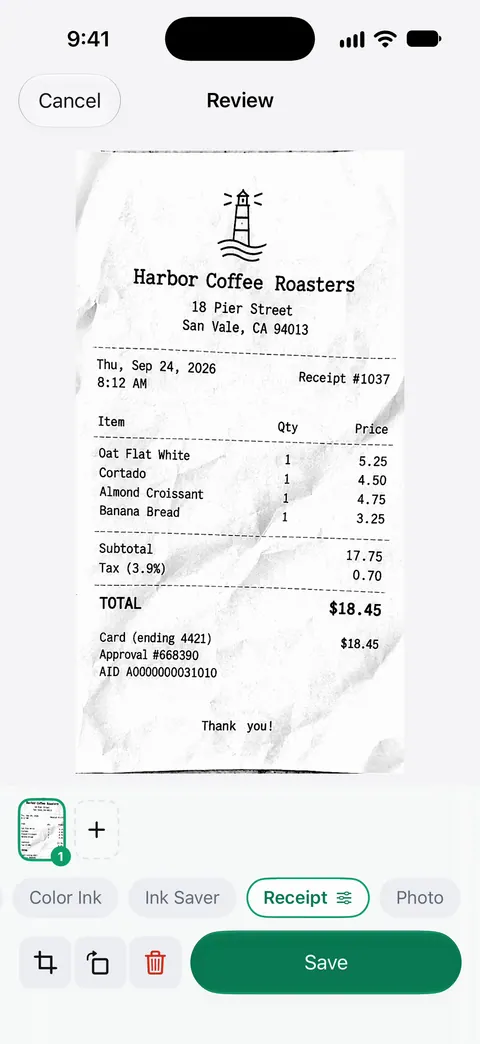
Scans come with Auto Clean, Color, Grayscale and Receipt filters. The screenshot shows what the Receipt filter does: crisp black text on a white page.
- Reading. Text recognition runs on the device, in 29 languages. Search looks inside the text of every document and shows the matching line and page.
- Filing. Then it reads the text, names the document, tags it and puts it in the right folder.
- Asking. Ask your documents anything. When does the lease end? What did I spend at the shop? The answer comes back with the page it came from.
- Exporting. Scanner One exports to Word, keeping headings, lists and tables, and to Excel and CSV. A CSV goes into a spreadsheet or to your accountant.
- Many receipts at once. A scan can have many pages, and you can reorder them.
Side by side, checked November 13, 2026
| Expensify | Scanner One | |
|---|---|---|
| What it is | Expense management: receipts, submissions, approvals, reimbursement | Scanner and PDF app |
| Price model | Free for individuals per its homepage; company plans from $5 per member; App Store lists a $4.99 monthly subscription | Free download. Pro at $4.99 a month, $29.99 a year or $59.99 once |
| Free limits | Not stated on the App Store page | Scanner One is free, with generous limits: scanning, clean PDFs and text search never stop. Exports: 3 a week |
| Receipt capture | SmartScan extracts details from a photo; email forwarding and upload | Scans come with Auto Clean, Color, Grayscale and Receipt filters. |
| Reports and reimbursement | Yes | No |
| Accounting | Syncs with QuickBooks, Xero, Sage Intacct, NetSuite | CSV, Excel and Word export |
| Privacy label | Linked to you: Purchases, Financial Info, Location, Contact Info, User Content, Identifiers, Usage Data, Diagnostics | No account, no tracking |
| Platforms | iPhone, iPad, Apple Vision; iOS 16.4 or later | iPhone and iPad; iOS 17 or later |
Privacy, from the labels
Expensify’s label lists Financial Info, Location and Contact Info among data linked to you, which fits an app that handles payments and reimbursement, and it shows no Data Used to Track You section. Scanner One’s position: Documents stay on your iPhone unless you share them or turn on iCloud Sync. Scanner One needs no account and does no tracking.
A simple system without expense software
- Scan each receipt the day you get it. Thermal paper fades; see what thermal paper is.
- Name it with the date, the shop and the amount, or let an app name it.
- Keep one folder per year, or per client if you bill expenses.
- At tax time, export a list or send the folder. The small business receipts guide has a folder layout, and how long to keep receipts covers the IRS timelines.
Which one to pick
- Your company reimburses through Expensify: Expensify, no question.
- You manage other people’s expenses: Expensify or another expense system.
- You keep receipts for taxes, warranties or an HSA: Notes for a few, Scanner One for many, with a Receipt filter and search.
- You need a spreadsheet of receipts for your bookkeeper: Scanner One’s CSV export, or Expensify if your bookkeeper uses its accounting sync.
Where Scanner One helps, and where it doesn’t
Where it helps: Scans come with Auto Clean, Color, Grayscale and Receipt filters. Search looks inside the text of every document and shows the matching line and page. Then it reads the text, names the document, tags it and puts it in the right folder. Documents stay on your iPhone unless you share them or turn on iCloud Sync.
Where it doesn’t:
- No expense reports, approvals, reimbursement or corporate cards. If any of those is the job, use Expensify or your employer’s system.
- No accounting sync. Scanner One exports files; it doesn’t connect to QuickBooks or Xero.
- Free caps and the label. Free accounts can run the PDF tools and the Word, Excel and CSV exports 3 times a week, from one shared allowance. On a free account, pages you share, print or export carry a small “Scanned with Scanner One” label at the bottom right. Pro removes it. Receipts you send to a client or employer carry the label on a free account.
- When Notes is enough. For a few receipts a month, the built-in scanner keeps a readable copy at no cost.
Questions and answers
Is Expensify free?
Expensify’s homepage says it is completely free to use as an individual, and that company plans start at $5 per member. The App Store lists one in-app purchase, a Monthly Subscription at $4.99.
Can Scanner One make expense reports?
No. It has no reports, approvals or reimbursements. It can export what it reads: Scanner One exports to Word, keeping headings, lists and tables, and to Excel and CSV. A CSV can go into a spreadsheet you send to your bookkeeper.
Do I need an expense app just to keep receipts for taxes?
Usually not. A clear scan or PDF of each receipt, kept in one folder with a sensible name, is what most people need. Our guide on scanning receipts for taxes covers what to keep and for how long.
Why do my receipts fade?
Most store receipts are printed on thermal paper, which darkens and fades with heat and light. Scan them soon after you get them, and keep the scan rather than relying on the paper.
Sources
What this page says about Scanner One was checked against the app on .
- Expensify - Travel & Expense on the App Store — SmartScan, submissions, reimbursements, accounting sync, in-app purchase, privacy label, version 9.5.36, iOS 16.4 requirement; read 2026-11-13
- Expensify homepage — free for individuals, company plans from $5 per member, receipt forwarding, reimbursement timing; read 2026-11-13
- Apple Support, Scan documents on your iPhone or iPad (article 108963) — the Notes and Files scanning steps; published 2026-02-13
- Scanner One on the App Store — the app’s own listing
Get Scanner One
Scanner One is free, with generous limits: scanning, clean PDFs and text search never stop.

Scanner OneScan, sign and ask anything
Scanner One is free, with generous limits: scanning, clean PDFs and text search never stop.