
Comparison
Scanner One vs Xodo on iPhone
Xodo’s App Store page lists compressing, rotating, splitting, scanning to PDF and filling and signing forms, with the Xodo Mobile subscription ($11.99 a month or $107.99 a year) adding all 30+ tools, including PDF to Office, redaction, merging and OCR. It also runs on web, Windows, Mac and Android. Scanner One scans paper, reads text for free, and includes merge, split, compress, passwords and Office export with a free allowance of 3 a week. Pick Xodo for cross-platform editing; Scanner One if your PDFs start on paper.

Scanner One is our app. Facts about Xodo come from its US App Store page and Xodo’s pricing page, read on November 13, 2026.
This page compares Xodo and Scanner One head to head. For a broader look at PDF editors, including PDF Expert and Acrobat, see the best PDF editor for iPhone.
Two starting points
Xodo is a PDF editor first. Its App Store page opens with tools for files you already have: compress, rotate, split, extract pages, convert Office and iWork files to PDF, fill and sign forms, and draw or type a reusable signature with Apple Pencil support. It can scan with the camera too. Its files sync with iCloud, OneDrive, Google Drive and Dropbox, and Xodo runs on the web, Windows, Mac, Linux and Android as well.
Scanner One is a scanner first. Point your camera at any piece of paper. Scanner One finds the edges, straightens the page, cleans it up and saves a real PDF. Then it reads the text, names the document, tags it and puts it in the right folder. The PDF tools come after the scan, on the same document.
If most of your PDFs arrive by email and you edit them on a computer too, Xodo’s shape fits. If most of your PDFs start as paper on a table, Scanner One’s does.
What Xodo’s subscription unlocks
The App Store description says the Xodo Mobile subscription, monthly or annual, gives unlimited access to all 30+ tools. Listed for subscribers: converting PDFs to Microsoft Office formats, PDF redaction, combining documents into one PDF, creating fillable forms, saving scans as PDFs with searchable text (OCR), and high compression. The US in-app purchases show Xodo Mobile at $11.99 a month and $107.99 a year.
Xodo’s pricing page adds two web and desktop facts: free users get 1 free action per day on Xodo Web tools, and the Document Suite plan, $14.99 a month or $107.93 a year, covers web, Windows, macOS, Linux, Android and iOS.
The same jobs in Scanner One
The PDF tools merge, split, compress, password-protect, add page numbers and watermarks, and extract text. Scanner One exports to Word, keeping headings, lists and tables, and to Excel and CSV. You can sign and annotate documents. Fill Form lets you type into the fields of a PDF form.
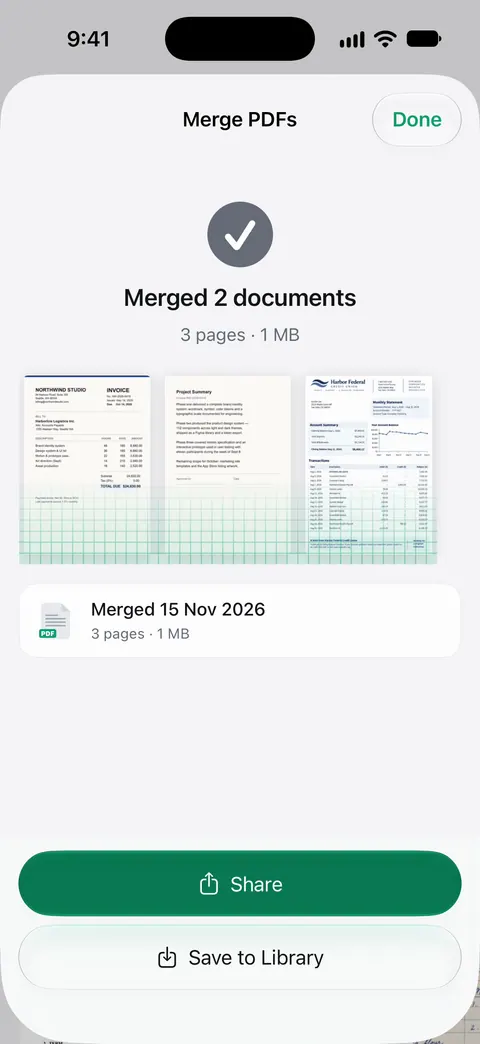
On a free account the tools and exports share one allowance: Free accounts can run the PDF tools and the Word, Excel and CSV exports 3 times a week, from one shared allowance. Signing and markup: Free accounts can sign and mark up 3 documents a month. Text recognition isn’t part of either limit. Text recognition runs on every page for everyone, free or Pro.
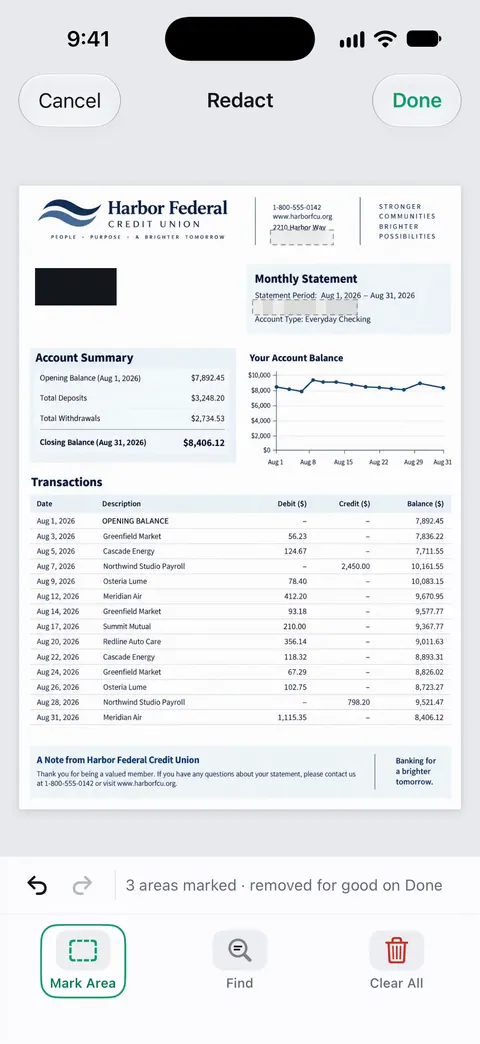
Redaction is in Pro. Redaction is permanent. Pro adds redaction, the smart eraser, edit text, auto-export and five alternate app icons.
Side by side, checked November 13, 2026
| Xodo | Scanner One | |
|---|---|---|
| Price model | Free; Xodo Mobile $11.99 a month or $107.99 a year; Document Suite $14.99 a month across platforms | Free download. Pro at $4.99 a month, $29.99 a year or $59.99 once |
| Free | Not itemized; tools listed include compress, rotate, split, scan, fill and sign, convert to PDF | Scanner One is free, with generous limits: scanning, clean PDFs and text search never stop. |
| Merge | Subscription | PDF tools; free allowance 3 a week |
| PDF to Word or Excel | Subscription | Scanner One exports to Word, keeping headings, lists and tables, and to Excel and CSV. |
| OCR | Searchable scans with the subscription | Text recognition runs on every page for everyone, free or Pro. |
| Redaction | Subscription | Pro: Redaction is permanent. |
| Privacy label | Used to track you: Usage Data; not linked: Identifiers, Usage Data, Diagnostics | No account, no tracking |
| Platforms | iPhone, iPad, Apple Vision (iOS 16.0 or later); web, Windows, macOS, Linux, Android | iPhone and iPad; iOS 17 or later |
Check the built-in tools first
The iPhone covers a few of these jobs without any app. Files scans to a PDF: tap the More button, tap Scan Documents, let Auto mode capture the page or tap the Shutter button, tap Done, choose a folder and tap Save. Notes signs a scanned page: tap the document, tap the Markup button, tap the Add button, then Signature, then Done.
For merging or splitting without an app, our free merge PDF and split PDF tools run in your browser. The merge PDFs on iPhone and split a PDF on iPhone guides show every route.
Redaction, done right
Both apps put redaction behind payment, Xodo in its subscription and Scanner One in Pro. Whichever you use, the point is that the hidden text is really gone, not covered by a black box someone can lift. Redaction is permanent. The redaction guide shows how to check a redacted file before you send it.
Which one to pick
- You edit PDFs on a computer as well as the phone: Xodo, with its web and desktop apps.
- You use Android too: Xodo.
- Your PDFs start as paper, and you want them read, named and filed: Scanner One.
- You want OCR without a subscription: Scanner One reads text on every page for free accounts.
- You want to pay once: Scanner One Pro Lifetime is a one-time purchase of $59.99 in the US.
Where Scanner One helps, and where it doesn’t
Where it helps: scanning, text recognition, filing and the PDF tools in one app. Text recognition runs on every page for everyone, free or Pro. Search looks inside the text of every document and shows the matching line and page. Documents stay on your iPhone unless you share them or turn on iCloud Sync. Scanner One needs no account and does no tracking.
Where it doesn’t:
- No computer or Android version. Scanner One runs on iPhone and iPad. Xodo covers the web, Windows, Mac, Linux and Android.
- No form creation is listed. Scanner One fills forms; Xodo’s subscribers can create fillable ones.
- Free caps and the label. Free accounts can run the PDF tools and the Word, Excel and CSV exports 3 times a week, from one shared allowance. On a free account, pages you share, print or export carry a small “Scanned with Scanner One” label at the bottom right. Pro removes it.
- When Files and Notes are enough. Scanning to PDF and signing are built into the iPhone.
Questions and answers
Is Xodo free on iPhone?
The app is free to download, and its App Store page lists tools like compressing, rotating, splitting, scanning and filling and signing forms, without itemizing which are free. The Xodo Mobile subscription, $11.99 a month or $107.99 a year, unlocks all 30+ tools, including PDF to Office, redaction, merging and OCR.
Does Xodo work on a computer?
Yes. Xodo’s pricing page lists Xodo Web in the browser, Xodo PDF Studio for Windows, macOS and Linux, and a Document Suite plan at $14.99 a month that covers all of them plus the mobile apps.
Can Scanner One redact a PDF?
Yes, with Pro. Redaction is permanent. Pro adds redaction, the smart eraser, edit text, auto-export and five alternate app icons.
Which is cheaper, Xodo or Scanner One?
Xodo Mobile is listed at $11.99 a month or $107.99 a year on the US App Store. Scanner One Pro is $4.99 a month, $29.99 a year or $59.99 once. Which costs less depends on whether the free tier of either covers you.
Sources
What this page says about Scanner One was checked against the app on .
- PDF Reader & Editor | Xodo on the App Store — tools, the Xodo Mobile subscription, signing and forms, scanning, cloud sync, in-app purchases, privacy label, version 10.0.0, iOS 16.0 requirement; read 2026-11-13
- Xodo pricing — Document Suite, Web and Desktop plans, platforms, the free plan’s 1 action a day on Xodo Web; read 2026-11-13
- Apple Support, Scan documents on your iPhone or iPad (article 108963) — the Files scanning steps and signing in Notes; published 2026-02-13
- Scanner One on the App Store — the app’s own listing
Get Scanner One
Scanner One is free, with generous limits: scanning, clean PDFs and text search never stop.

Scanner OneScan, sign and ask anything
Scanner One is free, with generous limits: scanning, clean PDFs and text search never stop.