
Guide
Scan a signed lease or contract, and find any clause later
Scan every page of the signed contract, including signature pages, initials, addenda and handwritten changes, into one PDF with Scan Documents in Notes or Preview. Name it with the parties, what it is and the dates. To find a clause later, search for a word: Notes searches text in scanned documents, and Preview’s Find works on PDFs that have a text layer. Note the key dates, such as the end date and notice period, in your calendar the same day.

This page is about turning a signed contract into a complete digital copy you can search, so that months later you can find the notice period or deposit clause in seconds. If you’re reading a contract before you sign it, see what to check in a contract before signing. To get the gist of a long one quickly, see summarizing a contract.
This is general information, not legal advice. What a clause means, and whether a copy is enough as evidence, depends on the contract and local law. For a dispute, ask a lawyer or a local tenant or consumer advice service.
Scan it the day you sign
The best copy is made while every page is still together and nobody has changed anything.
- Gather all the parts: the main contract, addenda, schedules, house rules, the inventory or move-in checklist, and any page with handwritten edits or initials.
- Take out staples if you can put them back, or fold each page back over the staple so it lies flat.
- Scan in one go. In Notes, create a note, type a title such as “Lease, 14 Elm St Apt 3, Jan 2027 to Dec 2027”, tap the Attachment button, then Scan Documents. Scan every page in order, front and back where there’s printing, then tap the Done button. In Preview, tap Scan Documents and do the same.
- Count the pages. Compare the page count with the contract’s own numbering (“page 7 of 12”). If a page is missing, scan it now while the paper is in front of you.
The pages people forget
- Signature pages, especially if each party signed a separate copy.
- Initialed pages and any pages with handwritten changes in the margin.
- Addenda that came later: a pet addendum, a parking agreement, a rent change.
- The move-in inventory or condition report for a lease. It matters most when you move out; see getting your deposit back.
Make the copy searchable
Search is what makes a scanned contract better than a paper one. It only works if the PDF holds text, not just pictures of pages.
- Notes reads scanned documents. Apple says Notes search includes text in scanned documents. Search all notes from the search field, or open the note, tap the More button, tap Find in Note and turn on Include Attachments to search inside the PDF.
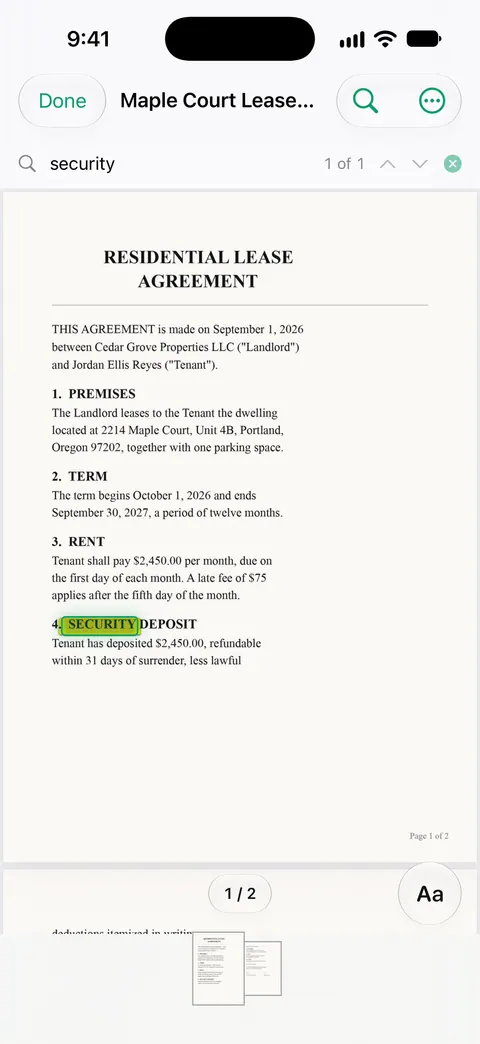
- Preview’s Find works on PDFs with text. Open the PDF, tap the search button and type a word or phrase. Preview searches for the exact phrase; turn on Whole Words to skip matches inside longer words, or Match Case.
- If Find finds nothing on a scan, the PDF is images only. Making a scanned PDF searchable shows how to add the text layer, and our free searchable PDF checker tells you which kind you have. The find a word in a PDF guide covers searching in more detail.
Find the clauses that matter
Search for the stem of a word so you catch every form of it.
| What you need | Words to search |
|---|---|
| How to end it | notice, terminat, cancel, early |
| Renewal | renew, extend, automatic |
| Money | deposit, fee, late, increase, penalty |
| Repairs and condition | repair, maintenance, damage, wear |
| Rules | pets, sublet, assign, guests, smoking |
| Dates | the end date, the month name, “days” |
When you find the clause, note its page number in the note or file name (“notice: p. 4, 60 days”). Next time you need it, Preview’s Go to Page takes you straight there.
For a lease coming up for renewal, what to check at lease renewal lists the clauses that tend to change.
Put the dates in your calendar now
A contract’s most expensive clauses are usually about time: the end date, the notice period, an automatic renewal, a rent increase date. The day you scan it, add calendar reminders for the notice deadline, not just the end date. If notice is 60 days, set the reminder for 75 days before the end.
Keep the copy safe
A signed contract has your name, address, signature and often account or ID numbers.
- Keep it where you’ll find it, such as a Home or Contracts folder in Files, or a note with a clear title.
- Lock the PDF if you send it on: in Preview, tap the Actions menu next to the file name, tap Lock, and set a password.
- Remember locked notes hide their contents from search: only the title appears, so put the key details in the title.
- Keep the paper original in a folder at home. A scan is your working copy.
Where Scanner One helps, and where it doesn’t
Scanner One makes searchable PDFs. Search looks inside the text of every document and shows the matching line and page. So a word search for “notice” takes you to the clause and the page it’s on.
Ask your documents anything. When does the lease end? What did I spend at the shop? The answer comes back with the page it came from. That’s useful for questions like “how much notice do I have to give?”, as long as you read the clause yourself before you act on it. Free accounts can ask the on-device AI 3 questions a day. Cloud AI is off until you switch it on, and page images are a separate permission.
You can sign and annotate documents. Free accounts can sign and mark up 3 documents a month.
Comparing versions. What changed compares the new version of a lease or policy with the one you signed.
What it doesn’t do: it doesn’t give legal advice, and an AI answer can miss context, so check the page it points to. If you send the scanned contract from a free account, On a free account, pages you share, print or export carry a small “Scanned with Scanner One” label at the bottom right. Pro removes it.
When the built-in way is enough: scanning into Notes gives you a searchable copy of a lease for free, and Preview’s Find handles PDFs that already have text. More in Guides.
Questions and answers
Is a scanned copy of a signed contract valid?
A scan is a copy. It’s usually fine as your record and to show what was agreed, but whether a copy is enough in a dispute depends on the contract and local law. Keep the signed original somewhere safe as well.
Why can’t I search my scanned contract?
The PDF probably has no text, only pictures of the pages. Scan it into Notes, which searches text in scanned documents, or run text recognition on the PDF first. Our guide to making a scanned PDF searchable shows how.
Should I scan the pages I initialed?
Yes. Scan every page, including initialed pages, addenda, schedules and any page with handwritten changes. A copy missing a page is the one you’ll need in a dispute.
What words should I search for in a lease?
Try notice, terminate, renew, deposit, late fee, repairs, pets, sublet and the end date. Search the word stem, such as renew, so it also finds renewal and renewed.
Sources
What this page says about Scanner One was checked against the app on .
- iPhone User Guide (iOS 27), Scan text and documents in Notes — Scan Documents in a note, adding pages, saved as a PDF in the note; read 2026-11-13
- iPhone User Guide (iOS 27), Search through your notes — search covers text in scanned documents; Find in Note with Include Attachments; locked notes show only titles; read 2026-11-13
- iPhone User Guide (iOS 27), Open and view PDFs and images in Preview — Find text in a PDF, Whole Words and Match Case, Go to Page; read 2026-11-13
- iPhone User Guide (iOS 27), Scan text and documents in Preview — Scan Documents in Preview and scanning additional pages; read 2026-11-13
- iPhone User Guide (iOS 27), Lock PDFs in Preview — locking a PDF with a password; read 2026-11-13
- Scanner One on the App Store — the app’s own listing
Get Scanner One
Scanner One is free, with generous limits: scanning, clean PDFs and text search never stop.

Scanner OneScan, sign and ask anything
Scanner One is free, with generous limits: scanning, clean PDFs and text search never stop.