
Guide
Make a scan black and white, like a photocopy
In Notes or Files, start Scan Documents and tap Filters before you capture, then choose the black-and-white look; Apple’s guide lists color, grayscale, black-and-white and photo. For a scan already in a note, tap the page’s thumbnail, the More button, then Filters. In Preview, tap a page thumbnail to adjust its coloring. Use black and white for printed text, grayscale for pencil or faint print, and keep IDs and anything with stamps or photos in color.

Choose black and white before you scan
The scanners in Notes and Files share the same camera screen, and since iOS 26 you can pick a filter before you capture.
- In Notes, open a note, tap the Attachments button, then Scan Documents. In Files, open a folder, tap the More button, then Scan Documents.
- Before you capture, tap Filters.
- Choose the black-and-white look. Apple’s guide describes the choices as color, grayscale, black-and-white, or photo.
- Capture the pages as usual, then tap Done (and in Files, choose a location and Save).
Every page you scan in that session uses the filter you picked. If one page needs color, such as a page with a signature in blue ink, change it on that page afterwards.
Change the filter after scanning
In Notes
- Open the note with the scan. Set the scan to a medium or large preview if it’s small: tap the Menu button on it, then View As.
- Tap the thumbnail of the page you want to change.
- Tap the More button, then Filters, and choose the look you want.
Apple notes that Filters (and Crop Page) work only on documents you scanned, not on other PDFs attached to a note.
In Preview
Preview (iOS 26 and later) lets you adjust the coloring of each page while you scan: after capturing, tap a page’s thumbnail and change its coloring before you tap Done. For a PDF that’s already saved, Preview’s tools crop, rotate and reorder pages, but don’t offer a color filter. Scan again if you need it.
In Mail
If you scanned straight into an email with Scan Document, tap the scan in the message and tap the Show Filters button.
Black and white, grayscale or color
| Look | Use it for | Avoid it for |
|---|---|---|
| Black and white | Typed letters, forms, printed contracts, receipts with faint gray print | Pencil, photos, colored stamps, highlighted passages |
| Grayscale | Pencil notes, faint print, signatures, newspaper clippings, pages with photos | Documents where color carries meaning |
| Color | IDs, passports, certificates with seals, kids’ drawings, charts, anything highlighted | Long text documents you’ll print at home |
Some practical reasons to pick black and white:
- It reads like a photocopy. Gray paper turns white and the text turns solid black, which is easier on the eyes and on a printer.
- It hides light shadows. A pale gray corner from a lamp often disappears. See getting rid of shadows on scans.
- It tends to make smaller files, which helps with email limits. If size is the real problem, see making a PDF small enough to email.
And reasons not to:
- Faint marks can vanish. Black and white decides for every spot: dark enough becomes black, the rest becomes white. Pencil, light handwriting and pale stamps can disappear entirely. Use grayscale for handwritten notes.
- Some offices refuse it. An ID or a certificate in black and white can look like a copy of a copy. Keep those in color.
- Highlights turn into black bars or disappear, depending on the color.
Black and white for pages that will be faxed or copied again
Some offices still fax, photocopy or rescan what you send them. Every copy loses a little: gray turns darker, fine lines thicken, and a gray background can swallow small print. A clean black-and-white scan survives that best, because there are no shades left to lose.
- Forms going to a fax line: send black and white, with the text as dark as you can get it. Our page on what to do when someone wants a fax covers the ways to send one from a phone.
- Pages someone will print and sign: black and white prints faster and clearer on an office printer, and their signature in pen stands out against it.
- Pages that will be scanned again: keep the margins white and the text black, so their scanner finds the edges and reads the text.
When to print instead of filtering
If a school, bank or office asks for “a black-and-white copy”, they usually mean they don’t need color, not that color is refused. A clear black-and-white scan is fine. If you then print it, check that every page is readable on paper: very light text in a scan can print even lighter.
Where Scanner One helps, and where it doesn’t
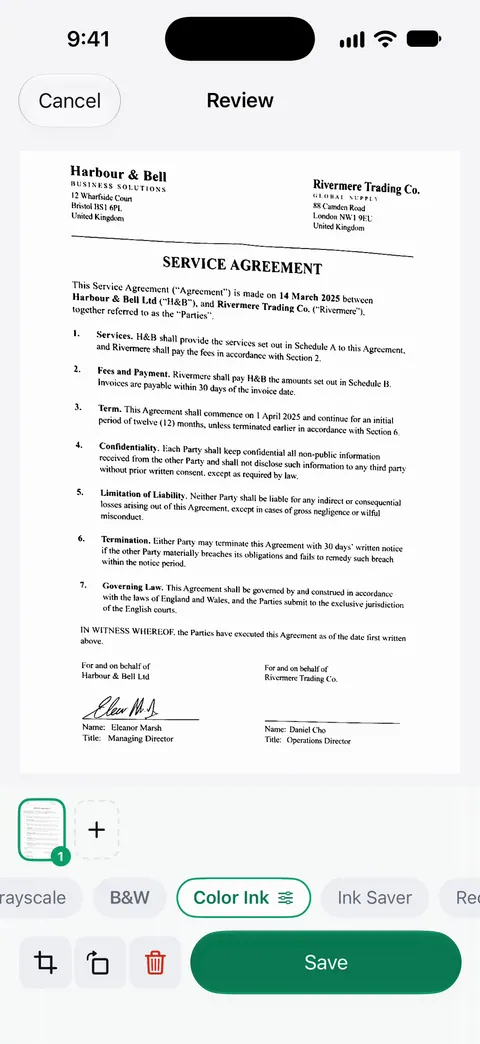
Scans come with Auto Clean, Color, Grayscale and Receipt filters. In review, the filter chips under the page include B&W, Grayscale, Color Ink and Ink Saver alongside Original and Auto Clean, as the screenshot shows, and you can switch between them before saving.
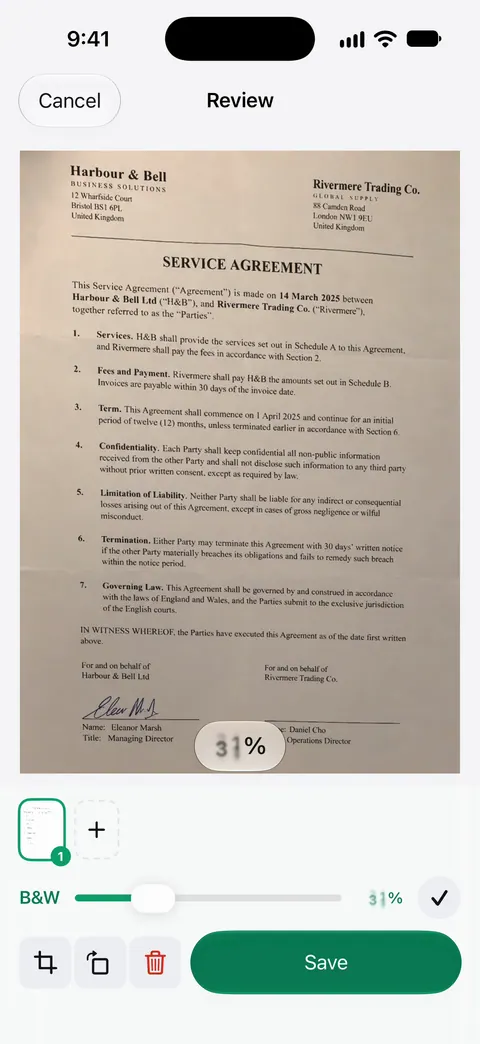
The B&W filter also has a strength slider, so you set how strong the effect is. That’s the control to reach for when pencil or faint print starts to drop out.
Scanner One is free, with generous limits: scanning, clean PDFs and text search never stop. The filters aren’t part of any monthly limit. What is limited on a free account is the PDF tools (3 a week). On a free account, pages you share, print or export carry a small “Scanned with Scanner One” label at the bottom right. Pro removes it.
What it doesn’t do: no filter can bring back text that wasn’t captured, so a blurry or dark photo still needs a rescan. When the built-in way is enough: Notes’ black-and-white filter does a good job on ordinary printed pages. See all the filters on the Auto Clean and filters page.
Questions and answers
What’s the difference between black and white and grayscale?
Black and white turns each spot either black or white, like a photocopy: crisp for printed text. Grayscale keeps the shades in between, which suits pencil, faint print, signatures and photos.
Can I change a color scan to black and white afterwards?
For a scan in Notes, yes: tap the page’s thumbnail, tap the More button and choose Filters. Apple notes that Filters work only on scanned documents, not on other PDFs in a note.
Does a black-and-white scan make a smaller file?
Usually it does, because there’s less detail in each page image. If size is the real problem, also see our guide to making a PDF small enough to email.
Should I scan my ID in black and white?
No. Keep IDs, passports and anything with a colored stamp, seal or photo in color. Offices that ask for a copy usually want it to look like the original.
Sources
What this page says about Scanner One was checked against the app on .
- Apple Support, How to scan documents on your iPhone or iPad (article 108963) — in iOS 26 you can pick flash or an image filter in Notes and Files; published 2026-02-13
- iPhone User Guide (iOS 27), Scan text and documents in Notes — adjust settings such as Flash or Filters before capture; read 2026-11-13
- iPhone User Guide (iOS 15), Scan text and documents in Notes — names the filter choices: color, grayscale, black-and-white or photo
- iPhone User Guide (iOS 27), Work with PDFs in Notes — Filters on a page of a scan; Filters and Crop Page work only on scanned documents; read 2026-11-13
- iPhone User Guide (iOS 27), Scan text and documents in Preview — adjust the coloring of each page from its thumbnail; read 2026-11-13
- iPhone User Guide (iOS 27), Add email attachments in Mail — a scan in an email: tap it, then the Show Filters button; read 2026-11-13
- Scanner One on the App Store — the app’s own listing
Get Scanner One
Scanner One is free, with generous limits: scanning, clean PDFs and text search never stop.

Scanner OneScan, sign and ask anything
Scanner One is free, with generous limits: scanning, clean PDFs and text search never stop.