
Guide
Scan W-2s, 1099s and other tax forms
Scan each W-2 and 1099 with Scan Documents in Notes, Files or Preview as it arrives, one PDF per form, into a folder for the tax year. Name each file with the year, form and payer, such as 2026 W-2 Acme Corp. Check every box and the employer ID are sharp. Make the PDFs searchable so you can find a number later. Keep them at least as long as the IRS says to keep tax records, usually 3 years after filing.

This page is general information, not tax advice. Deadlines and rules change each year. Check the IRS pages linked here, or ask a tax professional.
This page is about the forms themselves: getting each W-2 and 1099 scanned, named and findable. For the whole list of papers a return needs, see the documents to file your taxes. If it’s already April and you’re doing everything in one go, start with tax season papers in one evening.
Which forms arrive, and when
Forms trickle in from January into February, by mail and by email. For 2026 wages, the IRS instructions give employers until February 1, 2027 to furnish Copies B, C and 2 of the W-2 to employees, and they may send them electronically. Common forms to watch for:
| Form | Comes from | Shows |
|---|---|---|
| W-2 | Each employer | Wages and tax withheld |
| 1099-NEC | Clients who paid you as a contractor | Nonemployee pay |
| 1099-INT, 1099-DIV | Banks and brokers | Interest and dividends |
| 1099-B | Brokers | Sales of stocks and funds |
| 1099-R | Pension and retirement plans | Distributions |
| 1099-G | State agencies | Unemployment pay, state refunds |
| SSA-1099 | Social Security | Benefits paid |
A corrected form (a W-2c, or a 1099 marked CORRECTED) replaces the earlier one. Scan it, and rename the old file so you don’t use both. Freelancers get more of these: see the freelancer tax documents checklist.
Scan each form as it arrives
Scanning on the day the envelope arrives is easier than finding 9 envelopes in April.
- Make a folder for the tax year: in Files, open iCloud Drive or On My iPhone, tap the More button, then New Folder, and call it “Taxes 2026”.
- Open the folder, tap the More button, then Scan Documents.
- Lay the form flat on a dark surface. Many W-2s come as a sheet with several copies on one page: scan the whole sheet.
- Let Auto mode capture it, or tap the Shutter button and drag the corners to the paper’s edges. Tap Keep Scan.
- If there is a second page, such as the instructions or a state copy, add it. Then tap the Done button and Save.
- Rename the PDF: touch and hold it, tap Rename, and use a pattern like “2026 W-2 Acme Corp” or “2026 1099-INT First Bank”.
One form per PDF works best. Tax software and accountants ask for forms one at a time, and a single 14-page “tax stuff” PDF makes you scroll. For naming ideas, see how to name scanned documents.
Check the numbers
Zoom in on the scan and read the boxes you’ll type: wages, federal tax withheld, state wages, and the employer’s or payer’s identification number. Small type in the corners blurs first. If any digit is uncertain, scan again in better light.
Forms that arrive as PDFs
Many payroll services and banks deliver tax forms as downloads. You don’t need to print and scan those: save the PDF straight into the same year folder and rename it with the same pattern. Everything for the year stays in one place.
Make the scans searchable
A searchable PDF lets you search for an employer’s name or a number in the file, and copy a figure instead of retyping it. In Preview, open the scan, tap the Actions menu next to the file name, tap Export, choose PDF, and turn on Embed Text: Apple describes it as running OCR on the images to make the PDF searchable. More in making a scanned PDF searchable.
Sending forms to your accountant or tax software
- Tax software: most programs let you import a W-2 from the employer, photograph it, or type it in. If you type, work from your sharp scan, not the crumpled paper.
- An accountant: send the whole year folder through their secure portal, or follow sending documents to your accountant.
If a form is missing or wrong
The IRS says to contact your employer or payer first. If a corrected or missing form still hasn’t arrived by the end of February, you can call the IRS, which will contact the employer for you. If the form won’t arrive in time to file, the IRS can send you Form 4852, a substitute where you estimate your wages and withholding. If the real form later shows different numbers, you amend with Form 1040-X.
You can also see wage and income statements in your IRS Individual Online Account. That’s useful for checking a scan against what the IRS received.
How long to keep them
The IRS’s basic rule is 3 years from filing, with longer periods in some cases, such as 6 years if you failed to report income you should have, 7 years for a bad debt or worthless securities claim, and indefinitely if you didn’t file. How long to keep tax records explains each case. A dated folder per year makes the clear-out easy.
Where Scanner One helps, and where it doesn’t
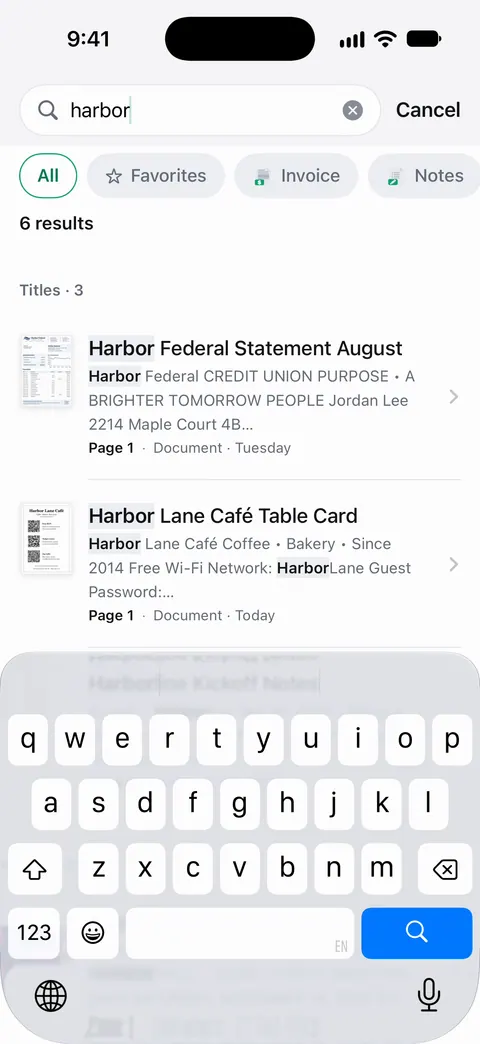
Text recognition runs on the device, in 29 languages. Scanner One makes searchable PDFs. Search looks inside the text of every document and shows the matching line and page. In tax season that means typing “1099” or a bank’s name and seeing every form that matches, with the line it was found on.
For a summary table: Scanner One exports to Word, keeping headings, lists and tables, and to Excel and CSV. Exporting a form’s text to Excel or CSV can give you a starting point for a list of payers and amounts, which you should check against the forms. Free accounts can run the PDF tools and the Word, Excel and CSV exports 3 times a week, from one shared allowance.
Then it reads the text, names the document, tags it and puts it in the right folder. Free accounts get smart filing for 10 documents a month.
The limits: On a free account, pages you share, print or export carry a small “Scanned with Scanner One” label at the bottom right. Pro removes it. Documents stay on your iPhone unless you share them or turn on iCloud Sync.
What it doesn’t do: it doesn’t file your return, calculate tax, or send anything to the IRS or your tax software for you. When the built-in way is enough: if you get 2 or 3 forms a year, a Files folder and Scan Documents do the job.
Checking what’s missing. Packs: say what you’re applying for, like a visa, a lease or your taxes, and see which papers you have and what’s missing.
Questions and answers
Can I upload a scanned W-2 to tax software?
Most tax software lets you import a W-2 from your employer or payroll provider, take a photo of it, or type it in. A clear scan helps with all three: even if you type, you’re reading from a sharp copy.
Do I need to keep my W-2 after I file?
Yes. The IRS generally asks you to keep tax records for 3 years after filing, and longer in some cases, such as unreported income. A scanned copy in a dated folder is easy to keep.
What if I lost my W-2?
Ask your employer for a copy first. You can also see wage and income statements in your IRS Individual Online Account. If a form still hasn’t arrived, the IRS explains what to do, including Form 4852.
Should I scan tax forms in color?
It doesn’t matter much. Tax forms are printed in black or red on white, and a clean grayscale or black-and-white scan is usually the most readable. Use color if the red form lines vanish.
When should my W-2 arrive?
For 2026 wages, the IRS instructions give employers until February 1, 2027 to furnish the employee copies. If yours isn’t there by early February, ask your employer.
Sources
What this page says about Scanner One was checked against the app on .
- IRS, General instructions for Forms W-2 and W-3 (2026) — employers furnish Copies B, C and 2 of the 2026 Form W-2 by February 1, 2027, and may furnish them electronically; read 2026-11-13
- IRS, Topic no. 154, Form W-2 and Form 1099-R (what to do if incorrect or not received) — contact the employer or payer, then the IRS; Form 4852 as a substitute; read 2026-11-13
- IRS, Get transcript — wage and income statements in the Individual Online Account; read 2026-11-13
- IRS, How long should I keep records? — 3 years by default, longer in some cases; last updated 2026-06-30
- Apple Support, Scan documents on your iPhone or iPad (article 108963) — Notes and Files scanning steps; page dated 2026-02-13
- iPhone User Guide (iOS 27), Export or compress PDFs and images in Preview — the Embed Text option runs OCR to make a PDF searchable; read 2026-11-13
- Scanner One on the App Store — the app’s own listing
Get Scanner One
Scanner One is free, with generous limits: scanning, clean PDFs and text search never stop.

Scanner OneScan, sign and ask anything
Scanner One is free, with generous limits: scanning, clean PDFs and text search never stop.