
Feature
Export to Word, Excel and CSV
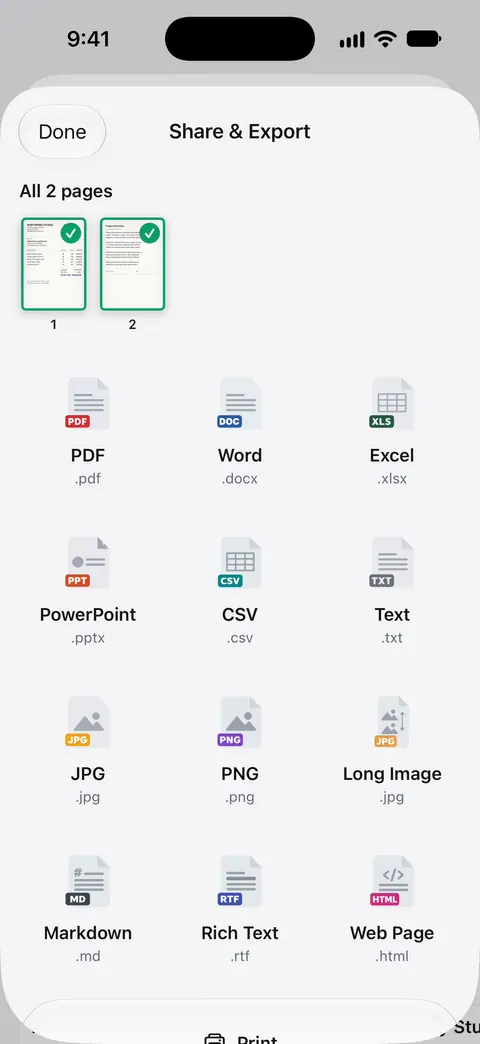
Scanner One exports to Word, keeping headings, lists and tables, and to Excel and CSV. Open the document, tap Share, and pick Word, Excel or CSV in Share & Export. Free accounts can run the PDF tools and the Word, Excel and CSV exports 3 times a week, from one shared allowance. Pro removes every limit. Check numbers and tables against the original before you rely on the file, especially from a blurred or handwritten page.

What it does
Scanner One exports to Word, keeping headings, lists and tables, and to Excel and CSV. That covers the three jobs people most often need:
- Word, to edit a letter, a contract draft or a form you only have on paper.
- Excel, to work with the numbers in a statement, an invoice or a price list.
- CSV, to bring rows into a spreadsheet, a bookkeeping app or a database that imports CSV.
Your scans are PDFs too: Point your camera at any piece of paper. Scanner One finds the edges, straightens the page, cleans it up and saves a real PDF. So the same export works on a page you scanned this morning and on a PDF that came by email.
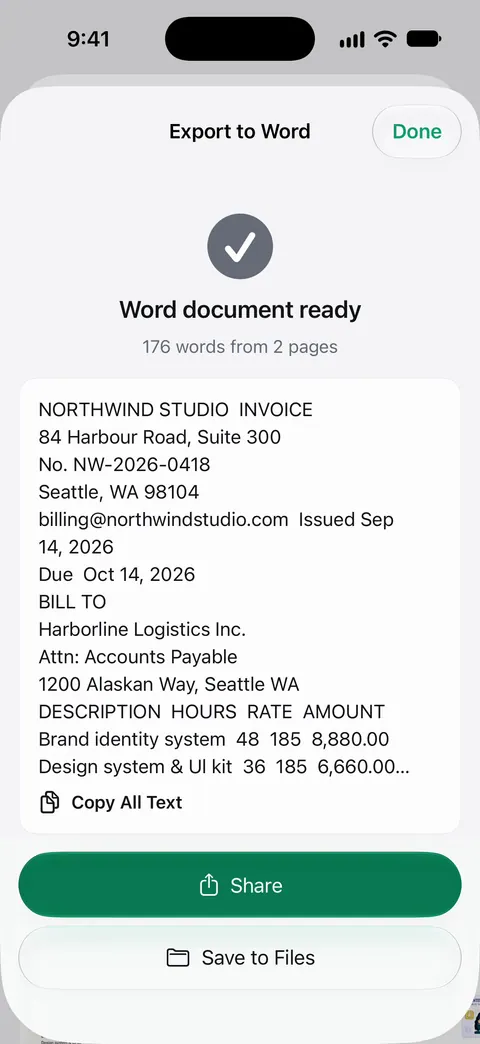
How to export to Word, Excel or CSV
- Open the document.
- Tap Share. Share & Export opens with the formats as tiles.
- Pick Word, Excel or CSV.
- Export. When the file is ready, share it or save it to Files.
- Open it in Word, Excel, Numbers or your spreadsheet app, and check it against the original.
You can also start from the Tools card on Home: PDF to Word and PDF to Excel are there, and you pick the document after.
What carries over, and what to check
Headings, lists and tables come across to Word. What to look at when you open the file:
- Numbers. A 1 read as a 7, or a missing decimal point, matters in a sheet. Check the totals add up.
- Tables with merged cells or no lines between columns are the hardest to rebuild. Check that each value is in the right column.
- Handwriting is much harder to read than print. Expect to retype handwritten parts.
- Stamps, logos and signatures aren’t words, so don’t expect them as editable text.
The quality of the export starts with the scan. A sharp, flat, well-lit page gives the cleanest file. See scanning for tips.
Common jobs
- Edit a letter you only have on paper: export to Word, edit, then save it back as a PDF. Our guide to converting a PDF to Word on iPhone covers the details, and editing text in a scanned document covers small changes without leaving the PDF.
- Get a bank statement into a spreadsheet: export to Excel and check the balance column. See turning a PDF or a scan into an Excel sheet.
- Receipts for an expense report: see an expense report due tomorrow and scanning receipts for taxes.
Other formats
Share & Export saves a document as a PDF, Word, Excel, PowerPoint, JPG, PNG, a long image, plain text, Markdown, Rich Text, a web page or CSV. Share & Export can also print a document or email it to you. Going the other way, from a Word file to a PDF, is a separate tool: The To PDF tool turns files and photos into PDFs. See Word to PDF on iPhone.
Where Scanner One helps, and where it doesn’t
If you need a few sentences from a page, you don’t need a Word file: Live Text in the iPhone Camera lets you select text in the frame and copy it, as Apple’s page describes. Our guide to copying text from a photo shows how.
Scanner One helps when the paper is a scan and you want the structure back: headings, lists and tables in Word, rows in Excel or CSV. Free accounts can run the PDF tools and the Word, Excel and CSV exports 3 times a week, from one shared allowance. The PDF tools share that allowance; see PDF tools. Pro removes every limit. On a free account, pages you share, print or export carry a small “Scanned with Scanner One” label at the bottom right. Pro removes it.
Questions and answers
Can I convert a scanned document to Word on iPhone?
Yes. Scanner One exports to Word, keeping headings, lists and tables, and to Excel and CSV. Open the scan, tap Share, choose Word and export.
How many exports are free?
Free accounts can run the PDF tools and the Word, Excel and CSV exports 3 times a week, from one shared allowance. Pro removes every limit.
Will the tables come out right in Excel?
Clear printed tables convert best. Always check totals and a few rows against the original, because a misread digit in a scan becomes a wrong number in the sheet.
What other formats can I export to?
Share & Export saves a document as a PDF, Word, Excel, PowerPoint, JPG, PNG, a long image, plain text, Markdown, Rich Text, a web page or CSV.
Sources
What this page says about Scanner One was checked against the app on .
- Apple Support, Use Live Text with your iPhone camera (iPhone User Guide, iOS 27) — copying text from the camera frame with Live Text; read 2026-11-13
- Scanner One on the App Store — the app’s own listing: export to Word (headings, lists and tables), Excel and CSV
Get Scanner One
Scanner One is free, with generous limits: scanning, clean PDFs and text search never stop.

Scanner OneScan, sign and ask anything
Scanner One is free, with generous limits: scanning, clean PDFs and text search never stop.