
Guide
How to compare two versions of a lease
Put the lease you signed next to the new version and compare them section by section: names, dates, rent, fees, deposit, utilities, renewal and notice terms, rules, and any new addenda. Mark every difference and ask about each one in writing before you sign. If both are Word files, Word’s Compare Documents marks every change for you. In Scanner One, What changed compares the new version of a lease with the one you signed.

This page is general information, not legal advice. Tenant law is set by states and cities. A comparison shows what changed; it doesn’t tell you whether a change is allowed. Your state’s tenant guide, attorney general or a local tenant organization can tell you what applies.
Get both versions in hand
You need two things: the lease you signed, with every addendum, and the new version you are being asked to sign. Get them in the same form if you can.
- Paper: scan both, every page, as one document each.
- PDF: keep them as they are.
- Word: if the landlord drafts in Word, ask for the new version as a Word file. It makes the comparison exact.
If your copy of the signed lease is missing, ask the landlord or manager for a copy before you compare. Don’t compare against memory.
Method 1: by hand, section by section
For most leases, a careful side-by-side read works. Use this table and mark every line that differs:
| Section | What to compare |
|---|---|
| Parties and unit | Every tenant’s name, the landlord or manager, the unit address |
| Term | Start date, end date, length |
| Rent | Amount, due date, how to pay, grace period |
| Fees | Late fees, pet, parking, storage, amenity, service fees |
| Deposit | Amount, any increase, where it is held |
| Utilities | Which you pay, which the landlord pays |
| Renewal and ending | Automatic renewal, how much notice you must give, staying past the end date |
| Repairs | Who fixes what, how to ask, response times |
| Rules | Pets, guests, subletting, smoking, alterations, noise |
| Entry | When and how the landlord can enter |
| Addenda and riders | New pages, removed pages, changed pages |
| Signatures | Who signs, and whether every page needs initials |
Go one section at a time, both documents open. Check every number twice. Write each difference down with its page number in both versions.
Method 2: Word or Google Docs, if you have the files
If both versions are Word files, let Word do the reading. Microsoft’s steps:
- Open one of the two versions in Word.
- On the Review tab, select Compare, then Compare Documents.
- Choose the lease you signed as the Original document and the new one as the Revised document, then select OK.
Word makes a new copy with every difference shown as revision marks. Google Docs offers the same on a computer: Tools, then Compare documents, against another Google Doc or a Word file in your Drive.
If the leases are PDFs, you can convert both to Word and compare them; how to compare two PDFs on iPhone explains the trade-offs.
Method 3: What changed, in Scanner One
What changed compares the new version of a lease or policy with the one you signed. It is made for exactly this case: the paper or PDF you signed last year, and the new version that just arrived.
- Scan the lease you signed, if it isn’t in Scanner One already. A scan can have many pages, and you can reorder them.
- Scan or import the new version.
- Use What changed to compare the new version with the one you signed.
- Go through each difference it finds, and check it on the page in both versions.
Pro adds What changed, filling forms from your documents, Pack checks and folder sharing. Check every difference yourself before you rely on it, and still read any clause that matters to you in full. The What changed feature page explains what it compares.
What to do with the differences
Now you have a list. For each line:
- Decide whether it matters to you. A changed rent date may not; a new fee or a longer notice period probably does.
- Ask about each one that matters, in writing. An email to the landlord or manager gives you an answer you can keep.
- Negotiate before you sign. If you agree to a change, it belongs in the lease. New York’s Attorney General’s guide notes that any changes to the lease should be initialed by both parties.
- Don’t sign until your questions are answered.
Some apartments have stronger protections. New York’s guide, for example, says a rent-stabilized renewal must be on the same terms and conditions as the prior lease. If you think your apartment is regulated, check with your state or city housing agency.
What a comparison can’t tell you
A comparison tells you what is different. It doesn’t tell you whether a clause is fair, normal or allowed where you live. USAGov points you to your state’s tenant rights agency, which may have a tenant handbook, and to legal aid if you need a lawyer. The lease renewal checklist covers what to look for beyond the differences.
Where Scanner One helps, and where it doesn’t
Scanner One compares documents; it doesn’t give legal advice or tell you what a clause means for you. Your state’s tenant guide and a local tenant organization can.
What changed compares the new version of a lease or policy with the one you signed. Ask your documents anything. When does the lease end? What did I spend at the shop? The answer comes back with the page it came from. So you can ask when the new lease ends or what the late fee is now, and see the page the answer came from. On a free account you can ask 3 questions a day.
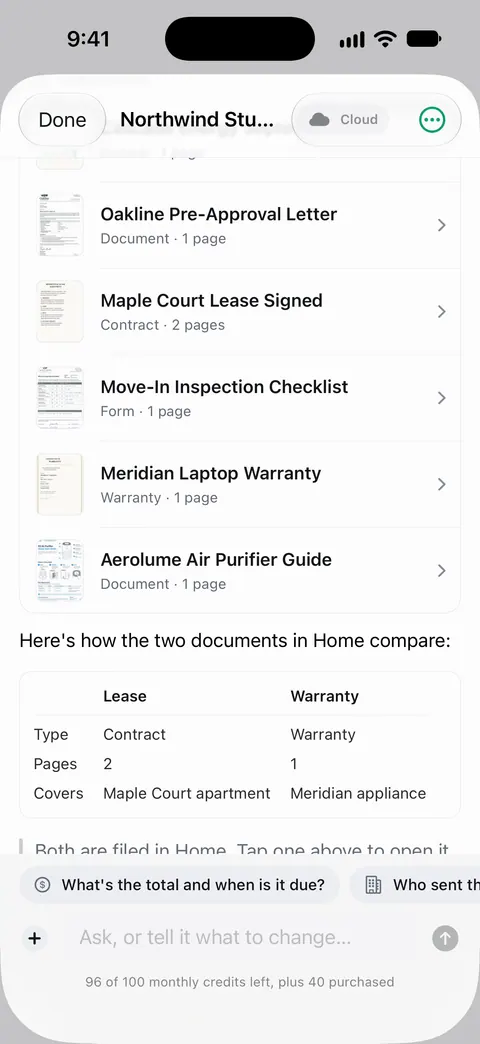
Documents stay on your iPhone unless you share them or turn on iCloud Sync. Cloud AI is off until you switch it on, and page images are a separate permission. You can sign and annotate documents. If you send the signed lease from a free account, On a free account, pages you share, print or export carry a small “Scanned with Scanner One” label at the bottom right. Pro removes it.
If you have both leases as Word files, Word’s Compare is thorough and you may need nothing else. What changed helps most when one or both versions are on paper.
Questions and answers
What is the fastest way to compare two leases?
If both are Word files, Word’s Compare Documents marks every difference in one step. If they are paper or PDFs, compare section by section with a checklist, or scan both and use a tool such as What changed in Scanner One, then check each difference on the page.
My landlord says nothing changed. Should I still compare?
Yes. A comparison takes minutes and protects you from a clause that changed by accident or on purpose. If nothing changed, you have confirmed it.
Can a comparison tell me if a lease clause is legal?
No. It only shows what is different. Whether a clause is allowed depends on your state and city. Your state’s tenant guide or a local tenant organization can help with that.
Is What changed free?
No, it is part of Pro. Pro adds What changed, filling forms from your documents, Pack checks and folder sharing. Pro comes monthly, yearly with a free week, or once for life.
Sources
What this page says about Scanner One was checked against the app on .
- Microsoft Support, Compare and merge two versions of a document — Review, Compare, Compare Documents, with differences shown as revision marks in a new copy; read 2026-11-13
- Google Docs Editors Help, Compare documents in Google Docs — Tools, Compare documents, with a Google Doc or a Word file in Drive; read 2026-11-13
- New York State Attorney General, Residential Tenants' Rights Guide — an example of state rules: renewal notice periods, rent-stabilized renewals on the same terms, and lease changes initialed by both parties; read 2026-11-13
- USAGov, How to file a complaint against a landlord — read your lease carefully; state tenant rights agencies and handbooks; read 2026-11-13
- Scanner One on the App Store — the app’s own listing
Get Scanner One
Scanner One is free, with generous limits: scanning, clean PDFs and text search never stop.

Scanner OneScan, sign and ask anything
Scanner One is free, with generous limits: scanning, clean PDFs and text search never stop.