
Guide
Initial every page of a contract on iPhone
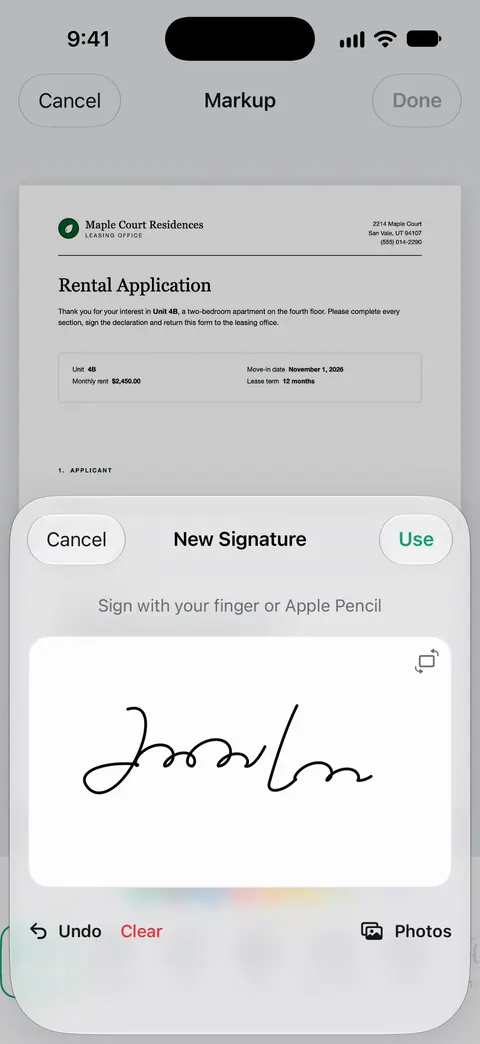
Save your initials as a separate signature: in Markup, tap the Add button, then Add Signature, then Add or Remove Signature, then the Add button, and write your initials. On iOS 27, label it as initials. Then go page by page: tap Add, tap Add Signature, pick your initials, and drag them to the initials line or the bottom corner. Sign the last page with your full signature, and flip through every page before you send.

Leases, car loans and settlement agreements often want your initials on every page and your full signature at the end. On a phone, the trick is to save your initials once so each page takes seconds. This page covers initials; the guide to signing a PDF on iPhone covers the full signature and the basics of Markup.
Before you start: read it, and count the pages
Initialing is how you say “I saw this page.” So read the contract first. The guide to checking a contract before signing lists what to look for.
Then note how many pages there are and which ones need initials. In Preview, tap the page count to see thumbnails. If the contract has initials lines, tap the Search button and search for “initial” to find them; it works when the PDF has real text, not on a scan.
Save your initials as a second signature
iPhone’s Markup can keep several signatures. Apple’s steps:
- Open the contract. If you’re prompted, open it in the Files app, then tap Save.
- Tap the Add button, then tap Add Signature.
- If you already have a signature saved, tap Add or Remove Signature, then tap the Add button.
- Write your initials with your finger. Tap Clear to try again. Turning your iPhone sideways gives you more room.
- On iOS 27, tap the Menu button next to New Signature and choose the initials label, so you can tell it apart from your full signature.
- Tap Done. Your initials are now saved for next time.
Write them big, then shrink them on the page. Small initials drawn small look shaky.
Initial each page
Now work through the document from page 1.
- Scroll to the first page that needs initials.
- Tap the Add button, tap Add Signature, then tap your initials.
- Drag them onto the initials line. Drag a blue dot on the box to resize them so they fit the line.
- Scroll to the next page and repeat.
- On the signature page, add your full signature the same way, and the date (the guide to adding the date covers formats).
- When you’re done, tap the Menu button, then Export, Print or the Share button. Tap the Back button to save.
On iOS 26, finish with the Share button, then Done.
In Preview (iOS 26 and later), tap the Form Filling button for a form with fields, or tap the Add button and choose a signature on a page without fields.
If the contract has initials fields
Some contracts made as fillable PDFs have small boxes labeled “Initials.” Tap one: if the keyboard appears, it wants typed initials. Type them in each box. If it is a signature field, sign your initials in it with your finger.
Don’t miss a page
A missed initial is the most common reason a lease comes back. Two habits catch it.
- Work in order and don’t skip ahead. Go page 1, 2, 3, and don’t jump to the signature page until every earlier page is done.
- Check with thumbnails at the end. Tap the page count (or the Show Sidebar button on iOS 27) and look at every page for your initials in the same spot. Pinch to zoom on any page you’re not sure about.
Also watch for:
- Exhibits and addenda. A pet addendum or a disclosure stapled to the end often needs initials or a signature of its own.
- Spots where only one person initials. Some clauses need tenant initials, others landlord initials. Only fill yours.
- Pages with two initials lines, such as next to a crossed-out clause.
Where to put initials when there’s no line
If the sender just says “initial each page,” the bottom right corner is the usual place. Keep them clear of the page text and the page number. Zoom in while you place them: pinch open, drag with two fingers to move around, then pinch closed to see the whole page.
Typed initials as a fallback
If you’d rather type, add a text box: tap the Add button, tap Add Text Form Box, type your initials and drag the box into place. Then tap the text box, tap the More button, and tap Duplicate to make a copy you can drag to the next page. It’s quicker, but some senders want drawn initials. Their instructions decide.
When the contract arrives through a signing service
If the sender used an e-signature service, open their link and sign there instead of downloading the PDF. Those services place initials for you and track who signed what. Initialing a downloaded copy with Markup creates a separate file that their system won’t know about.
Where Scanner One helps, and where it doesn’t
For one contract, Apple’s Markup does this well: save your initials once, and each page takes a tap and a drag. It’s free and adds nothing to the page.
Scanner One helps when the contract started on paper, or when you want it filed with your other documents after you sign. Point your camera at any piece of paper. Scanner One finds the edges, straightens the page, cleans it up and saves a real PDF. You can sign and annotate documents. You can scan a printed lease, initial and sign it in the same app, and keep the signed copy beside the original.
Checking a new version before you initial it. What changed compares the new version of a lease or policy with the one you signed. The guide to comparing two versions of a lease shows when that matters.
The limits, plainly:
- Free accounts can sign and mark up 3 documents a month. Pro removes every limit. A long contract is one document, however many pages you initial.
- On a free account, pages you share, print or export carry a small “Scanned with Scanner One” label at the bottom right. Pro removes it. If the label matters on a contract you return, Apple’s Markup adds none.
- When the sender uses a signing service, sign there.
Questions and answers
Why do contracts ask for initials on every page?
Initials on each page show that you saw every page of the version you signed, and make it harder for anyone to swap a page later. Leases, loan papers and settlement agreements often ask for them.
Can I copy my initials onto all pages at once on iPhone?
Not with Apple’s Markup in one step. Save your initials as a signature, and adding them to each page takes two taps and a drag. For typed initials, a text box can be duplicated from the More button and dragged to each page.
Where do I put initials if there’s no line?
The usual place is the bottom right corner of each page, clear of the text. If the sender gave instructions, follow those instead.
Are typed initials okay instead of handwritten ones?
It depends on the sender. Many accept typed initials in a form field, others want them drawn. If the instructions don’t say, drawn initials saved as a signature are the safer choice.
How many documents can I sign for free in Scanner One?
Free accounts can sign and mark up 3 documents a month. Pro removes every limit.
Sources
What this page says about Scanner One was checked against the app on .
- Apple iPhone User Guide, Fill out forms, sign documents, and create signatures on iPhone — creating several signatures such as initials, Add or Remove Signature, labeling a signature (given name, nickname or initials), moving and resizing, Add Text Form Box, Export or Share; undated, read 2026-11-13
- Apple iPhone User Guide, Fill out and sign PDF forms in Preview on iPhone — the Form Filling button and the Add button for a signature; undated, read 2026-11-13
- Apple iPhone User Guide, Add text, shapes, stickers, and more with Markup on iPhone — zooming and panning to place things precisely, and the More button to duplicate a text box; undated, read 2026-11-13
- Apple iPhone User Guide, Open and view PDFs and images in Preview on iPhone — showing thumbnails, Go to Page, and Search to find initials lines; undated, read 2026-11-13
- Scanner One on the App Store — the app’s own listing: signing and annotating documents
Get Scanner One
Scanner One is free, with generous limits: scanning, clean PDFs and text search never stop.

Scanner OneScan, sign and ask anything
Scanner One is free, with generous limits: scanning, clean PDFs and text search never stop.