
Guide
Send a scanned document on WhatsApp as a PDF
Scan the paper into the Files app first (More button, Scan Documents, then Save). In WhatsApp, open the chat, tap the Attach button (the plus sign), tap Document, find the PDF and tap Send. Or in Files, touch and hold the PDF, tap Share and choose WhatsApp. WhatsApp allows documents up to 2 GB. Sending it as a document keeps every page sharp, where a photo is usually compressed.

On WhatsApp there are two ways to send a document, and only one keeps it readable. A photo of a form gets compressed and arrives as a picture. A PDF sent as a document arrives as the file you made, every page sharp. This guide is about WhatsApp specifically; for Mail, Messages and AirDrop, see sending a PDF from iPhone.
Step 1: make a PDF of the paper
WhatsApp’s document picker shows files, not your camera, so scan first.
- Open Files and go to a folder, such as On My iPhone or iCloud Drive.
- Tap the More button (three dots), then Scan Documents.
- Hold the iPhone over the page. In Auto mode it captures by itself; or tap the shutter, fit the corners and tap Keep Scan.
- Scan any other pages, tap Done, then Save.
Give the file a name the other person will understand, like “Lease signed page 4”. WhatsApp shows the file name in the chat, and it’s what the person sees when they save it. The scan to PDF guide covers Notes and Preview too.
Step 2: send it from the chat
WhatsApp’s own steps on iPhone:
- Open the chat with the person or the group.
- Tap the Attach button (the plus sign).
- Tap Document.
- Find your PDF. WhatsApp says you can pick files from iCloud Drive or other sources, such as Dropbox. Tap Browse if you don’t see it under Recents.
- Tap the send button, or Send if asked.
The chat shows the file name, the number of pages and the size, with a preview of the first page.
Or send it from the Files app
Starting from the file works just as well:
- In Files, touch and hold the PDF, then tap Share.
- Tap WhatsApp in the row of apps (tap More at the end of the row if it isn’t there).
- Pick the chat and tap Send.
Apple’s tip on the same page: tap Compress before Share to send a ZIP file. Don’t do this for WhatsApp: the person has to unzip it before they can read it, and a scanned PDF barely shrinks.
Photo or document: which to send
| As a photo | As a PDF document | |
|---|---|---|
| Quality | Usually compressed by WhatsApp | Sent as the file you made |
| Pages | One picture per page | All pages in one file |
| What the person gets | Pictures in their chat and maybe their photo library | A file they can save, print or forward |
| Best for | A quick look, like “is this the right form?” | Anything they’ll keep, print or file |
WhatsApp does offer an HD Media button for photos (Standard quality or HD quality). It helps with photos, but a PDF is still better for papers: it’s cropped, straight and keeps pages together.
If you have photos of a document already, turn them into a PDF first: see photos to PDF on iPhone, or use our free photos to PDF tool, which runs in your browser.
Opening and saving PDFs someone sends you
- To read it, tap the document in the chat. WhatsApp opens a preview.
- To keep it, open it, tap the Share button and choose Save to Files. A file left only in a chat is easy to lose when you change phones.
- To sign or fill it, save it to Files first. WhatsApp’s help says its own PDF viewing and editing feature is available on Web and Windows, not in the iPhone app, so on iPhone use Preview, Files or another app. See signing a PDF on iPhone.
Before you send a personal document
WhatsApp chats are convenient, but a document sent there sits on both phones, and in group chats on everyone’s.
- Send to the person, not the group, unless everyone needs it.
- Cover what wasn’t asked for. An ID number or account number on a page they didn’t need is information you didn’t need to share.
- Check who’s asking. If someone you don’t know asks for your ID on WhatsApp, verify through a number or website you already know.
Sending documents securely has more on this.
Where Scanner One helps, and where it doesn’t
The Files app and WhatsApp’s own Document button are all you need to send a clean PDF. If you only do this now and then, that’s enough.
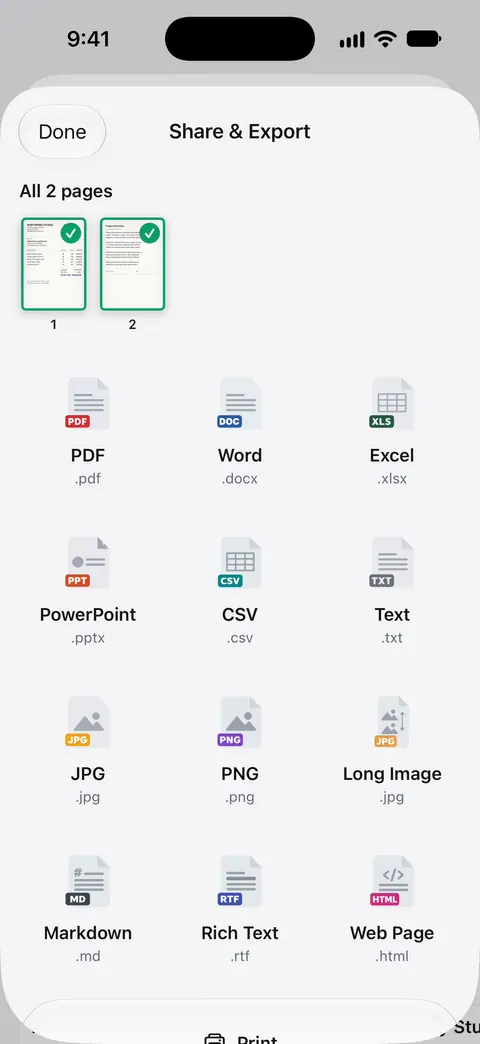
Scanner One helps when the paper is hard to scan or you send papers often. Point your camera at any piece of paper. Scanner One finds the edges, straightens the page, cleans it up and saves a real PDF. A scan can have many pages, and you can reorder them. Share & Export saves a document as a PDF, Word, Excel, PowerPoint, JPG, PNG, a long image, plain text, Markdown, Rich Text, a web page or CSV. So you can send the PDF to WhatsApp from its share sheet, or a JPG when someone wants a picture.
Redaction is permanent. That’s useful before you send an ID copy to someone who only needs part of it. Redaction is part of Pro: Pro adds redaction, the smart eraser, edit text, auto-export and five alternate app icons.
The limits, plainly:
- On a free account, pages you share, print or export carry a small “Scanned with Scanner One” label at the bottom right. Pro removes it. If the person needs a clean copy, keep that in mind.
- Free accounts can run the PDF tools and the Word, Excel and CSV exports 3 times a week, from one shared allowance. Pro removes every limit.
- It doesn’t send messages for you: you still choose WhatsApp and the chat yourself.
More sending guides are in Guides.
Questions and answers
Why does my document look blurry when I send it on WhatsApp?
You probably sent it as a photo. WhatsApp says media files are usually compressed when shared. Send the scan as a PDF with Attach, then Document, and the pages arrive as they are.
What is the largest document I can send on WhatsApp?
WhatsApp’s help page says the maximum for documents is 2 GB. The person receiving it still has to download it, so a smaller file is kinder on a slow connection.
Can I send several pages as one document on WhatsApp?
Yes, if they are in one PDF. Scan all the pages in one session, or merge separate files into one PDF first, then send that single document.
Where do PDFs sent to me on WhatsApp go?
They stay in the chat. To keep one, open it, tap the Share button and choose Save to Files.
Sources
What this page says about Scanner One was checked against the app on .
- WhatsApp Help Center, How to send media, contacts, or location (iPhone) — Attach, then Document, from iCloud Drive or other sources; documents up to 2 GB; media files are usually compressed; HD Media choice; read 2026-11-13
- WhatsApp Help Center, How to view and edit PDFs on WhatsApp — viewing and editing PDFs inside WhatsApp is listed for Web and Windows, not the iPhone app; read 2026-11-13
- iPhone User Guide, Send files from the Files app on iPhone — touch and hold a file, tap Share, choose how to send; scanning in Files; undated guide page, read 2026-11-13
- Apple Support, Scan documents on your iPhone or iPad (article 108963) — scanning steps in Files and Notes; published 2026-02-13
- Scanner One on the App Store — the app’s own listing: Share & Export formats
Get Scanner One
Scanner One is free, with generous limits: scanning, clean PDFs and text search never stop.

Scanner OneScan, sign and ask anything
Scanner One is free, with generous limits: scanning, clean PDFs and text search never stop.