
Guide
Text a document from your iPhone, not a blurry photo
Scan the paper to a PDF first: in Files, tap the More button, tap Scan Documents, capture the pages and tap Save. Then touch and hold the PDF, tap Share, tap Messages, choose the person and tap Send. A PDF arrives as a document, with every page. A photo of a page is often compressed, and on green-bubble texts your carrier may limit the size.

Landlords, offices and family often ask you to “just text me a copy”. The quick way, snapping a photo in Messages, is also the one that comes out tilted, shadowed and soft at the other end. This guide is about sending a clear copy by text. For email, AirDrop and links, see sending a PDF from iPhone.
Why texted photos come out blurry
Three things work against a photo of a page in Messages:
- Compression. Apple notes that your carrier may set size limits for attachments, and that iPhone may compress photo attachments when necessary.
- Low quality previews. If Send Low Quality Photo Previews is on in Settings, people get a smaller preview first, and with Low Data Mode on, only the preview is sent.
- The photo itself. A photo isn’t cropped or straightened, picks up shadows, and has a lot of table in it. Shrink that down and the small print goes first.
A scanned PDF avoids most of this: it’s cropped to the page, straightened, and goes as a document.
Step 1: scan the paper to a PDF
- Open Files, go to a folder, tap the More button, then Scan Documents.
- Hold the iPhone over the page. In Auto mode it captures by itself; or tap the shutter, fit the corners and tap Keep Scan.
- Scan any other pages, tap Done, choose where to save it and tap Save.
Name it so the other person knows what it is, like “Pay stub October 2026”. For more ways to scan, see scanning to PDF. If a scan looks soft, why scans come out blurry has the fixes.
Step 2: text it from Files
- In Files, touch and hold the PDF, then tap Share.
- Tap Messages.
- Type the person’s name or number, add a short note if you like (“Here’s page 1 and the signature page”), and tap Send.
You can share from other apps the same way: Apple’s guide says to select the content, tap Share, then choose Messages. That includes Preview, Mail attachments and most scanner apps.
Blue bubbles and green bubbles
How the document travels depends on who you’re texting.
| Texting | How it goes | What to expect |
|---|---|---|
| Another iPhone, blue bubble | iMessage | Arrives as a document. Apple says iMessage attachments can be encrypted so only the sender and receiver can access them |
| An Android phone, green bubble | SMS, MMS or RCS | Depends on the carrier and the phone. Large files may be shrunk or fail |
| A business number | Often SMS | Some can’t receive files at all |
If a green-bubble send fails or arrives as a tiny picture, email it instead, or ask the person for an upload link. Making a PDF smaller helps when a file is on the edge.
When they asked for a photo
Some people specifically want a picture, perhaps because their phone shows PDFs badly. You can still send a clean one:
- Open the scan in Preview.
- Tap the Actions Menu button, tap Export, choose JPEG, and leave the Size slider toward higher quality.
- Save it, then text the JPEG the same way from Files.
That gives them a cropped, straight image instead of a photo of your kitchen table.
Finding and saving documents people text you
Apple’s Messages keeps a list of what’s been shared in each conversation:
- Open the conversation.
- Tap the person’s name or picture at the top.
- Swipe left, then tap Documents (or Photos for pictures).
To keep a document, open it, tap Share and choose Save to Files. A copy kept only in a conversation is easy to lose.
A few habits that save a second text
- Send all pages in one PDF, in order, rather than five photos the person has to assemble.
- Say what it is in the message: “Lease, signed, all 6 pages”.
- Check it on your own screen first. Open the PDF and zoom in on the smallest print.
- Don’t text what wasn’t asked for. Cover account numbers or ID numbers that aren’t needed. If someone needs a copy of your ID for one purpose, a watermark helps; our free ID copy watermark tool runs in your browser.
- Be sure who’s asking. A text asking for your documents from a number you don’t know is a common scam. Call back on a number you already have. More in sending documents securely.
If a landlord needs a stack of papers tonight, the situation guide landlord wants documents tonight walks through the whole evening.
Where Scanner One helps, and where it doesn’t
The Files app scanner and Messages are all you need to text a clear PDF. For a page now and then, that’s enough.
Scanner One helps when the paper fights back: shadows, curls, receipts. Point your camera at any piece of paper. Scanner One finds the edges, straightens the page, cleans it up and saves a real PDF. Scans come with Auto Clean, Color, Grayscale and Receipt filters. Share & Export saves a document as a PDF, Word, Excel, PowerPoint, JPG, PNG, a long image, plain text, Markdown, Rich Text, a web page or CSV. So you can text a PDF, or a clean JPG to someone who wants a picture, from its share sheet.
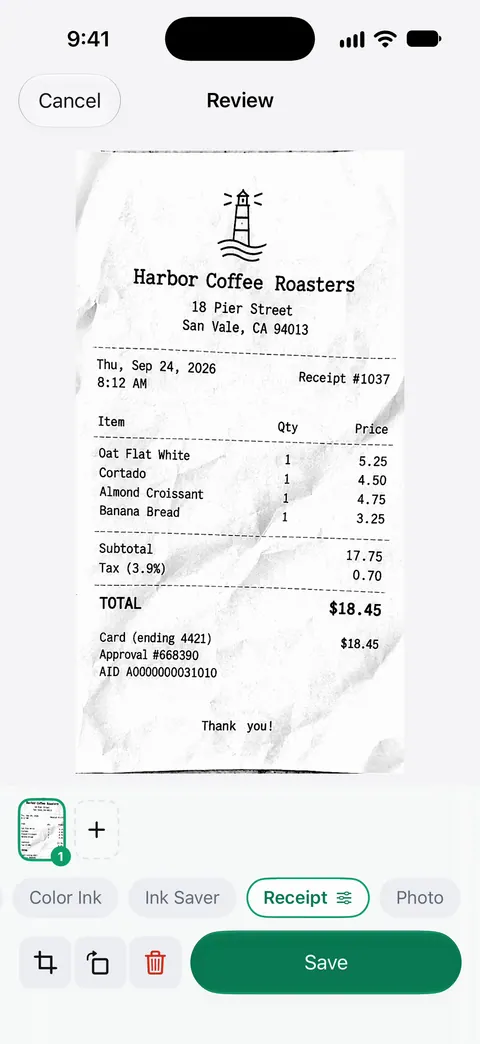
The limits, plainly:
- On a free account, pages you share, print or export carry a small “Scanned with Scanner One” label at the bottom right. Pro removes it.
- It can’t change how a carrier handles a green-bubble message. A large PDF to an Android phone may still be better sent by email.
- Scanner One is free, with generous limits: scanning, clean PDFs and text search never stop.
More guides on sending papers are in Guides.
Questions and answers
Can I send a PDF by text message on iPhone?
Yes. In Files, touch and hold the PDF, tap Share, choose Messages and send. Between iPhones with iMessage it arrives as a document. To an Android phone it depends on the carrier and the size, so for a long PDF email can be more reliable.
Why do photos I text look blurry to the other person?
Apple says iPhone may compress photo attachments when necessary, and carriers may set size limits. A text sent as SMS or MMS is the most likely to shrink. A scanned PDF avoids most of this, and is cropped and straight too.
How do I find a document someone texted me?
Open the conversation, tap their name or picture at the top, swipe left and tap Documents. To keep one, open it, tap Share and choose Save to Files.
Is it safe to text a copy of my ID?
Only to someone you’ve confirmed. iMessage attachments are encrypted between you and the person, but the copy stays on both phones. Text an ID only when it was asked for, and cover numbers they don’t need.
Sources
What this page says about Scanner One was checked against the app on .
- iPhone User Guide, Take and edit photos or videos in Messages on iPhone — carriers may set size limits for attachments and iPhone may compress photo attachments; Send Low Quality Photo Previews; iMessage attachments encrypted between sender and receiver; undated guide page, read 2026-11-13
- iPhone User Guide, Share content in Messages on iPhone — sharing from other apps with Share, then Messages; finding Documents someone sent in a conversation; undated guide page, read 2026-11-13
- iPhone User Guide, Send files from the Files app on iPhone — touch and hold a file, tap Share, choose Messages, tap Send; undated guide page, read 2026-11-13
- Apple Support, Scan documents on your iPhone or iPad (article 108963) — scanning steps in Files and Notes; published 2026-02-13
- Scanner One on the App Store — the app’s own listing: Share & Export formats
Get Scanner One
Scanner One is free, with generous limits: scanning, clean PDFs and text search never stop.

Scanner OneScan, sign and ask anything
Scanner One is free, with generous limits: scanning, clean PDFs and text search never stop.